32 MULTIMEDIA
SNOW MODE
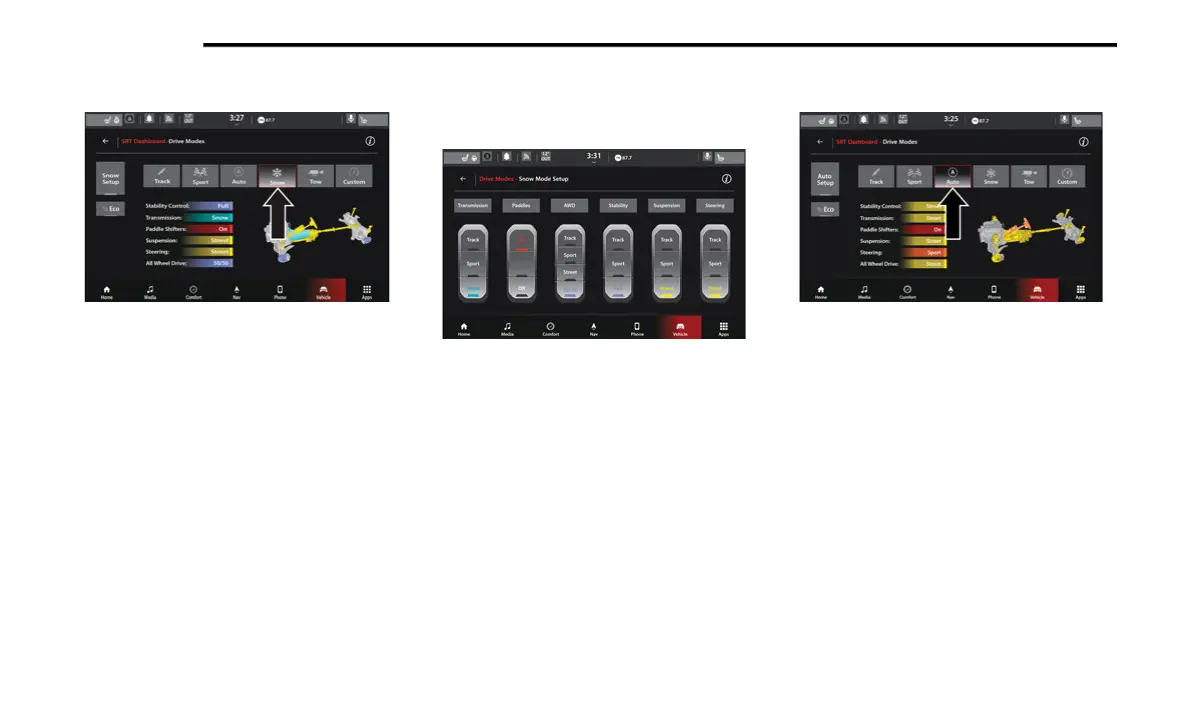
Drive Mode (Snow)
Selecting “Snow” on the touchscreen will
activate Snow Mode for use on loose traction
surfaces. When in Snow Mode (depending on
certain operating conditions), the transmission
will use second gear (rather than first gear)
during launches, to minimize wheel slippage.
The Transmission is set to Snow, Stability
Control is set to Full, All-Wheel Drive is set to
50/50, and Steering and Suspension are set to
Street.
The Paddle Shifters can be enabled or disabled
by pressing the Snow Set-Up button on the
touchscreen.
Snow Mode Set-Up
AUTO MODE
Drive Mode Auto (Default)
Auto Mode is enabled upon ignition ON, or by
selecting Auto on the touchscreen. The
Transmission, Stability Control, and All-Wheel
Drive modes are set to their Street settings.
Steering and Suspension can be configured in
either the Track, Sport, or Street. The Paddle
21_WD_S_SU_EN_USC_t.book Page 32















 To Next Page