Installing the Hardware in a Single Auditorium
Dolby
®
Digital Cinema System Manual Issue 0.92 (Preliminary) 25
3.3.11 Connect Integrated Media Block Audio Outputs
To connect the IMB audio outputs:
1. Wire-up the provided RJ45/DB25 adapter for your cinema processor. (See the wiring
diagrams in Figure 3-11 and Figure 3-12.)
2. Connect the RJ45 output on the IMB to the RJ45/DB25 adapter, and then follow the
instructions for your cinema processor, as described next.
If your configuration uses a DMA8Plus:
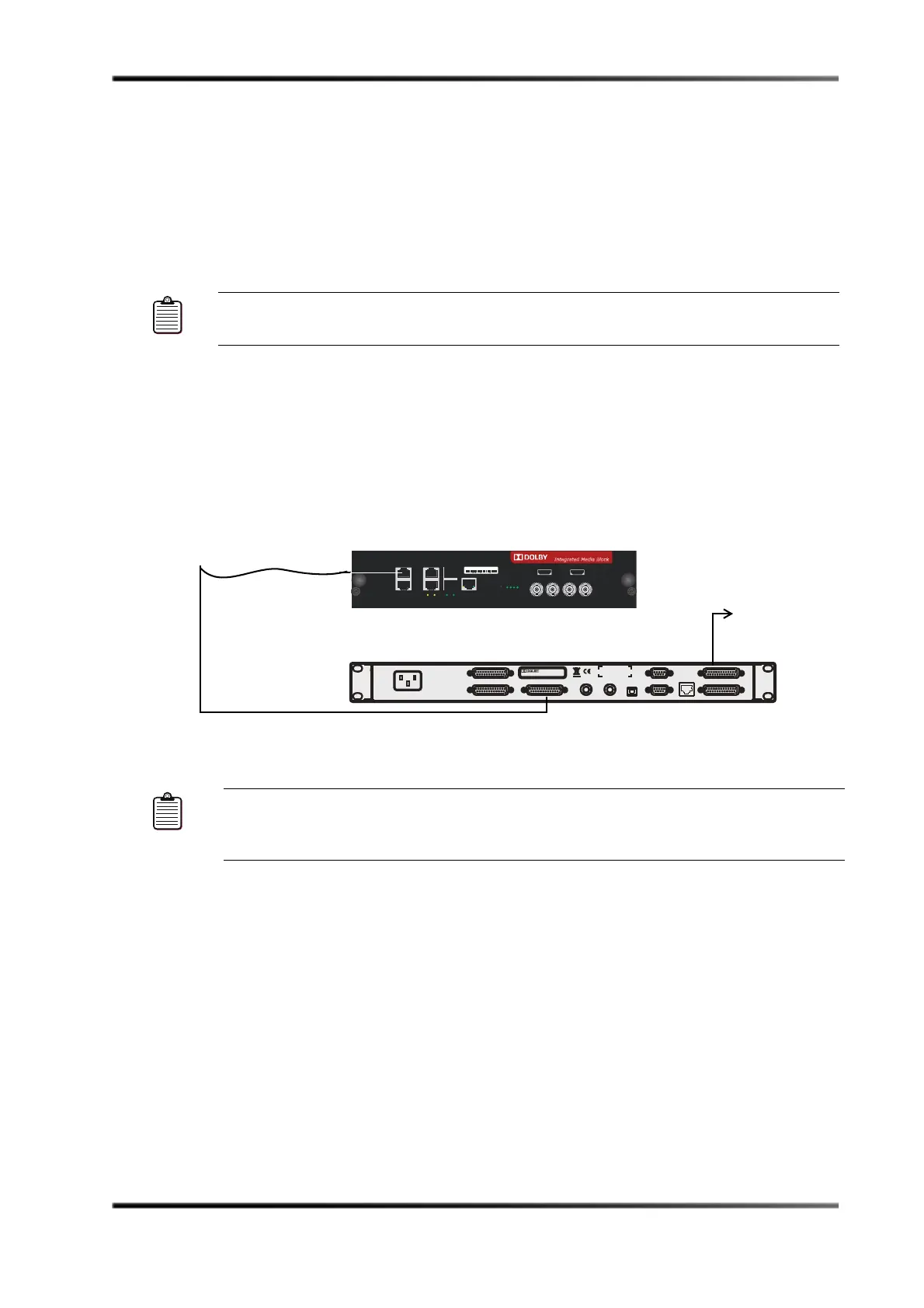
• Connect the DB25 end of the RJ45/DB25 adapter to the DMA8Plus
4 x AES IN
connector, as shown in Figure 3-13.
If you are not using a cable manufactured by Dolby, be sure to use a similar cable (RG59
or better) that meets the AES audio specification.
• Connect the DMA8Plus
AUDIO OUT TO CP connector to the analog audio input on the
auditorium’s cinema sound processor.
Figure 3- 13
Figure 3-13 Connecting the IMB Audio Outputs for a DMA8Plus Configuration
If your configuration uses a CP650 with a Cat. No. 790 option card:
• Connect the DB25 end of the RJ45/DB25 adapter to the CP650
OPTION CARD I/O
connector (with Cat. No. 790), as shown in Figure 3-14. In some cases, you may need
an additional adapter or you can contact Dolby for a compatible cable.
Note: Use shielded Cat5e cable for EMI/EMC compliance and be sure the bend radius for
each side of the audio cabling is not less than two inches (50 mm).
Note: The RJ45/DB25 adapter and the DMA8Plus 4 x AES IN connector are balanced 110
If you are not using a cable manufactured by Dolby, be sure to use a similar cable
that meets the AES audio specification.
AUDIO OUT TO CP
ANALOG AUDIO IN
10BASE-T
ACT LINK
RS-232
AUTOMATION
DIGITAL MEDIA
OPTICAL
DIGITAL 4 IN
1xAES 1xAES
DIGITAL 3 INDIGITAL 2 IN
4xAES IN
DIGITAL 1 IN
DMA8Plus
Digital Media Adapter
Dolby, Pro Logic and the double-D symbo l
are registered trademarks of Dolby Laboratories.
TO CP CONTROL
TO DA CONTROL
100–240 Vac 50–60Hz 15W
~
Balanced
To Dolby cinema
IMB
Dolby DMA8Plus
110
4 x AES IN
8 x AES OUT
OUT
CH
1-8
CH
9-16
HDMI 1 HDMI 2
PWR
ID
RDY
SYNC
HDSDI SYNC
DATA INPUTS
A
B
ACT LINK
ABB
STATUS
AUX
CAT745-BAR
RESET
OUTAB IN
CAT745-BAR 515677
Integrated Media Block
Cat. No. 745
AES-EBU
SERIAL NUMBERAUDIO OUTPUT



 To Next Page