Maintaining the DSS220 Internal Hard Drives
Dolby
®
Digital Cinema System Manual Issue 0.92 (Preliminary) 63
3.13.1 Replacing a DSS220 Drive
To replace a DSS220 internal hard drive:
1. Note the front-panel drive that needs replacement, indicated by its red LED.
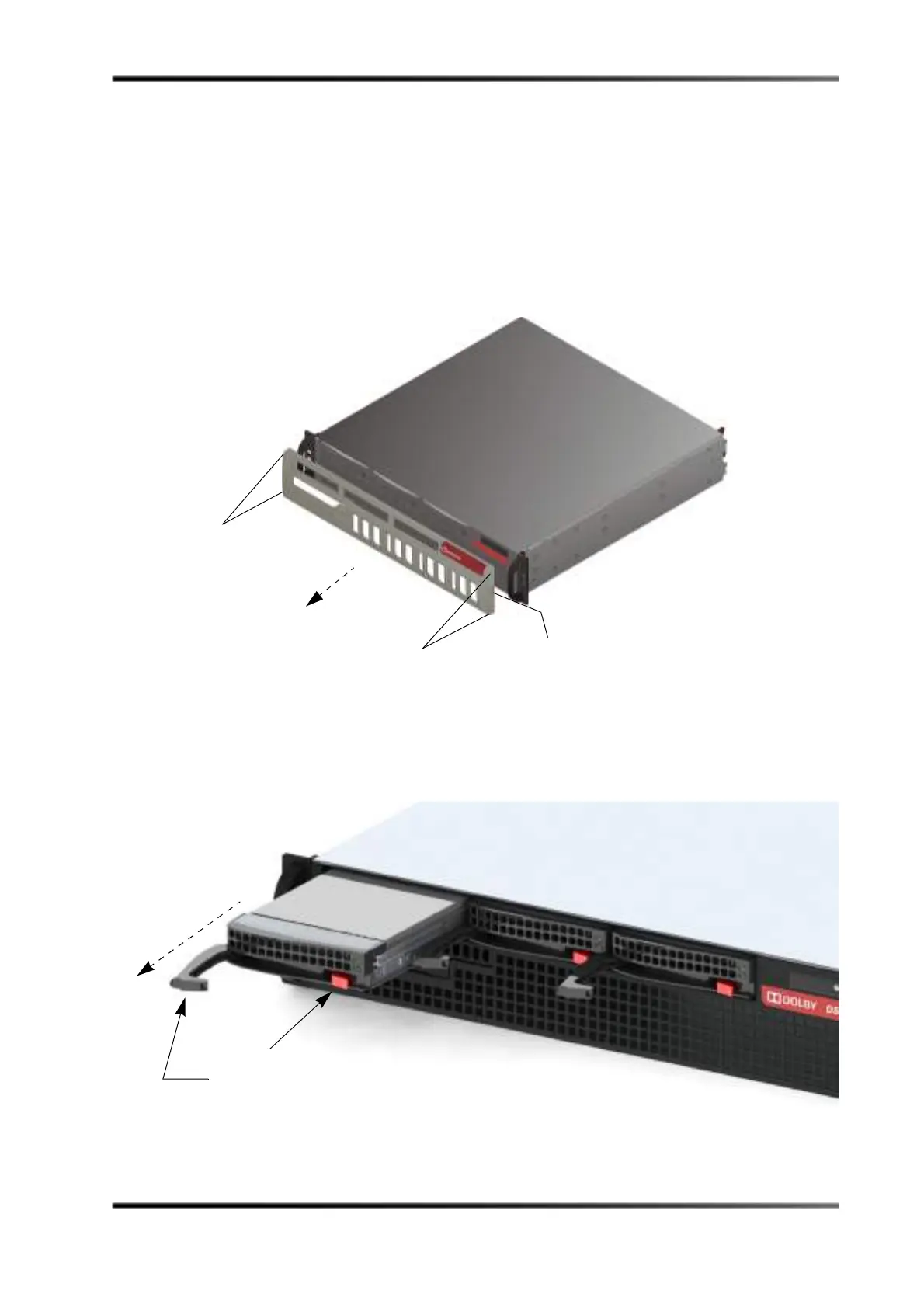
2. Remove the front-panel cover by placing a finger on the cover’s indented area (in the
upper-right corner), while swinging the cover out to the left and gently pulling the
cover out of the front panel (see Figure 3-72).
Figure 3- 72
Figure 3-72 Remove DSS220 Front-Panel Cover
3. Press the failed drive’s red release button to extend the drive tray handle, then use the
handle to pull the drive tray out of the DSS220 chassis, as shown in Figure 3-73.
Figure 3- 73
Figure 3-73 Press Release Button to Extend Handle and Remove Drive
Press here to retract pins,
release, and swing cover out to the left to remove
Pins
Pins
Press red
button to extend
handle and pull
drive out of chassis



 To Next Page