Maintaining the DSS220 Internal Hard Drives
Dolby
®
Digital Cinema System Manual Issue 0.92 (Preliminary) 65
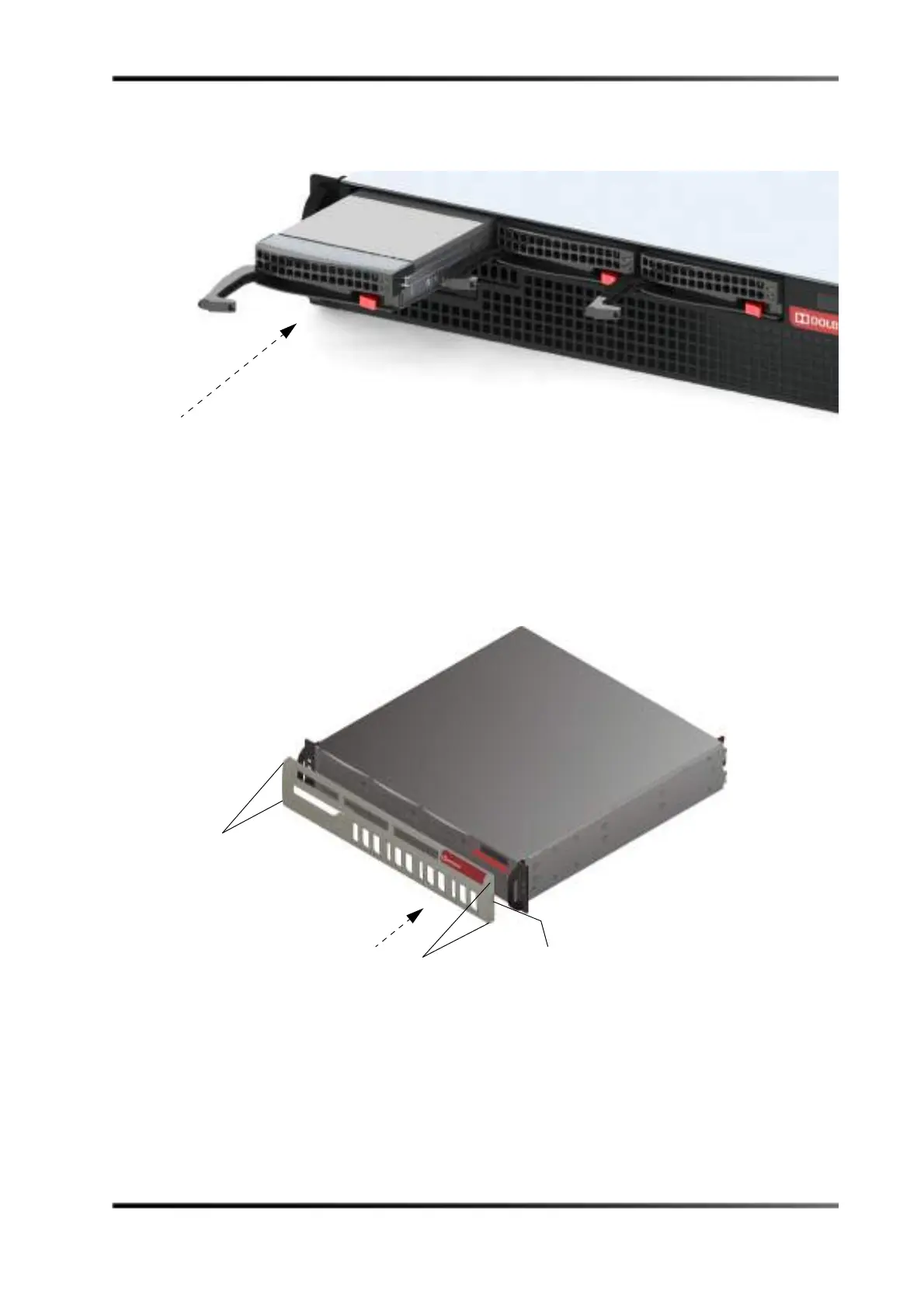
9. Slide the drive tray into the chassis, pressing down on its handle until it snaps into
place, as shown in Figure 3-76.
Figure 3- 76
Figure 3-76 Slide Drive into DSS220 Chassis
10. Replace the front-panel cover:
• Line up the two pins on the cover’s left side with their respective holes on the
front panel, then insert the pins in the holes.
• Place a finger on the cover’s right indent, press inward to depress the two pins,
line up the pins with their respective holes, then release your finger to insert the
pins and snap the cover in place (see Figure 3-77).
Figure 3- 77
Figure 3-77 Replace Front-Panel Cover
11. The system automatically rebuilds the replacement drive.
The rebuild process partitions larger drives to the same size as the existing internal
drives. There are some instances when you may have to rebuild a drive manually.
For information on rebuilding drives manually, see the Show Manager online help.
Press here to retract pins and
release to snap cover in place
Pins
Pins



 To Next Page