4
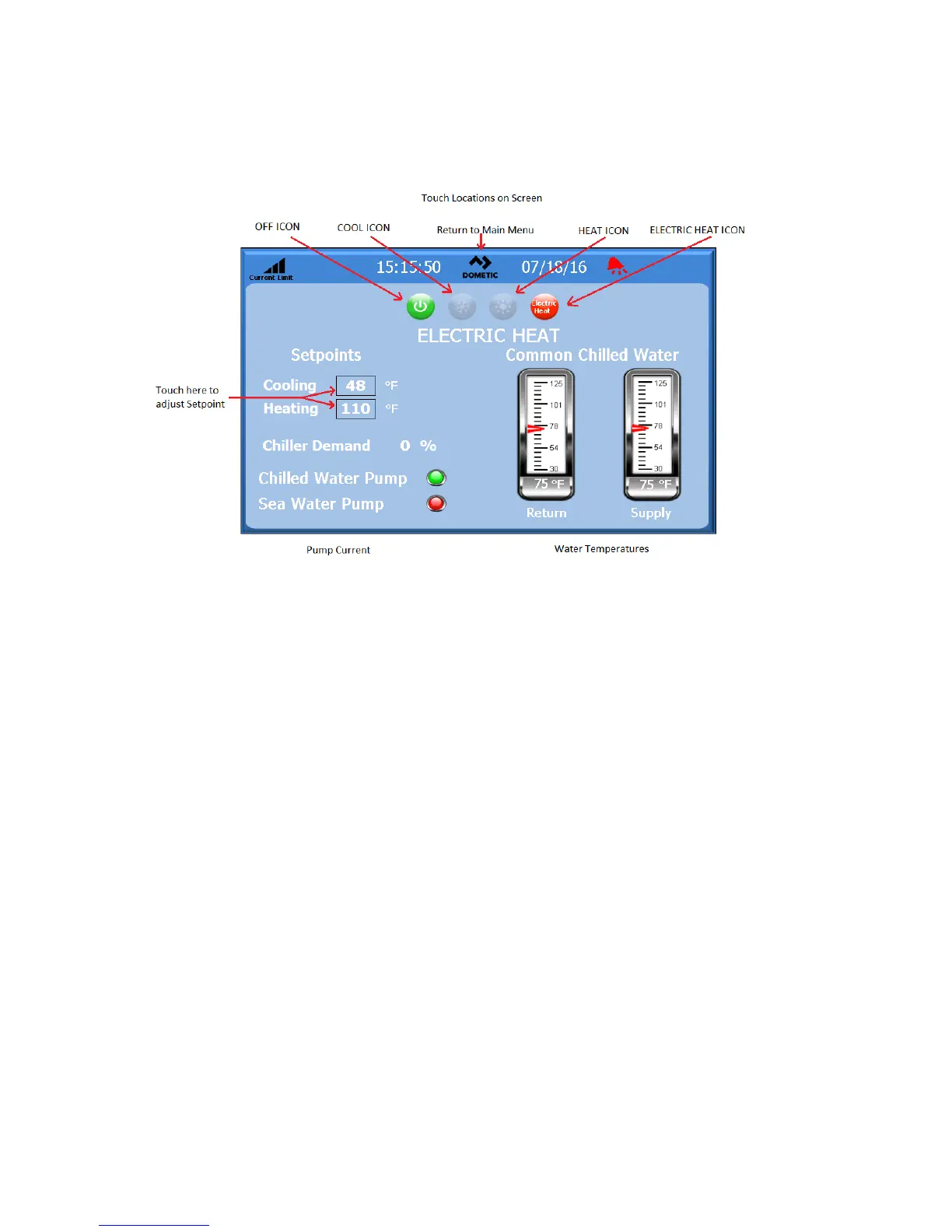
Figure 4: Touch Locations
on
S
creen
L
ogo
The touchscreen logo is customizable. Pressing the logo will return you to the Main menu screen from any sub-screens.
Some screens contain pop-up screens with information. To exit a pop-up, simply touch the X to close the screen.
Off Icon
Off icon will be illuminated only if the system is in a run state. Touch the Off icon to turn off the system.
C
ool Icon
Cool will be illuminated only if the system is in cooling. Touch this icon to put the system in cool mode and the word cool will
appear on the screen.
H
eat Icon
Heat will be illuminated only if the system is in heating. Touch this icon to put the system in heat mode and the word heat will
appear on the screen.
E
lectric
Heat
Icon
Only visible if option is installed. Electric Heat will be illuminated only if the system has electric heat enabled. Touch this
icon to put the system in heat mode and the word heat will appear on the screen.
S
etpoint Thermometers
These icons are touched to adjust the cooling or heating set points.
See Appendix 1 for complete touchscreen navigation.



 To Next Page