20
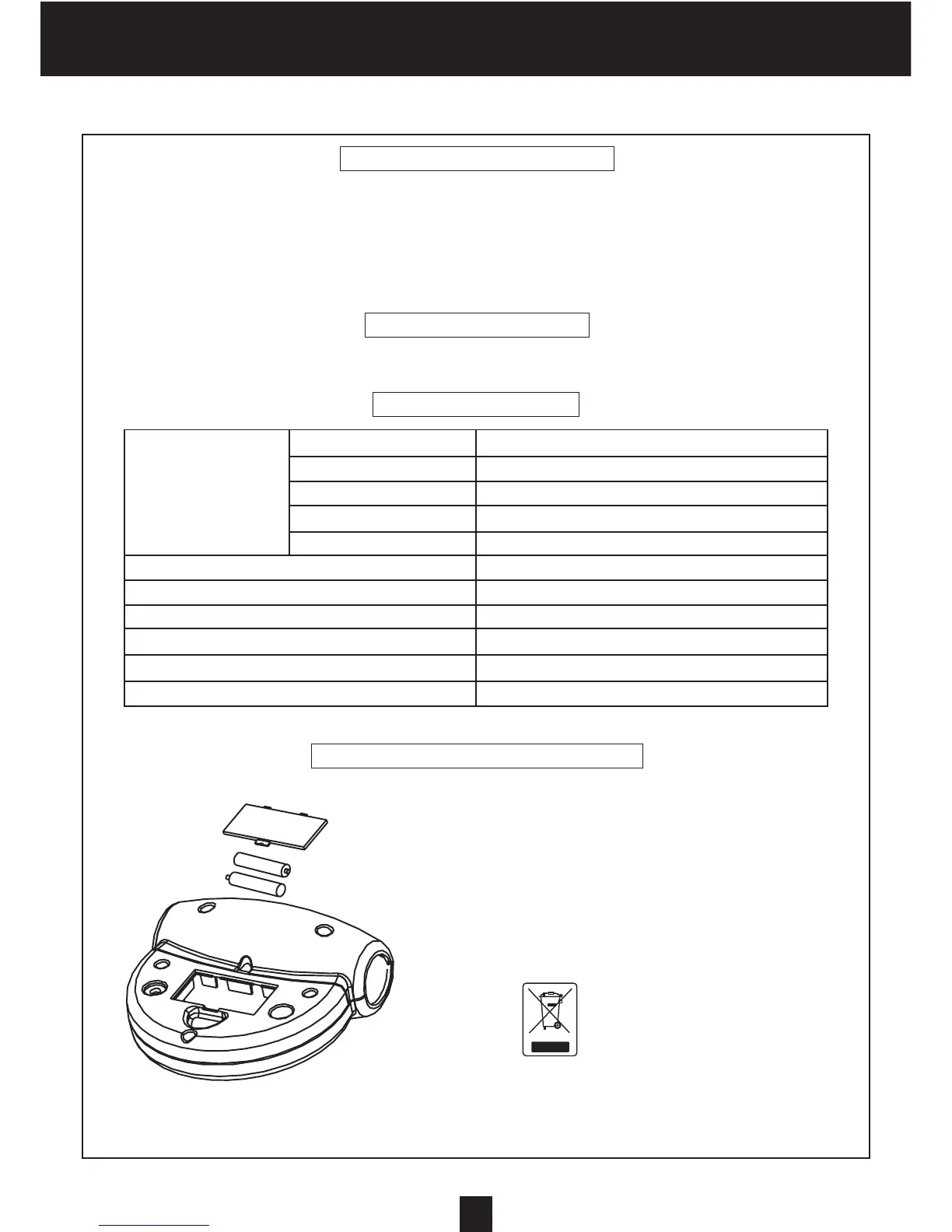
1. Pull off the battery cover and place two SIZE-AA or UM-3 batteries into
the battery housing on the back of the monitor, please refer to the illus-
trations below.
2. Make sure the batteries are correctly positioned and battery springs
are in proper contact with the batteries.
3. Install the battery cover and ensure it is tightly closed.
4. If the display is illegible or only partial segments appear, please remo-
ve the battery; wait for 15 seconds, then reinstall it.
5. The batteries life is approx. two months under normal use.
6. Removing the batteries will erase the computer’s memory.
7. Take old batteries to the recycling centers intended for that
purpose.
RECYCLING:
The ‘crossed out dustbin’ sign means that this product and its batteries cannot be
thrown out with domestic waste. They should be treated apart. When you have
finished with them, drop them at an authorised collection point so they can be
recycled. This gesture will go towards protecting the environment and your health.
Time 0:00-99:59
Distance 0.01-99.99 KMS or Miles
FUNCTION Current SPEED 0.0-99.9 KPH or MPH
Pulse Rate 30-240 beats per minute
Calorie 0.1-99.9K.Cal
DISPLAY Liquid crystal type
CONTROLLER 4 bit Single chip microprocessor
SENSOR No-contact magnetic type
POWER SOURCE Requires 2 type AA or UM-3 batteries
OPERATING TEMPERATURE 0°C ~ +40°C (32°F ~ 104°F)
STORAGE TEMPERATURE -10°C ~ +60°C (14°F ~ 140°F)
You can set your “aims” either fir the TIME, the DISTANCE, the CALO-
RIES or the PULSATIONS.
For example, if you set a CALORIES aim of 100, at the start of the
exercise, you will notice the CALORIES display countdown from 100
to 0.
We advise you to set only one aim (TIME or DISTANCE or CALORIES)
per exercise.
Note that, if no aim is set for (TIME, DISTANCE and CALORIES) and
that all the aims are at 0, all these values will go increasing, as soon
as you start cycling.
When an aim is reached during your exercising, the display flickers
and the monitor’s alarm rings for 8 seconds, specifying that your trai-
ning is finished.
SPECIFICATIONS
SET YOUR AIMS
AUTOMATIC STOP
If no signal is received from the pedals for five minutes, the console switches off.
HOW TO REMOVE BATTERY
ENGLISH


 To Next Page