RF Baghouse, Models RFWP and RFWPH
50
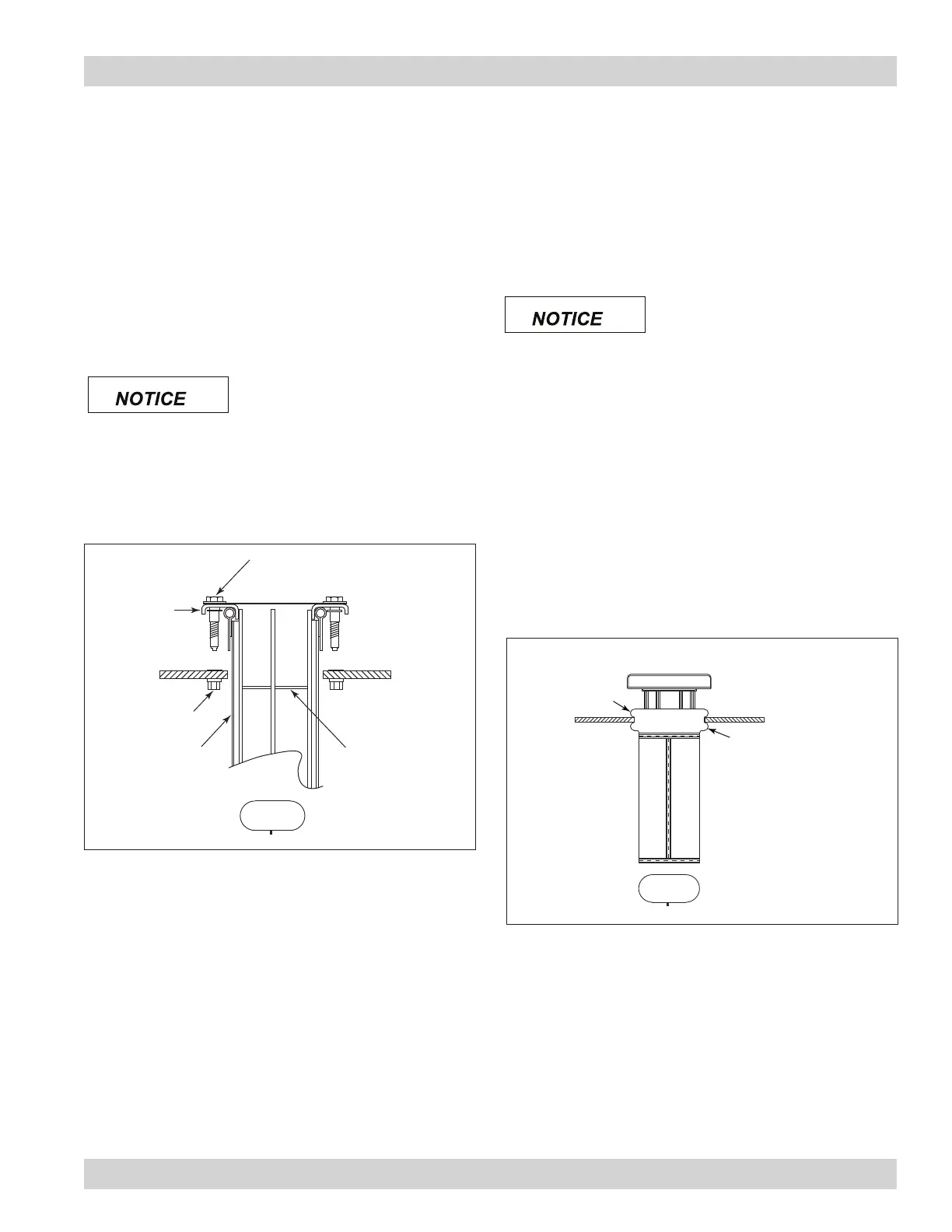
boltsafe bolt
tubesheet
threaded insert
filter bag
filter cage
top flange
center seam on long side
of oval tubesheet hole
Felt Bag and Cage and Pleated Bag with Boltsafe
Hardware Filter Installation
Felt Bag and Cage with Boltsafe™
Hardware Filter Installation
1. Slide the lter bag onto the lter cage until the top edge of
the bag reaches the top ange of the lter cage.
Note: Place the bottom seam of the bag parallel to
the long side of the oval.
2. From the clean-air plenum, insert the lter bag and lter
cage assembly through the tubesheet aligning the two
bolts with the two threaded inserts factory installed in the
tubesheet.
3. Secure with Boltsafe bolts provided.
Hand-start each bolt before
tightening either bolt. Do not
use a power or impact driver to tighten bolts. A
speed wrench using a maximum of 20 ft-lbs is
recommended.
Pleated Bag with Boltsafe™ Hardware Filter
Installation
1. From the clean air plenum, insert pleated bag assembly
through the tubesheet aligning the two bolts with the
threaded inserts in the tubesheet. It may be necessary
to squeeze the pleated bag as it is inserted into the
tubesheet.
2. Secure with Boltsafe bolts provided.
Hand-start each bolt before
tightening either bolt. Do no
use a power or impact drive to tighten bolts. A
speed wrench using a maximum of 20 ft-lbs is
recommended.
Felt Snap-In Bag Filter Installation
1. From the clean-air plenum, carefully insert the snap-in
lter bag aligning the seam with the long edge of the oval
in the tube sheet.
2. Snap the bag in place with the tube sheet between the
upper and lower rings on the lter bag collar.
3. Slide the lter cage into the lter bag and seat rmly.
filter cage
tubesheet
lower ring
upper ring
filter bag
center seam on long side
of oval tubesheet hole
Felt Snap-In Bag Filter Installation




 To Next Page