control, press lock, open or search key, to see if they function properly, if they do then
the power supply is normal, take the second step
② Disconnect the battery for over 2 minutes, then connect the battery, open the
electrical door lock and observe whether the instrument displays normally, connect
working personnel to update VCU software remotely;
③ If the abnormality continues after the battery is disconnected, check whether the
contact of VCU and the connectors of the instrument are firm, whether the battery plug
is sufficiently plugged, re-plug the plug,
④ Check whether the instrument communication is burned out, if the instrument
connection is burned out, then the instrument needs to be switched
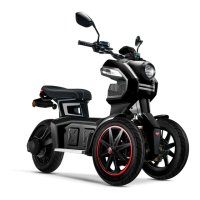
The table corresponding to the flickering of LED indicator light on the controller


 To Next Page