Operation Section
G 63
Finger Tip (Option)
Function of Knobs
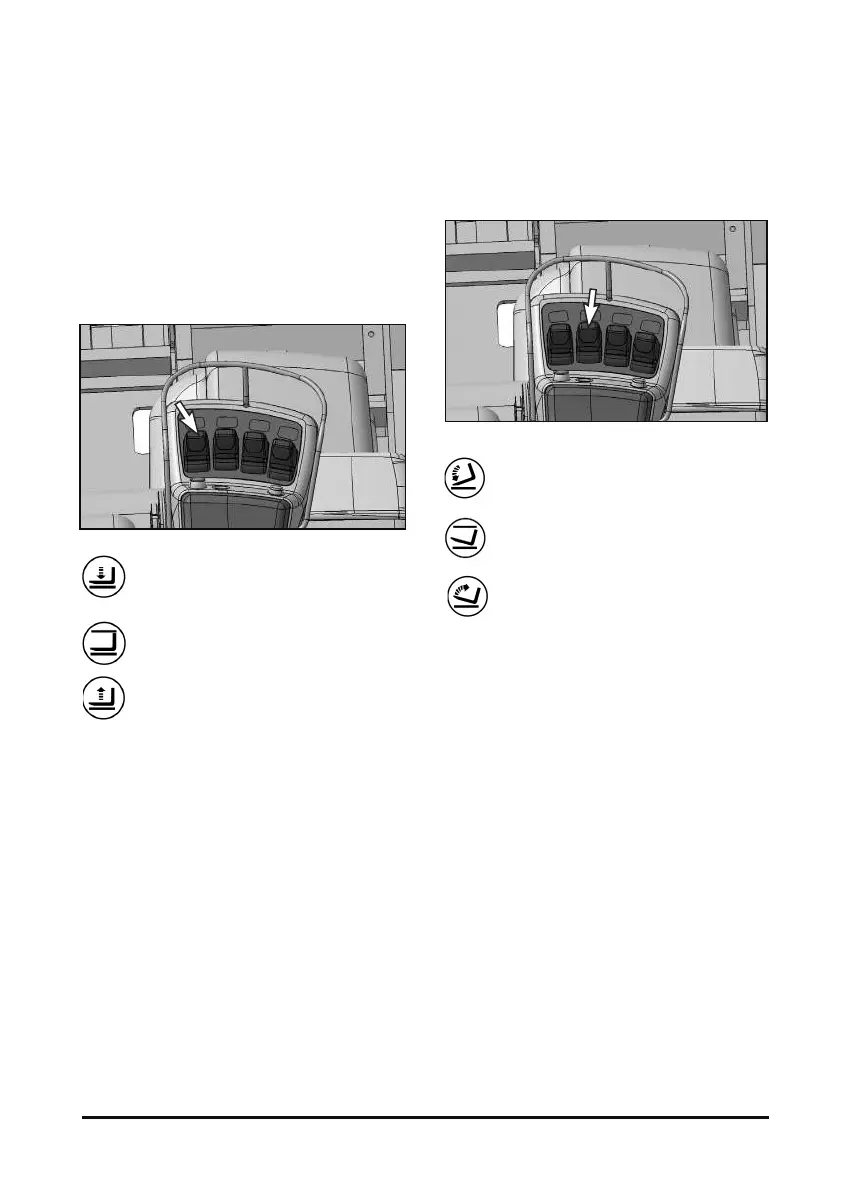
If finger tip control option is equipped, the hall-effect
type electric knobs replace convention control valve
levers.
Lift Control knob
G
G
G
G
G
G
G
G
G
G
G
G
G
G
G
Lower - Push the knob forward smoothly
to lower the lift forks.
Hold - Release the lift knob. The knob will
return to the center(hold) position and the
forks will remain in the position they are in.
Raise - Pull the knob back smoothly to
raise the lift forks.
NOTE: To prevent a sudden change of position of
the load, operate all lift, tilt and attachment
knobs smoothly.
G
Tilt Control knob
G
G
G
G
G
G
G
G
G
G
G
G
G
G
G
Tilt Forward - Push the knob forward
smoothly to tilt the lift forks forward.
Hold - Release the tilt knob. The knob will
return to the center(hold) position and the
forks will remain in the position they are in.
Tilt Back - Pull the knob back smoothly to
tilt the lift forks back.
NOTE: To prevent a sudden change of position of
the load, operate all lift, tilt and attachment
knobs smoothly.
G



 To Next Page