Operation Section
-61-
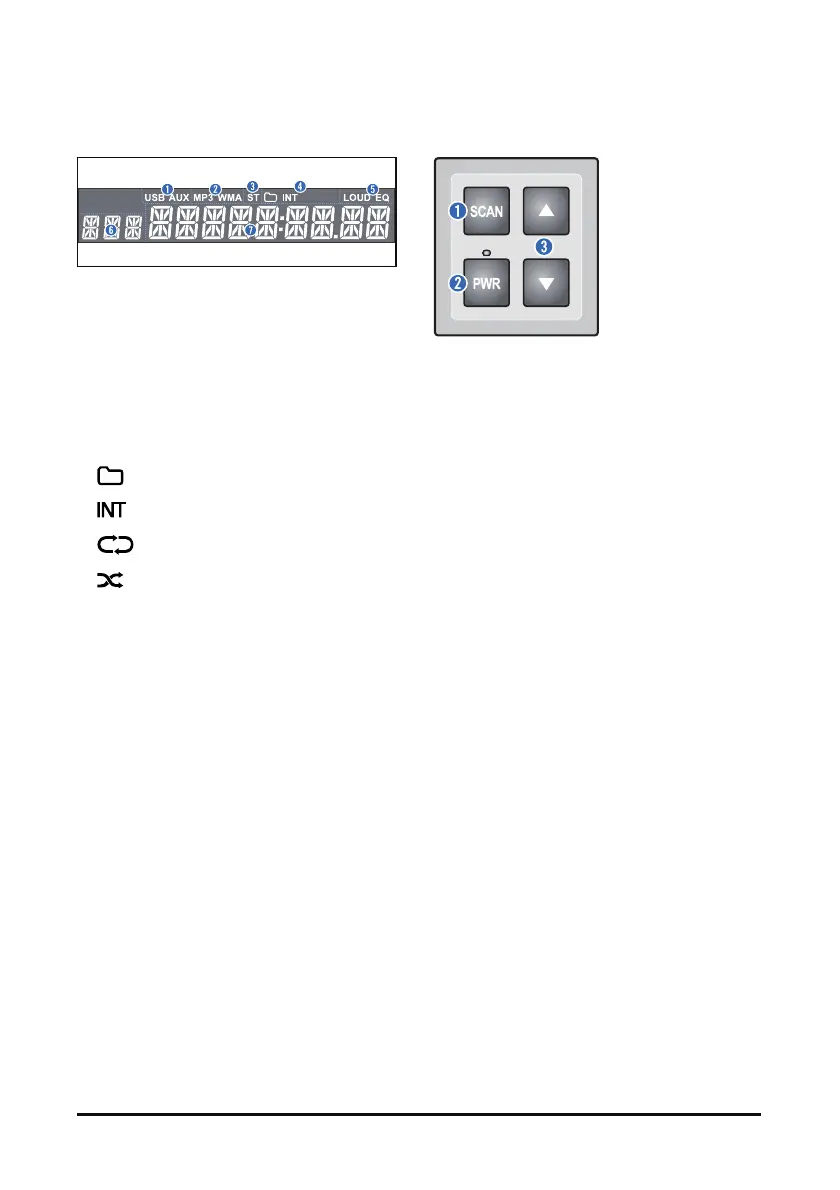
Display window
1. USB/AUX indicators: When the External Device is
connected, indicator is lights up.
2. MP3/WMA indicators: When the Audio Stream is
detected, indicator is lights up.
3. Stereo [ST] indicator for FM stereo station: When
a stereo Broadcast is received, indicator is lights
up.
4. Playback mode indicators for USB mode
: Folder mode
: Intro playback
: Repeat playback
: Random playback
5. LOUD/EQ indicators for sound effect
LOUD: Loudness mode on
EQ: EQ mode on
6. Multi-function display area for showing the
information
Wired remote controller
1. SCAN button: In Radio mode, tune up the
frequency(press): find a station (press and hold).
2. POWER [PWR] button: Turn on the power or
mute on/off(press): turn off the power (press and
hold).
3. Volume [▲/▼] buttons: Adjust the volume.



 To Next Page