MUXD 19" (B6L 19")
5. Maintenance
2222
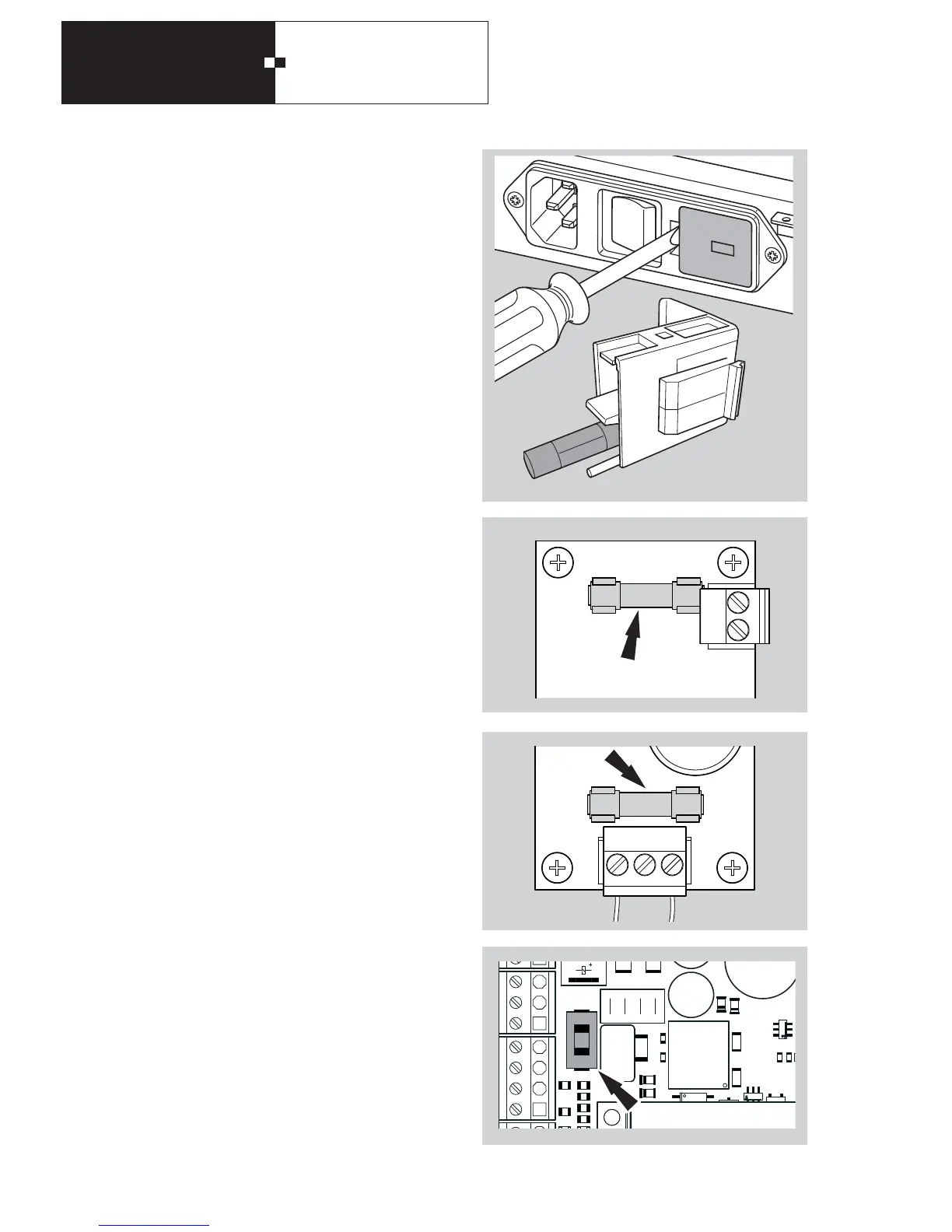
A - Primary side with a 500 mATT microfuse
To check or replace the fuse, open the housing of the volt-
age selector with a flat screwdriver.
Then pull out the fuse from the cover removed from the
voltage selector. Please use only permitted fuses. They are
available as an accessory under item No. 1900001797351.
B - 3.15 AT microfuse on power supply unit module
Then remove the fuse from the fuse holder. Please use only
permitted fuses. They are available as an accessory under
item No. 1900001797316.
The use of other fuses is not permissible..
C - 10 AT microfuse on power supply unit module
Then remove the fuse from the fuse holder. Please use only
permitted fuses. They are available as an accessory under
item No. 0005167633330.
The use of other fuses is not permissible.
D - SMD fuse
1)
If the fuse needs to be replaced, there is a replacement fuse
on the TP4 basic card. The fuse can be re-ordered using
item No. 1900001797487 (Lifflefuse type 0454.002T,
2 AT).
The use of other fuses is not permissible.
1
1



 To Next Page