8
Bluetooth Key Sharing
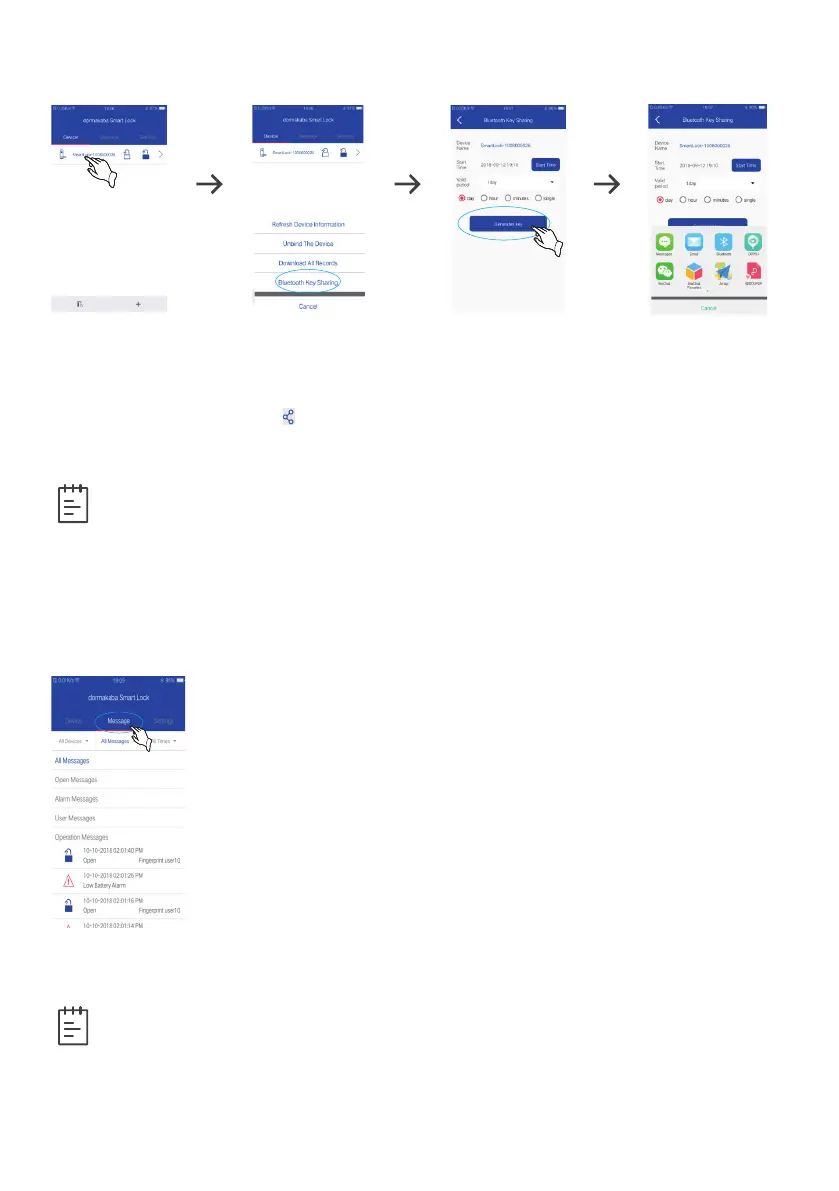
1. Enter device management interface and press a binding device until a selection
menu pops up. Then click “Bluetooth Key Sharing”.
2. Choose the start date, time and valid period, and click “generates key”.
3. Click the sharing icon “ ”to share the new key to other users via email, WhatsApp,
SMS, WeChat, QQ, etc. The receiver can input the key to open the door.
Note
• Only the administrator is equipped with “Bluetooth Key Sharing” on the
management interface.
• When single valid term is selected, only 10 Bluetooth keys can be shared, 10+ keys
can be shared but the door cannot be opened.
• The shared keys are valid for use within 24 hours; if you select other time ranges,
the Bluetooth key sharing is not restricted.
View Message
1. Click “All Devices” after entering “Message” interface.
2. Select a device name, click “All Messages” to unfold options
including “All Messages”, “Open Messages”, “User Messages”,
“Operation Messages”and “Alarm Messages”. You can click “All
Times” to unfold operations including “All Times”, “Recent 1
day”, “Recent 7 days”, “Recent 15 days”, “Recent 30 days” and
“Custom time zones”.
3. Select the required message type or time zone to view.
Synchronize Message: In the “Message” interface, press a lock
icon until a dialogue box pops up on the bottom of the screen and
click “Synchronize” to keep the message on the app in line with the
smart lock system.
Note
• In the “Message” interface, press a lock icon until a dialogue box pops up on the
bottom of the screen to select “All” or delete some certain records.
• The Android users can operate the app following above instruction, operation
system is slightly different for IOS users. The mobile app shall prevail in actual
operation and menu.



 To Next Page