English
1. Press Menu Settings Software update.
2. Press Check for update? Yes to check if there’s a software update
available.
3. Press for software update settings:
• Check again to re-check for update packages to be downloaded.
• Version Info to see software version information.
• Release notes to see information about the software update
package.
Additional functions
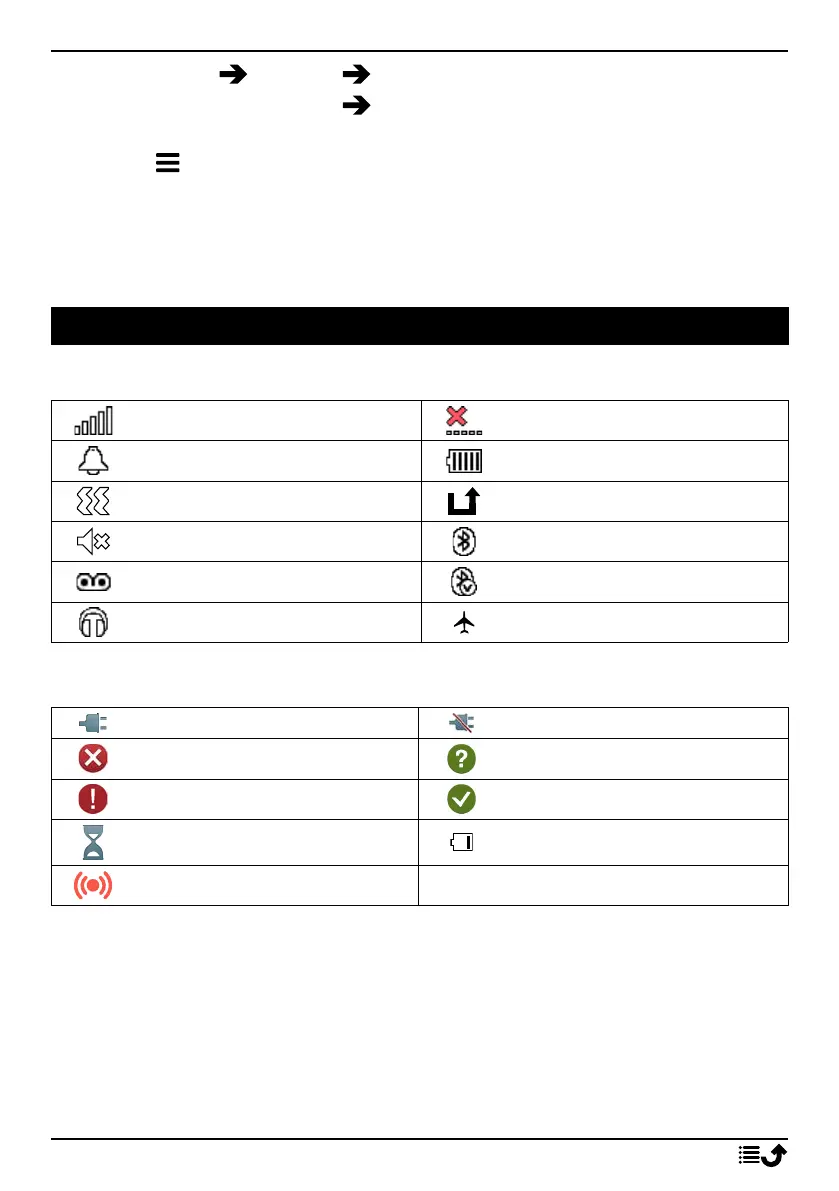
Display status symbols
Signal strength
No network coverage
Alarm active
Battery level
Vibration only
Call divert activated
Silent
Bluetooth on
Voicemail message received
Bluetooth connected
Headset connected
Flight mode activated
Display main symbols
Charger connected Charger removed
Error
Query
Warning
Done (confirmed)
Processing, please wait Battery level low
Assistance button call
46



 To Next Page