EasyManua.ls Logo

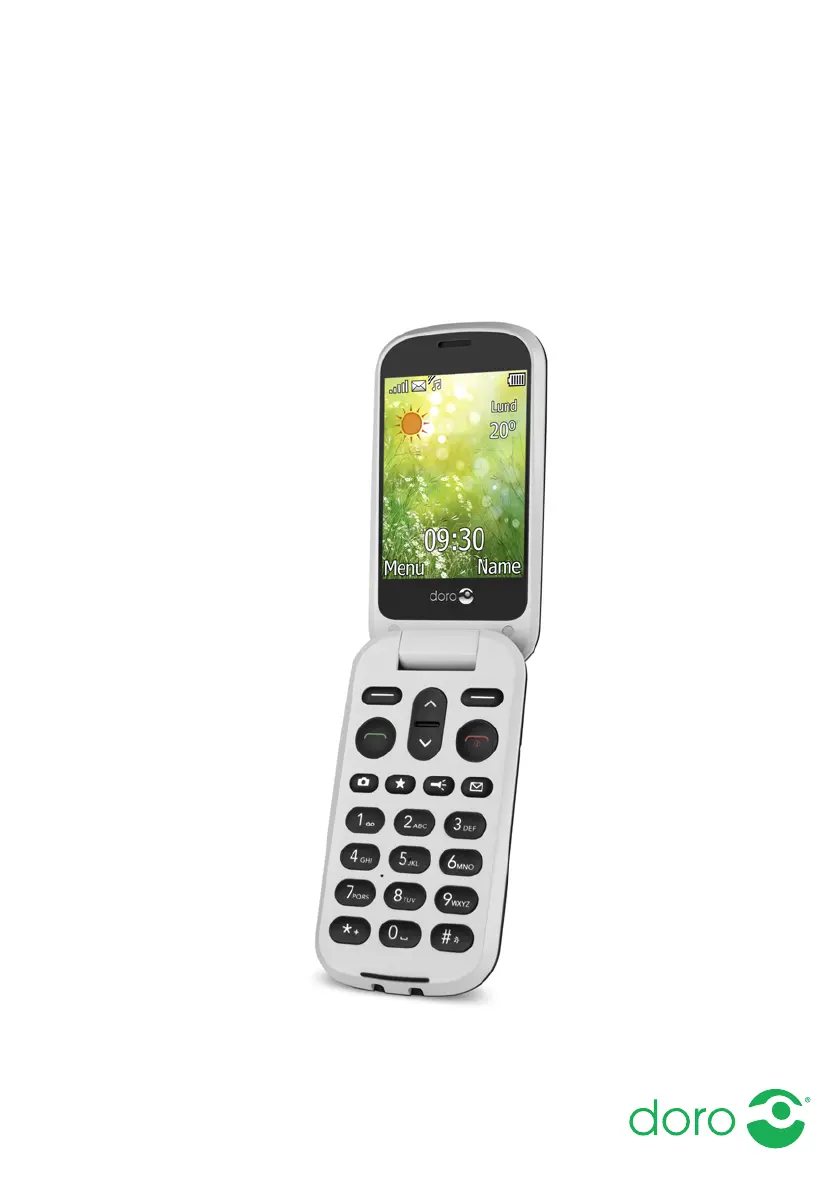
Doro 6050 - User Manual

Doro 6050
68 pages
Print Icon
To Next Page IconTo Next Page
Loading...
English
Doro 6050

Table of Contents

Other manuals for Doro 6050

Questions and Answers

  • N
    Nathan HortonAug 17, 2025
    What to do if my Doro 6050 shows a SIM card error?
    • T
      Tracey PatelAug 17, 2025
      If your Doro Cell Phone displays a SIM card error, check the condition of the SIM card. If it is damaged, contact your service provider. Also, check the installation of the SIM card by removing it and reinstalling it. Ensure the contact surfaces of the SIM card are clean by wiping them with a clean cloth.
  • M
    Michael ChoiAug 20, 2025
    Why can't I add a contact on my Doro 6050?
    • D
      Devin JohnsAug 20, 2025
      If you are unable to add a contact to your Doro Cell Phone, the phonebook memory might be full. Delete contacts to free up memory.
  • J
    jamesboyleAug 23, 2025
    How to fix Doro 6050 that cannot be switched on?
    • L
      Luke MarshallAug 23, 2025
      If your Doro Cell Phone cannot be switched on, it might be due to a low battery. Connect the power adapter and charge the battery for 3 hours. Note that full battery capacity is reached after the battery has been charged 3–4 times. Alternatively, the battery might be incorrectly installed. In this case, check the installation of the battery.
  • F
    Felicia GrimesAug 26, 2025
    Why is my Doro Cell Phone battery not charging?
    • G
      garciamaryAug 26, 2025
      If your Doro Cell Phone battery isn't charging, there could be several reasons. First, the battery or charger might be damaged, so check their condition. Second, ensure the charging environment is within the temperature range of 0 °C and 40 °C. Finally, verify that the charger is correctly connected to both the phone and the power socket.
  • H
    Heather AcostaAug 28, 2025
    Why does standby time decrease on Doro 6050 Cell Phone?
    • J
      Jeffrey SmithAug 28, 2025
      If the standby time of your Doro Cell Phone is decreasing, it could be due to a low battery charge capacity, in which case you should install a new battery. Alternatively, if you are too far from a base station, the phone constantly searches for a signal, which consumes battery power. Try to find a place with a stronger signal, or temporarily turn off the phone.
  • M
    Mr. Wayne Brown MDAug 31, 2025
    What to do if I hear echo or noise on my Doro 6050 Cell Phone?
    • S
      sramirezAug 31, 2025
      If you are experiencing echo or noise on your Doro Cell Phone, it might be a regional problem from a bad network relay. Try hanging up and redialing, as this may switch you to another network relay.
  • C
    Carlos ParkSep 2, 2025
    Why is the signal weak on my Doro Cell Phone?
    • B
      briana63Sep 3, 2025
      A weak signal on your Doro Cell Phone can occur if you are too far from the base station. Try again from another location. Network congestion can also cause a weak signal, so try calling at a later time.
  • C
    Craig RodriguezSep 5, 2025
    How to fix failure to place calls on Doro Cell Phone?
    • V
      vboyerSep 5, 2025
      If you cannot place or receive calls on your Doro Cell Phone, call barring might be activated. Deactivate call barring.
  • A
    adriennemoraSep 8, 2025
    Why can't I send or download MMS on my Doro Cell Phone?
    • C
      Christina EstesSep 8, 2025
      If your Doro Cell Phone is failing to send or download MMS, it may be because the phone memory is full. Delete received MMS or select to set the default storage for MMS to be saved on a memory card (not included). Also, ensure that the correct MMS profile is selected manually.
  • S
    Sarah WoodardSep 12, 2025
    What to do if Doro 6050 PIN code not accepted?
    • S
      Susan BakerSep 12, 2025
      If your Doro Cell Phone is not accepting the PIN code, you may have entered the wrong PIN code too many times. Enter the PUK code to change the PIN code, or contact your service provider.

Summary

Getting Started Guide

Charge the Phone

Exploring Your Phones Features

Phone Settings and Customization

Call Management and Usage

Phonebook and Call Log Management

Advanced Call Options and SOS Functionality

Call Settings and Modes

Managing Your Phonebook Contacts

Voice Mail, Speed Dial, and Top 10 Contacts

Emergency Contact Information (ICE)

Using the Assistance Button

Making an Assistance Call

Procedures for activating and initiating an emergency assistance call sequence.

Messaging Features and Usage

Creating and Sending SMS Messages

Detailed steps for composing and dispatching text messages via SMS.

Creating and Sending MMS Messages

Creating and Sending Email Messages

Email Account Setup and MMS Roaming

Using the Camera

Taking Photos with Your Phone

Basic steps and tips for using the phone's camera to take pictures.

Camera Adjustments and Settings

Image Viewer and Connectivity Options

Bluetooth Settings and Device Pairing

Internet Connectivity Setup

Mobile Data, Roaming, and Data Counter

File Manager Operations Guide

Connecting to a Computer via USB

Sound and Display Settings

Additional Phone Features

Resetting and Troubleshooting

Troubleshooting: Power and Call Issues

Troubleshooting: SIM Card and Network Problems

Troubleshooting: MMS and Network Service Issues

Safety and Environmental Precautions

General Safety Precautions for Device Use

Essential safety advice for operating the phone, including precautions for health and environment.

Emergency Calls and Personal Data Protection

Device Maintenance and Security Measures

Product Warranty Information and Terms

Doro 6050 Specifications

General IconGeneral
Display diagonal2.8 \
External displayYes
Display resolution320 x 240 pixels
Compatible memory cardsMicroSD (TransFlash)
Rear camera resolution (numeric)3 MP
Wi-Fi-
Data networkGSM
SIM card typeMicroSIM
SIM card capabilitySingle SIM
2G bands (primary SIM)900, 1800, 1900 MHz
Bluetooth version3.0+HS
Headphone connectivity3.5 mm
Multimedia Messaging Service (MMS)Multimedia Messaging Service (MMS) is a standard way to send messages that include multimedia content to and from a mobile phone over a cellular network
Ringer typePolyphonic
Talk time (2G)6 h
Battery voltage5 V
Battery capacity800 mAh
Standby time (2G)420 h
Subscription typeNo subscription
TypeEntry-level phone
Product colorGrey, White
Form factorClamshell
PersonalizationRingtones
Personal info management (PIM)Calendar, Events reminder, Games
Head SAR (EU)1.4 W/kg
Weight and Dimensions IconWeight and Dimensions
Depth19.6 mm
Width56.2 mm
Height106.9 mm
Weight111 g

Related product manuals