English
Installation
IMPORTANT!
Turnoffthephoneanddisconnectthechargerbeforeremovingthe
batterycover.
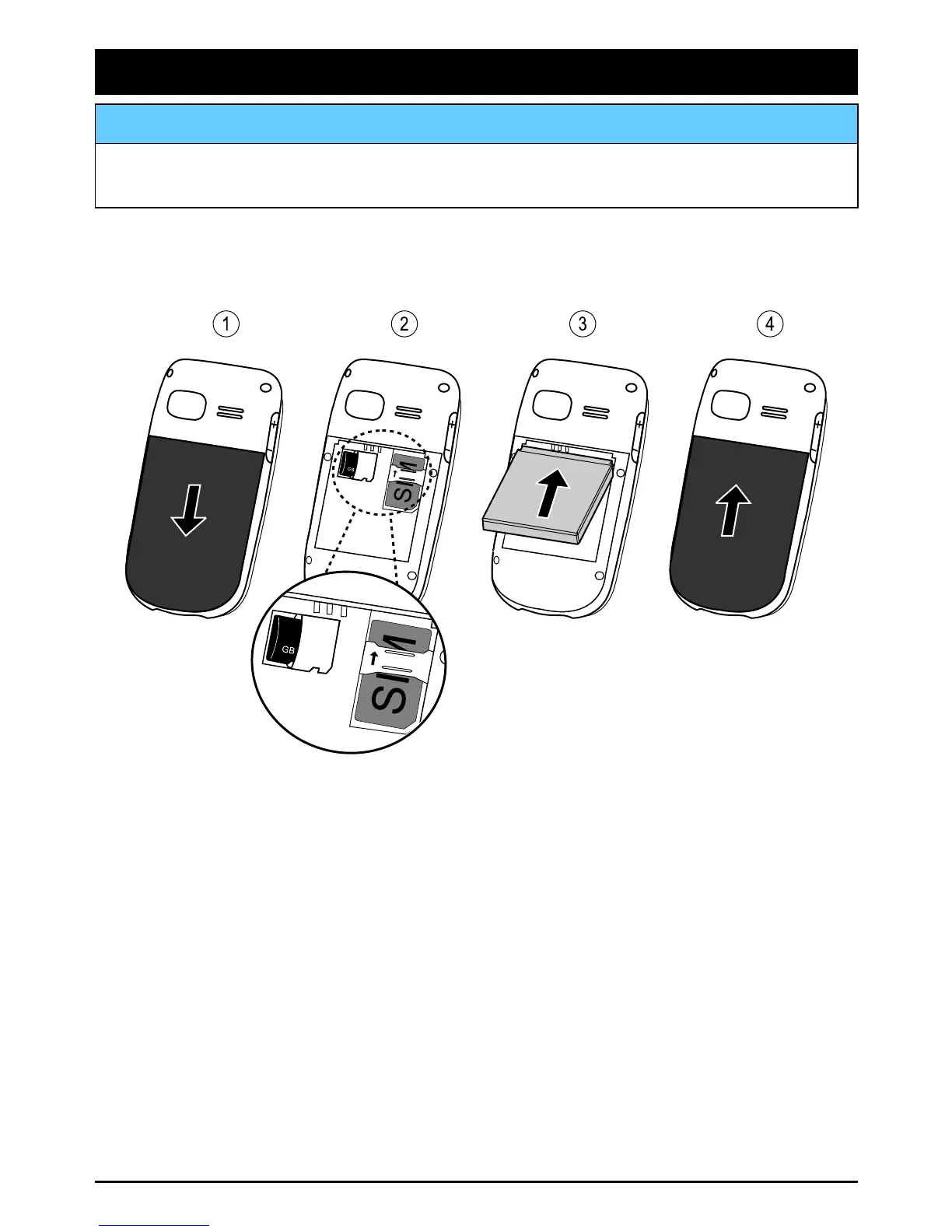
InstallingtheSIMcard,memorycardandthebattery
TheSIMcardholderislocatedbehindthebattery.
1.Removethebatterycoverandthebatteryifitisalreadyinstalled.
2.InserttheSIMcardbygentlyslidingitintotheholder.Makesure
thattheSIMcard’scontactsarefacinginwardsandthatthecut
offcornerispointingdownwards.Takecarenottoscratchor
bendthecontactsontheSIMcard.
Toinsertamemorycardbygentlyslidingitintotheholder.Make
surethatthememorycard’scontactsarefacinginwardsandthat
thecutoffcornerispointingdownwards.Takecarenottoscratch
orbendthecontactsonthememorycard.
Toremovethememorycard:ndthesmallridgeontheexposed
endofthememorycard.Presslocktoreleaseandputyour
ngernailintotheridgeandgentlypullthememorycardout.
3.Insertthebatterybyslidingitintothebatterycompartmentwith
thecontactsfacingupwardstotheleft.
1















 To Next Page