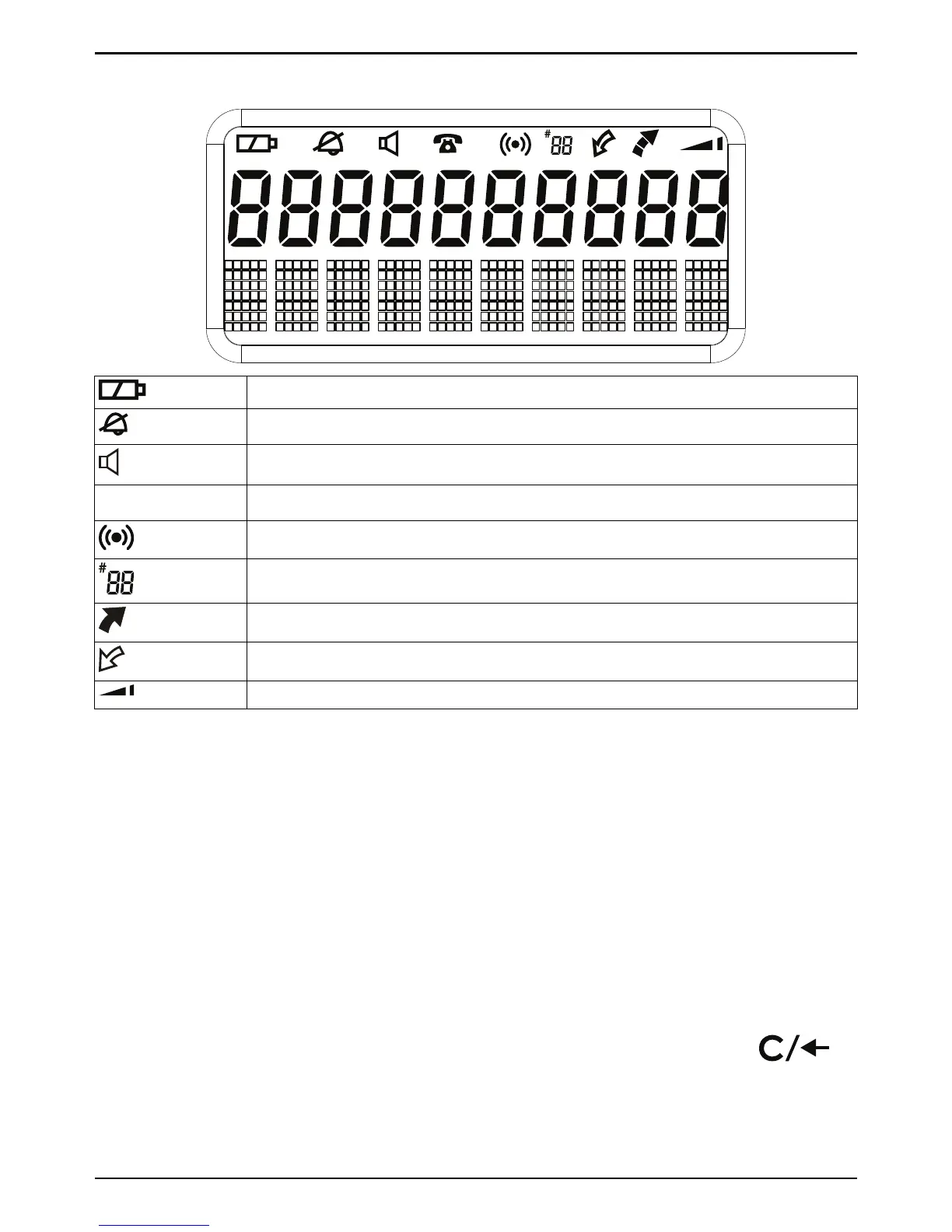
No batteries installed or low batteries
Ringer off
Speakerphone activated
T
New (missed call) number received.
Alarm function activated
Alarm contact's memory position
Outgoing call
Incoming call
Boost lock on
Phonebook
99 phone numbers (max. 22 digits) with names (max. 10 letters) can be
stored in the Phonebook. When the memory is full, FULL is displayed. If
you subscribe to a caller ID service, the name allocated to the caller in
the Phonebook will be displayed for incoming calls. You can also record a
name (NAME REC) to be read aloud with the Phonebook entry (instead of
the caller’s phone number, if VOICE=ON).
Storing contacts
1. Press W, use v/V to scroll to STORE NO.. Press 0.
2. Enter a phone number. Use v/V to move the cursor and
to
erase if needed. Use
#
to insert a pause in the number.
3. Press 0 to confirm. A blinking cursor is displayed on the second line
on the display.



 To Next Page