English
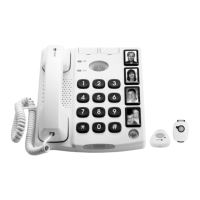
3. Press and hold the button on the pendant until OK is displayed.
Repeat the steps if you need to pair further pendants.
5 pendants can be paired simultaneously to the phone.
If you attempt to pair a new pendant when 5 pendants are already
paired, FULL will be displayed.
Note! When adding a new unit (with 5 pendants already paired, FULL)
you must first delete all the paired units and then pair one by one (there
is no option to delete paired units individually).
Delete paired pendants
1. Scroll to PENDANT. Press 0.
2. Select DELETE ?. Press 0.
VOICE
When ON is selected, a recorded voice is played with button presses.
Set the voice function ON/OFF, and confirm with 0.
RING MEL
Select the required ringer melody, and confirm with 0.
RING VOL
Select the required ringer volume, and confirm with 0.
BOOST LOCK
The powerful amplification (boost) is by default set to switch OFF after
every call, this can be changed so the amplification stays switched ON.
on the phone, or the alarm button on the cordless pend-
ant. See also Alarm function, p.13.



 To Next Page