Doro Secure 480 user guide 0.1 Page 10 of 16
Doro AB - www.doro.com
When the DORO SECURE 480 is placed in the charging dock all bezel button functions are disabled
and device screen turns OFF after 10 seconds. By pressing the crown button the DORO SECURE 480
display is turned ON for 10 seconds to show the DORO SECURE 480 status, network and battery
level.
2.2 Setting up
In order to use the DORO SECURE 480 it must configured using the Web service. A new DORO SECURE 480
has been put into a SETUP mode at the factory and powered off for shipment. The DORO SECURE 480 will
remain in SETUP mode until it has been configured using the Web service.
2.2.1 DORO SECURE 480 ready for setup
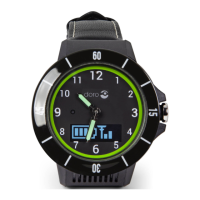
During the initial charging period the DORO SECURE 480 display will show SETUP. This indicates that
DORO SECURE 480 is in a setup mode. Please note that if you remove the DORO SECURE 480 from the
charging dock in SETUP mode the DORO SECURE 480 will turn itself off automatically. Please keep the
DORO SECURE 480 in the charging dock for the duration of the configuration. Please wait until the DORO
SECURE 480 mobile network icon shows at least one bar and the battery is fully charged. The fully charged
state is indicated by GREEN LED on DORO SECURE 480 dial near 3 o’clock and by steady battery icon with
all four bars visible. Please note that it is normal for the DORO SECURE 480 to move the watch hands
during the setup period.
NOTE: Connection to a mobile network is required in order to complete the DORO SECURE 480 setup. If
mobile network is not available for DORO SECURE 480 in a couple of minutes please move the DORO
SECURE 480 to another location where mobile network is available.
2.3 Web service
Doro Secure 480 web service is a service that allows individual caregivers and professional care entity
personnel to manage the call routing and caregiver reachability services, to manage the settings of DORO
SECURE 480 devices, and to see the location of an assistee in a map view.
The Doro Secure 480 web service is hosted by Doro in a telecom grade redundant server environment.
Caregivers and professional care providers can use the Doro Secure 480 web service with a web browser.
Doro Secure 480 is found here: https://secure480.com
Please see User manual for Doro Secure 480 web service Ref #1 for more detail information how to use
the Web service.


 To Next Page