Doro Secure 480 user guide 0.1 Page 6 of 16
Doro AB - www.doro.com
The DORO SECURE 480 also has a Bluetooth Low Energy link that can be used to detect the proximity of a
home beacon and more importantly the loss of contact with the home beacon.
DORO SECURE 480 also has a vibrator to assist persons with hard of hearing or poor eye sight with the use
of the DORO SECURE 480. The DORO SECURE 480 speaker is also used as part of the user interface.
1.2 Accessories
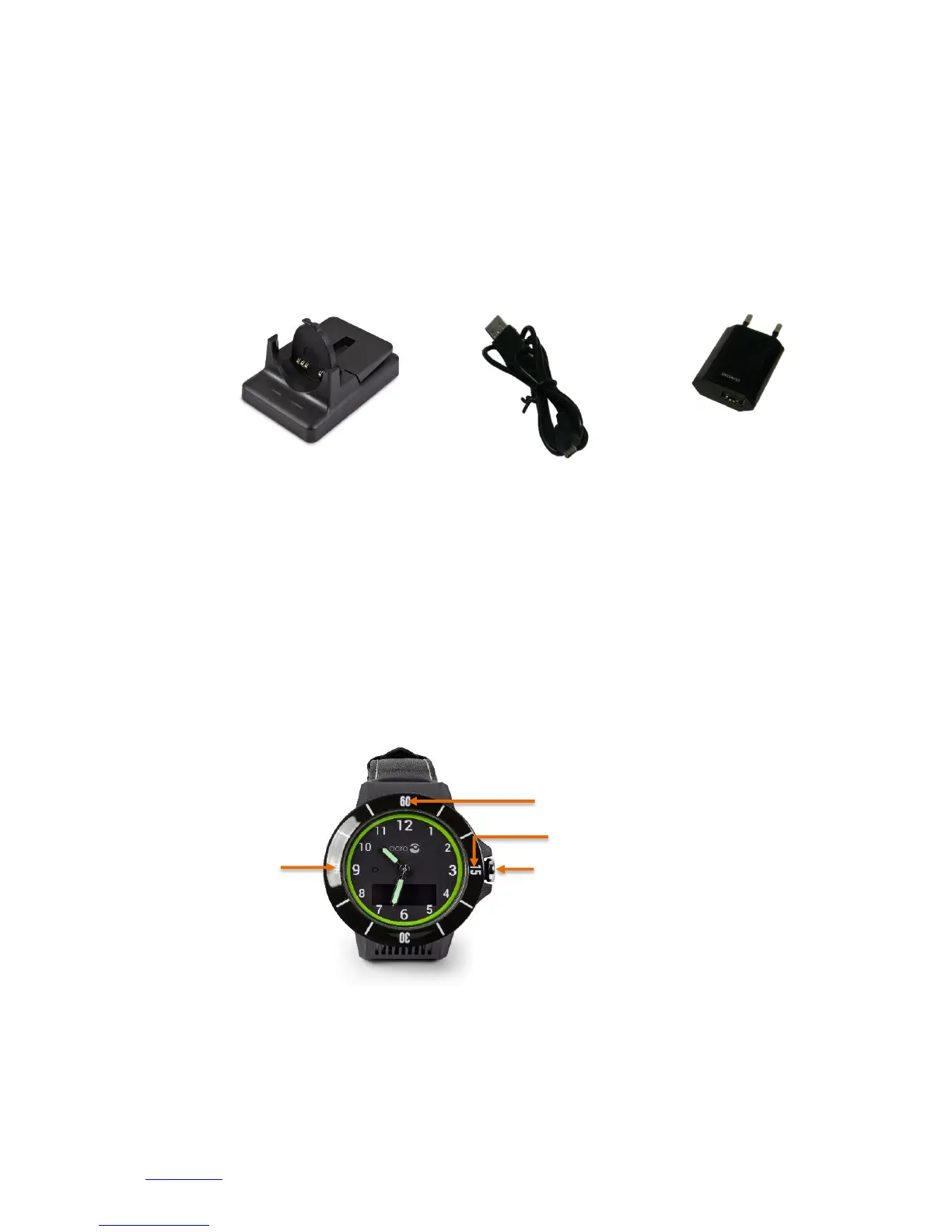
The following accessories are provided with DORO SECURE 480 (these may vary depending on model and
region).
1.3 Buttons
The DORO SECURE 480 wristwatch has Three buttons and a crown. The three buttons on the watch bezel
are hidden inside the watch mechanics and there are no mechanical buttons visible. Press firmly the watch
bezel at number 15, 45 or 60. When the button is activated the watch gives a haptic feedback and the
selected action is activated. The crown button is the only visible mechanical button.
The help request call is initiate by the crown button. The UP button is located at number 60 in the bezel.
The CALL / YES button is located at number 45 in the bezel. The CANCEL / NO button is located at number
15 in the bezel. The buttons and crown are enabled or disabled depending on the profile selected.


 To Next Page