XMPI0MTIRPD2ST021 11/24 Ed. 2021
6. GRAPHIC DISPLAY
The graphic display panel mounted on the inverter allows the display of parameters and the management of
the dosing pump.
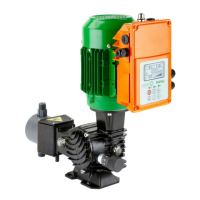
The version of the Rapida with graphic
display panel looks like the picture
opposite, with the display already
connected to the inverter via the two
cables (pictures in the right-hand box).
The inverter is already programmed for
start-up and speed adjustment directly
from the panel.
The keypad is used to navigate the
parameter menu as follows:
Press RUN to start up/shut down the device: start-up and adjustment is handled by
remote 4-20mA signal where:
4mA → STOP;
20mA → max. flow rate.
When restarting after each shutdown, the device will be in the last state it was left in
(manual or automatic mode, RUN or STOP). Instead of pressing RUN, functions can
also be operated via an external button. See chapter 12 for its connection
Pressing the MAN button switches to manual control, which allows you to set the l/h
[Hz. or % adjustment] using the two arrows.
Press SEL to access the timer menu: here you can set the two timers for timed mode
and delayed start. Use the arrows to change the minutes and hours. Confirm the
setting by pressing SEL. Press PAR again to return to the main menu.
If a timer has been set, after returning to the main menu, press MAN to start the timer
mode: the device will run (or wait to start) for the set minutes. If no timer has been
set, the device will run continuously.
However, if the RUN button is pressed in the main menu, the device restarts in
automatic mode, ignoring any timer that may have been set.
Press and hold PAR to access the parameter menu.
5X2 FLAT CABLE FOR COMMUNICATION
BETWEEN INVERTER AND DISPLAY.
POWER CABLE FOR THE
DISPLAY.


 To Next Page