8
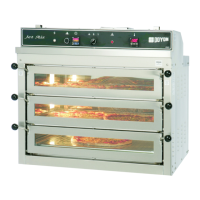
1) TOP TEMPERATURE
Displays the temperature of the TOP. It is also used in the parameter settings mode.
2) CLOCK
Displays the cooking timer. When the cooking timer is running, the display shows the
minutes remaining to complete the cooking time and a flashing light spot indicates that it
is counting time.
3) STONE TEMPERATURE
Displays the temperature of the sole (stone). It is also used in the mode parameter settings.
4) INCREASE KEY VALUES
Key used to increase the value of the parameter.
5) DECREASE KEY VALUES
Key used to decrease the value of the parameter.
6) TOP KEY
Pressing this button will display the desired temperature for the top. Edit with keys up or
down, and press the button again to save the setting and return to the actual temperature
display.
7) FRONT HEAT COMPENSATOR KEY
Pressing this button will display the desired % of heat compensation for the top-front of
the unit. By pressing the button again, it will display the % of heat compensation for the
sole (stone). Edit with keys up or down and press the button again to save the setting and
return to actual temperature display. We suggest that you keep the % level between 3%
and 5%.
8) SOLE (STONE) KEY
Pressing this button will display the desired temperature for the sole (stone). Edit with
keys up or down, and press the button again to save the setting and return to the actual
temperature display.
9) TIMER KEY
Pressing this button will allow you to program the cooking time. Edit with keys up or
down. Press the timer button to save and exit the editing.
If cooking is underway, pressing this key lets you change the time remaining. Press the
button to save and exit the editing.


 To Next Page
 Loading...