VariZapper
3 Description of the Device
3.1 Working Parts
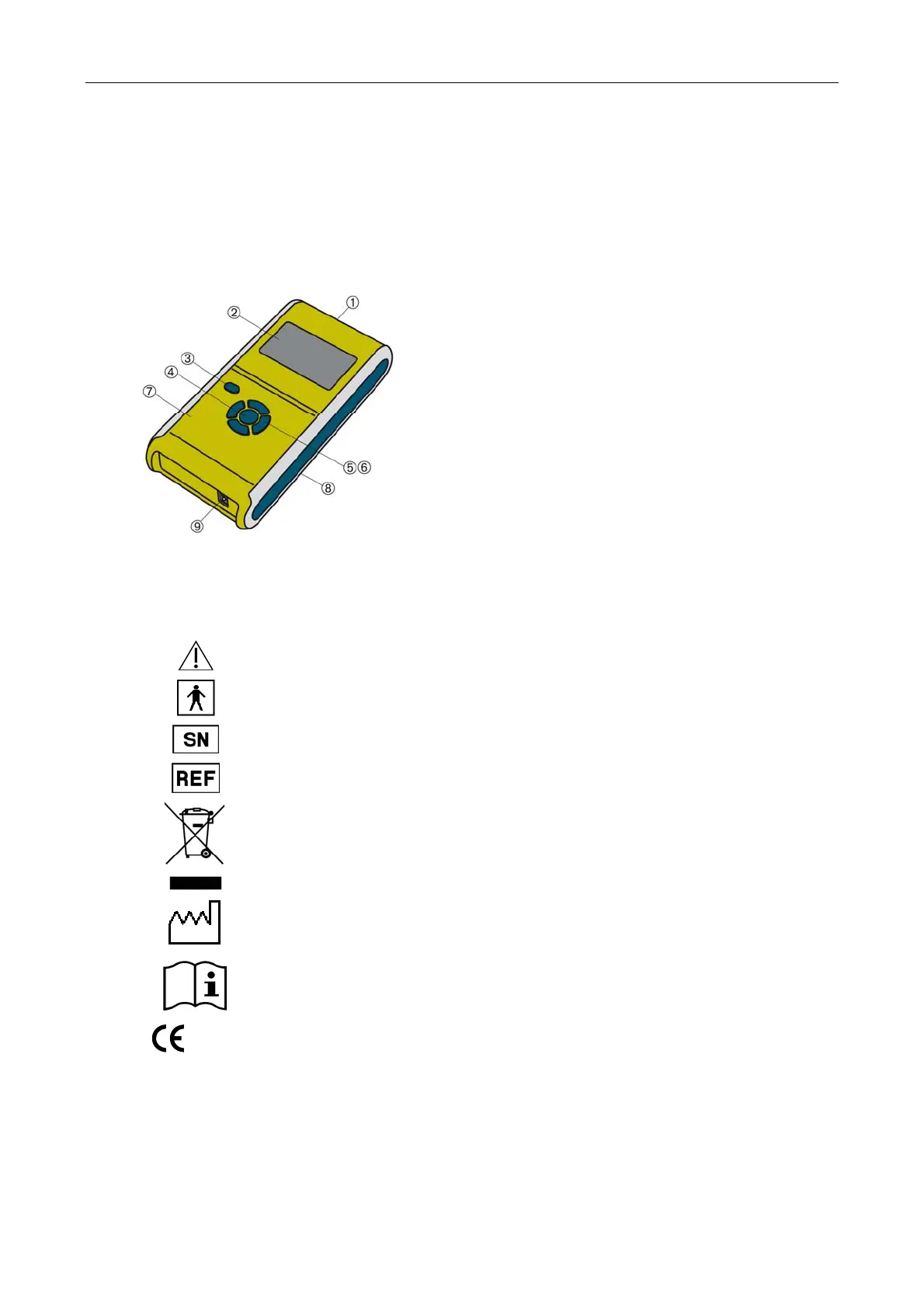
VariZapper allows some adjustments through its keyboard. The various operating conditions are clearly
indicated on the LCD display.
9. Insertion Slot for Program Driver Cards
10. Display
11. ON/OFF Button
12. Start Button
13. Modification Buttons (high/low)
14. Modification Buttons (left/right)
15. Battery Compartment
16. Electrode Cable Jack
3.2 Symbols Used in the Text
Attention: Read accompanying documents, especially user manual!
Type BF applied part
Serial number
Catalogue number
Environment
Do not dispose of the appliance with the normal household waste at the end of
its life, but hand it in at an official collection point for recycling. By doing this you
will help to protect the environment.
Date of manufacture
Consult instructions for use
0482
By labelling with CE mark, the manufacturer asserts that the product fulfills all
relevant requirements of the respective EC Directives. A conformation
assessment process has been successfully completed. The identification
number in respect of the conformation assessment process is given in
accordance with the CE labelling of the relevant notified body.
16


 To Next Page