VariZapper
5.3 Turning the Device On and Off
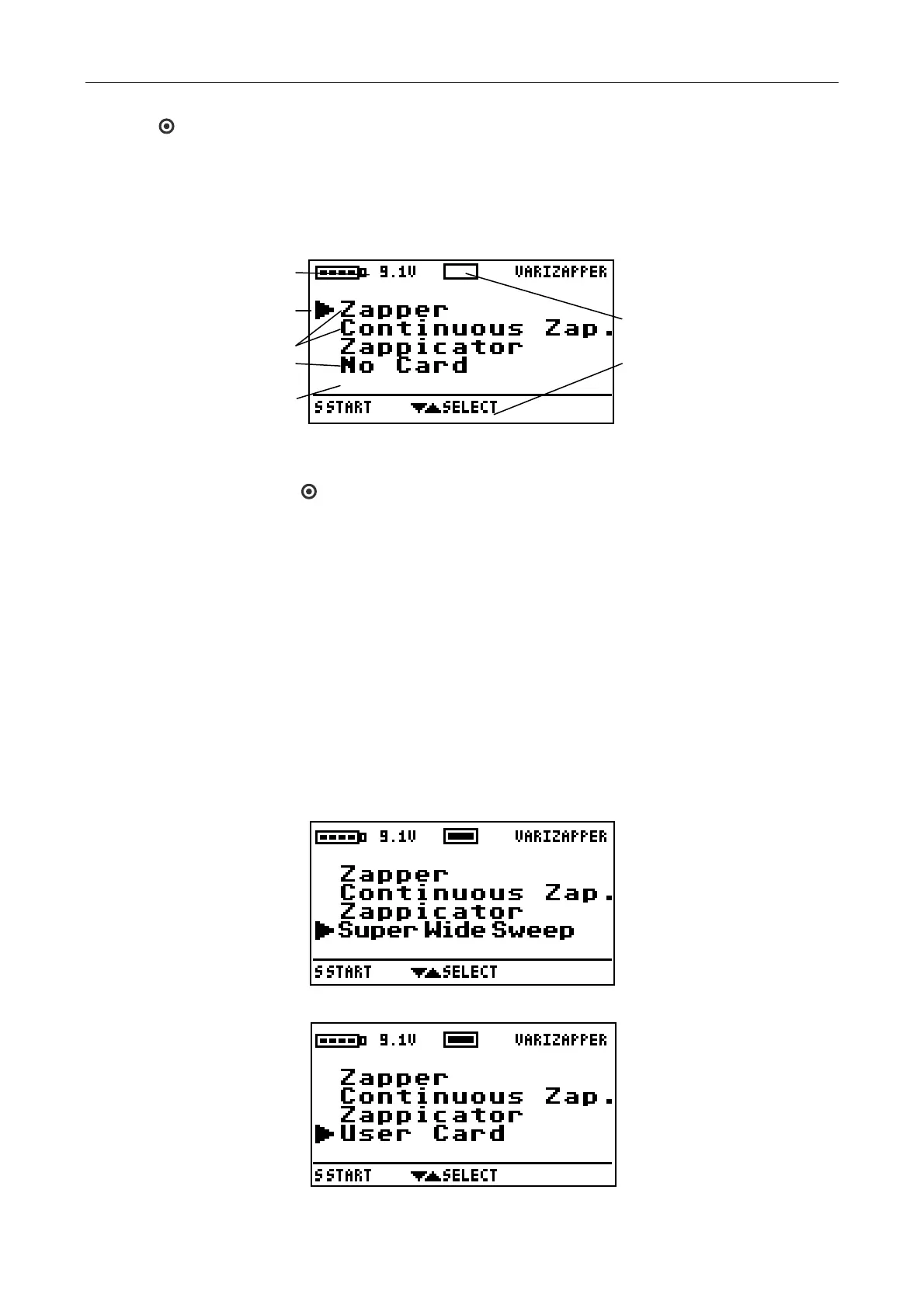
Press the button to turn on the VariZapper. After the greeting information and three tones the main menu
appears with the program list, the contents of which are explained below:
Battery s
tatus
Marker Arrow indicates
Selected Program
Standard Programs
Indicates that no Program
Driver Card is inserted
Symbol that no Card inserted
Indication of the keyboard
functions
If no program is
started and no button activated within two minutes, the device shuts itself off. The same
access to Help text appears in all the submenus just as it does in the main menu. You can shut the device
off at any time by pressing the button.
5.4 Working with the Standard Program
With the modification buttons you may choose the desired standard program from the list. The marker
arrow moves up or down accordingly. When the last program is marked, the button will take you back to
the top. Likewise, you can jump from the upper program to the bottom of the list by pressing the button.
Be aware that if there is no Program Driver Card in the device, instead of the program, “No Card“ appears at
the end of the list. In this case the marker arrow cannot be moved to this position.
5.5 Working with Program Driver Cards
Numerous Program Driver Cards are available for the VariZapper. Insert the desired card until it locks into
place in the slot on the front of the device. Pay attention to the orientation of the card. The writing must be on
top and the arrow pointing in the direction of the device. It is not necessary to turn off the VariZapper when
inserting or changing the cards. The card may be stored in the device. Use only original cards! If the card is
recognized by the device, the corresponding program will appear in the last position on the list and the
selection arrow will be set automatically at this last position.
If a VariGamma card is put in the device, the last line of the program list will display “User Card“
After running any other program, the Program Driver Card program can be selected again.
18


 To Next Page