Mach M3
Dr. Mach
Lamps and Engineering
4.2 Removing the upper housing part
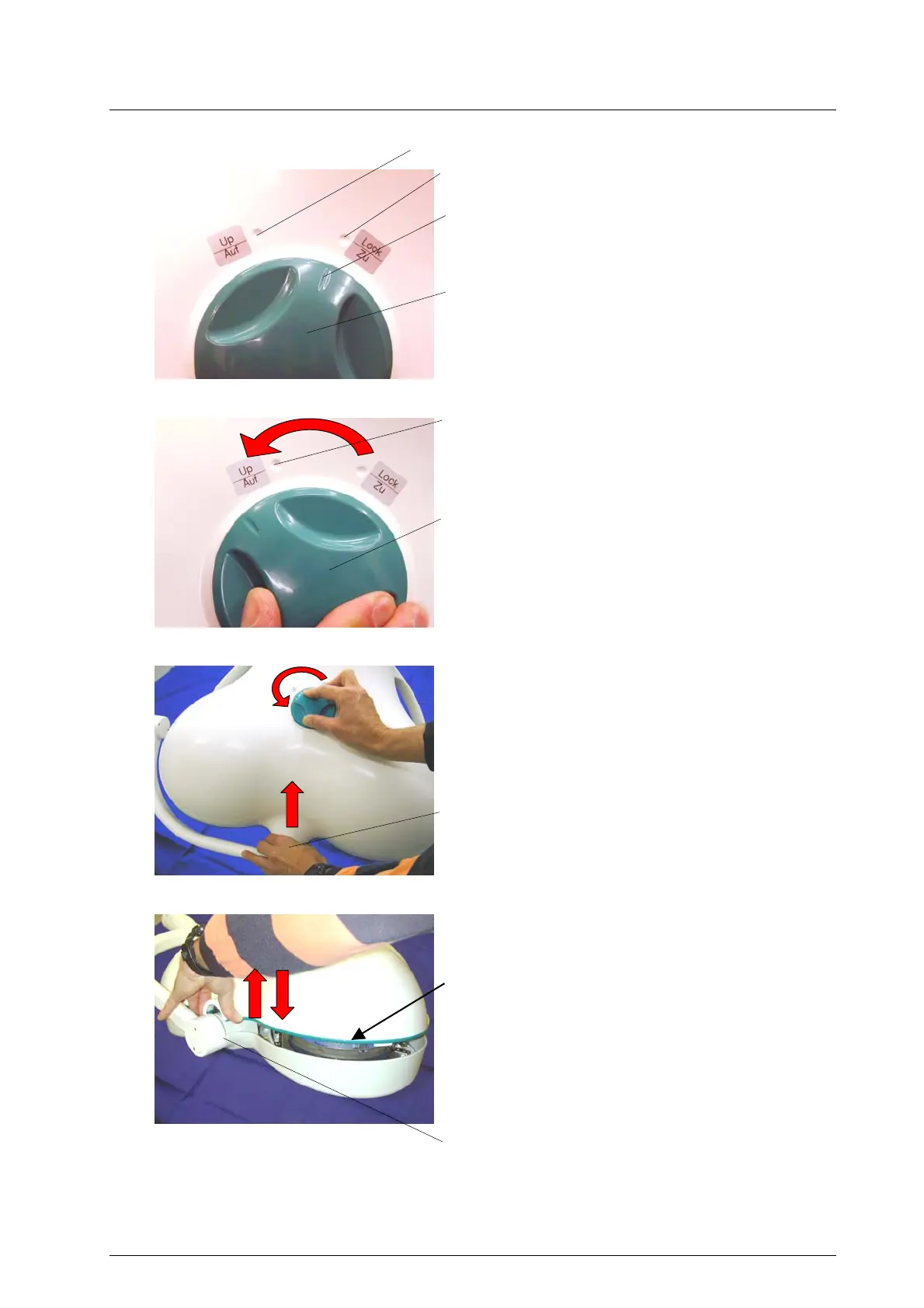
The upper housing part can be removed by turning
the turn-lock fastener 8.
The upper housing part has two markings, 6
(Lock) and 5 (Up). The notch 7 at the turn-lock
fastener 8 shows the open or close status of the
upper housing part.
Turn the turn-lock fastener 8 to the left over the
marking 5 until stop and hold it in this position.
Lift the upper housing part with the other hand at
the cardanic suspension 9 and remove it uniformly.
Be careful when removing the upper housing
part, do not damage the sealing profile 10!
Mount the upper housing part in reverse order:
Turn the turn-lock fastener 8 again to the left over
the marking 5 until stop and hold it in this position.
Put the upper housing part flush on the bottom
housing part.
Be careful when mounting the upper housing
part, do not damage the sealing profile 10!
Turn the turn-lock fastener 8 under slight pressure
on the upper housing part to the right until the
marking 6 (Lock).
Check by eye-control, if the upper housing part is
mounted uniformly on the bottom housing part of
the lamp.
5
6
7
8
5
8
9
10
9
59200001 Edition 06 28.11.2002 / Bak page 13/22



 To Next Page