Instructions for use | Atlan A300, A300 XL, A350, A350 XL SW 1.0n 83
Operating concept
5.2 Color concept
5.2.1 Colors of the control elements
Colors denote the availability of functions and settings.
5.2.1.1 Therapy controls and buttons
5.2.1.2 Rotary knob
The rotary knob lights with different colors.
5.2.2 Waveforms and parameters
Waveforms for mandatory breaths are displayed in the colors specified in the
system configuration, see page 167.
In the flow waveform, spontaneous breathing and pressure support are displayed in
a light brown color.
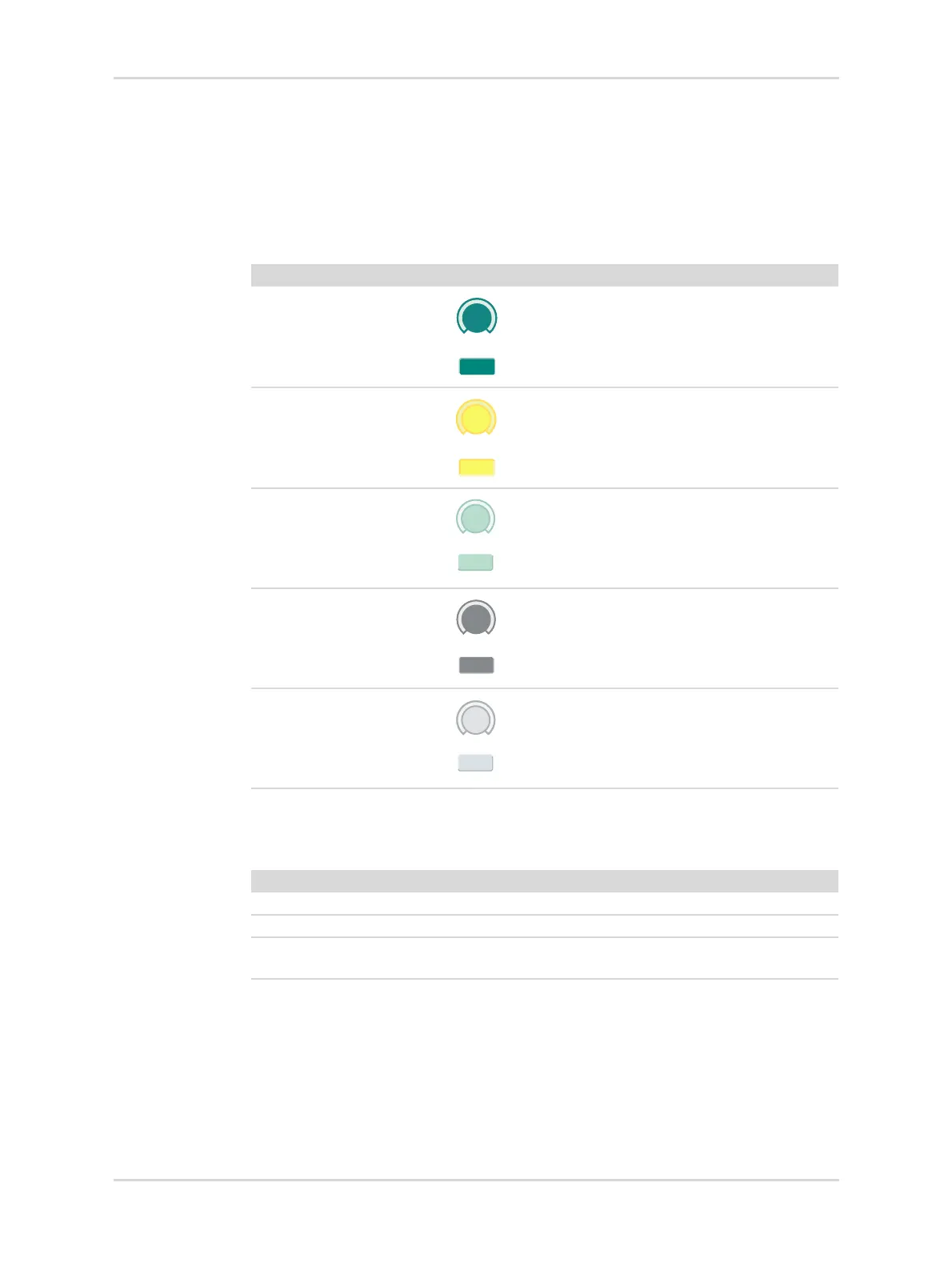
Color Example Meaning
Dark green Available element:
function activated
Yellow Selected element:
not yet confirmed with
rotary knob
Light green Available element:
function not activated
Dark gray Control element:
currently not available,
function activated
Gray Unavailable element
Color Meaning
Blue Therapy in progress.
Yellow A function or setting must be confirmed.
Flashing yellow A function or setting, which is still not confirmed, will
be reset within the next 5 seconds.








 To Next Page