deutsch
english
3535
Setting the process
parameters
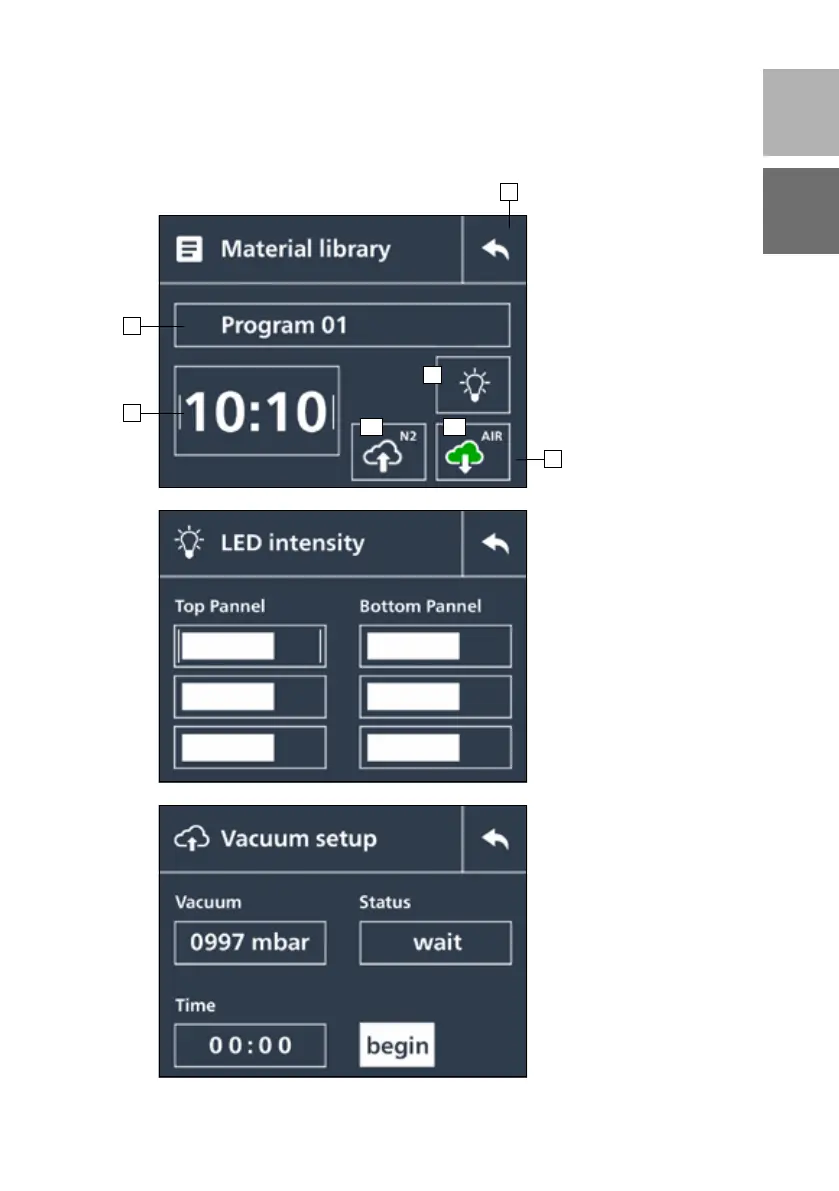
1 – Return button
2 – Programme name
(freely definable by turning
the rotary button)
3 – Intensity setting for LED sources
(freely definable by turning the
rotary button)
4 – Exposure medium
4.1 Green – nitrogen active
4.2 Green – vacuum active
4 .1 and 4.2 not marked – air active
5 – Exposure time
Setting the LED intensities
The intensity can be shown in
percent per panel. There are
3 LED spots on each panel.
Attention: If the predetermined
values are modified for the
appropriate material, the final
material properties indicated
by the manufacturer can be
changed.
Checking the vacuum function
The vacuum function is
checked on the basis of a
special vacuum value being
reached after a defined time.
The result is shown on this
screen after the test.
1
4
4.1 4.2
3
2
5


 To Next Page