Issue 1 4
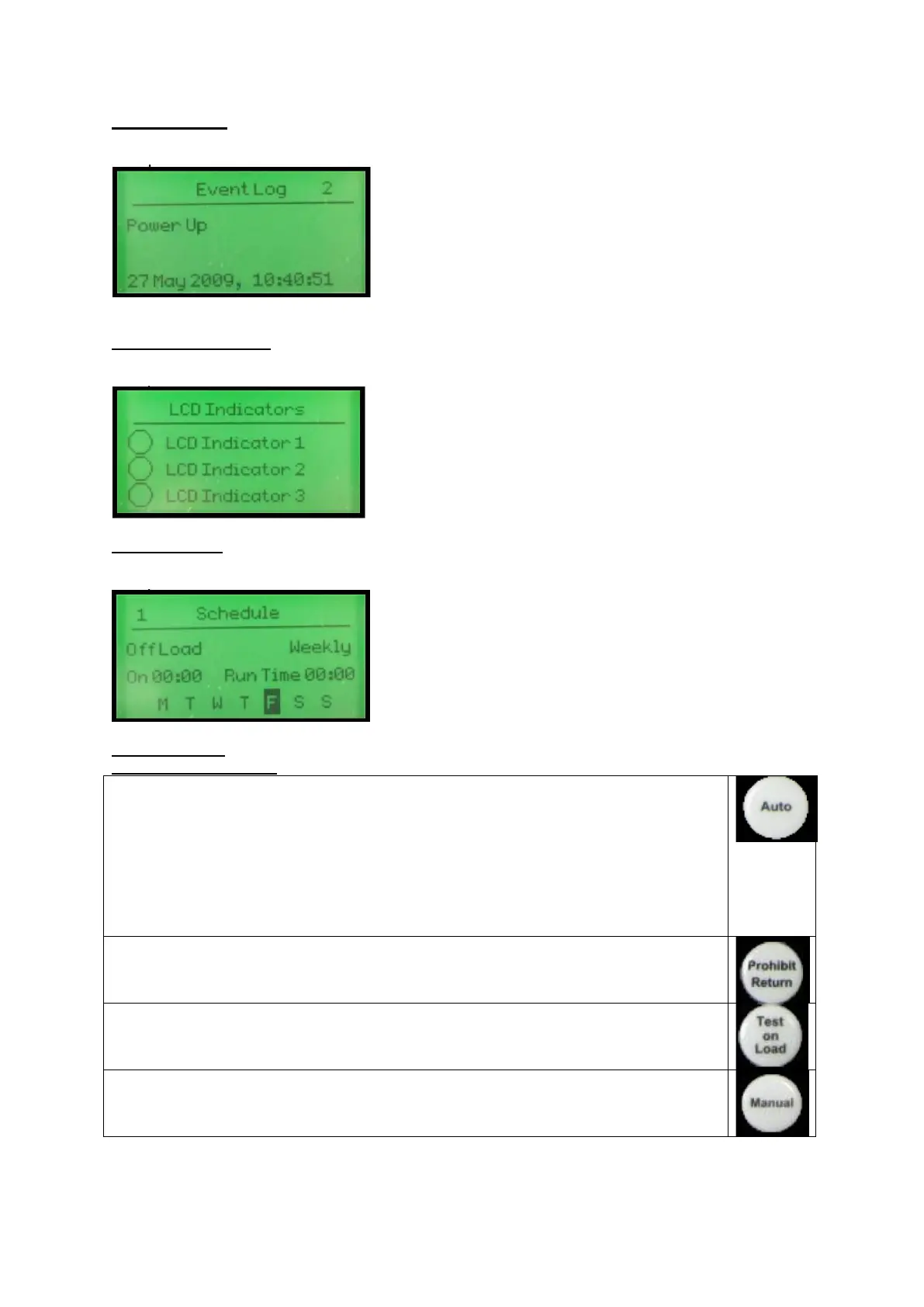
3.5 EVENT LOG
Displays the entire event log
Example:
3.6 LCD INDICATORS
Shows the status of the configurable LCD indicators
Example:
3.7 SCHEDULE
Shows the settings of the exercise scheduler
Example:
4.0 CONTROLS
4.1 MODE SELECTION
This button places the module into its ‘Automatic’ mode. This mode allows the module to
control the function of the load switching completely automatically. The module will
monitor the remote start input and mains supply status and once a start request is
made, the set will be placed on load.
Upon removal of the starting signal (or the mains supply returns), the module will
automatically transfer the load from the generator to the mains and remove the genset
starting instruction.
For further details, please see the more detailed description of ‘Auto operation’
elsewhere in this manual.
Operation is as AUTO MODE above but the load is not transferred back to the mains
supply when it is reinstated. This function is sometimes called “MANUAL RESTORE”
Once in Test on load mode the module will send a start request to the generator and
place the set on load. The set will remain on load when in this mode.
This mode allows manual control of the ATS functions. Once in Manual mode the
module will send a start request to the generator.
Breakers can be opened and closed using the transfer buttons detailed below.



 To Next Page