9. Song functions
The drumkit is equipped with 50 song presets and 2 demo-
songs, that can be played back while you play the drums si-
multaneously.
9.1 Choose songs
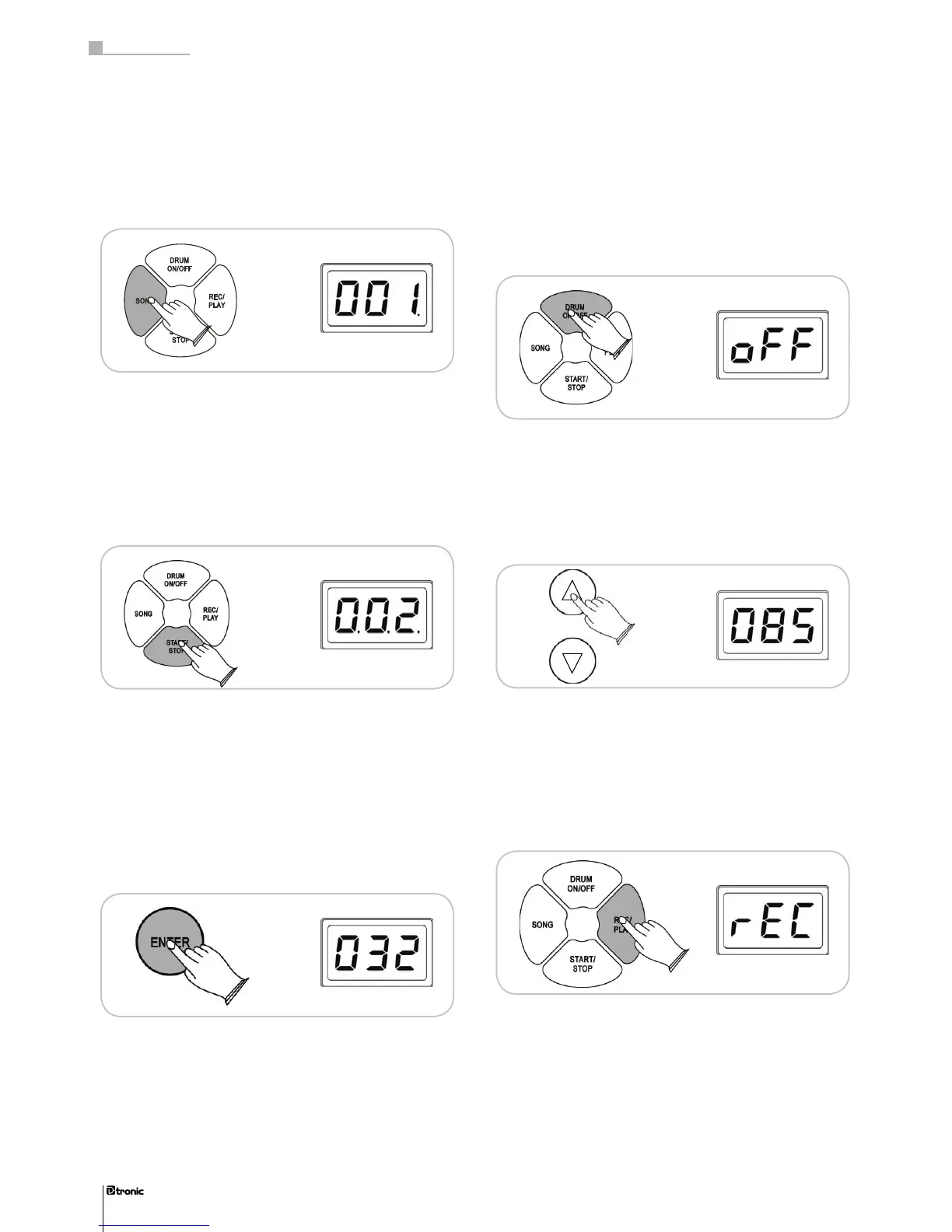
When you press the Song button you can choose between the
songs 001 – 050 and the demosongs 1 and 2 by using the + /-
buttons or the JOGDIAL. The respective song can be enabled
or disabled by pressing the START/STOP button.
9.2 Adjust song level
When you press the ENTER button while a song is already
running, you can go to the menu which allows you to adjust
the volume level of the song. With the JOGDIAL or the + /-
buttons you can adjust the song level in a range from 000 –
032 and customize the relationship between the volume level
of the song and your drumming level.
9.3 Drum on/off
With this function the main drum track of a song can be swit-
ched off, so you can play along with the song just hearing
your own drumming part. By pressing the DRUM ON/OFF but-
ton you can disable the drum track, pressing the button again
enables it.
9.4 Adjust song tempo
During the playback of a song you can adjust the tempo by
using the TEMPO + /- buttons. Pressing the TEMPO buttons
simultaneously resets the tempo to the basic value.
10. Record and playback
The drumkit allows you to record and playback your perfor-
mance on the module. You can choose between the subme-
nus RECORD, PLAY and CLEAR by pressing the REC/PLAY
button.
42
Part 3: Functions
42


 To Next Page