2
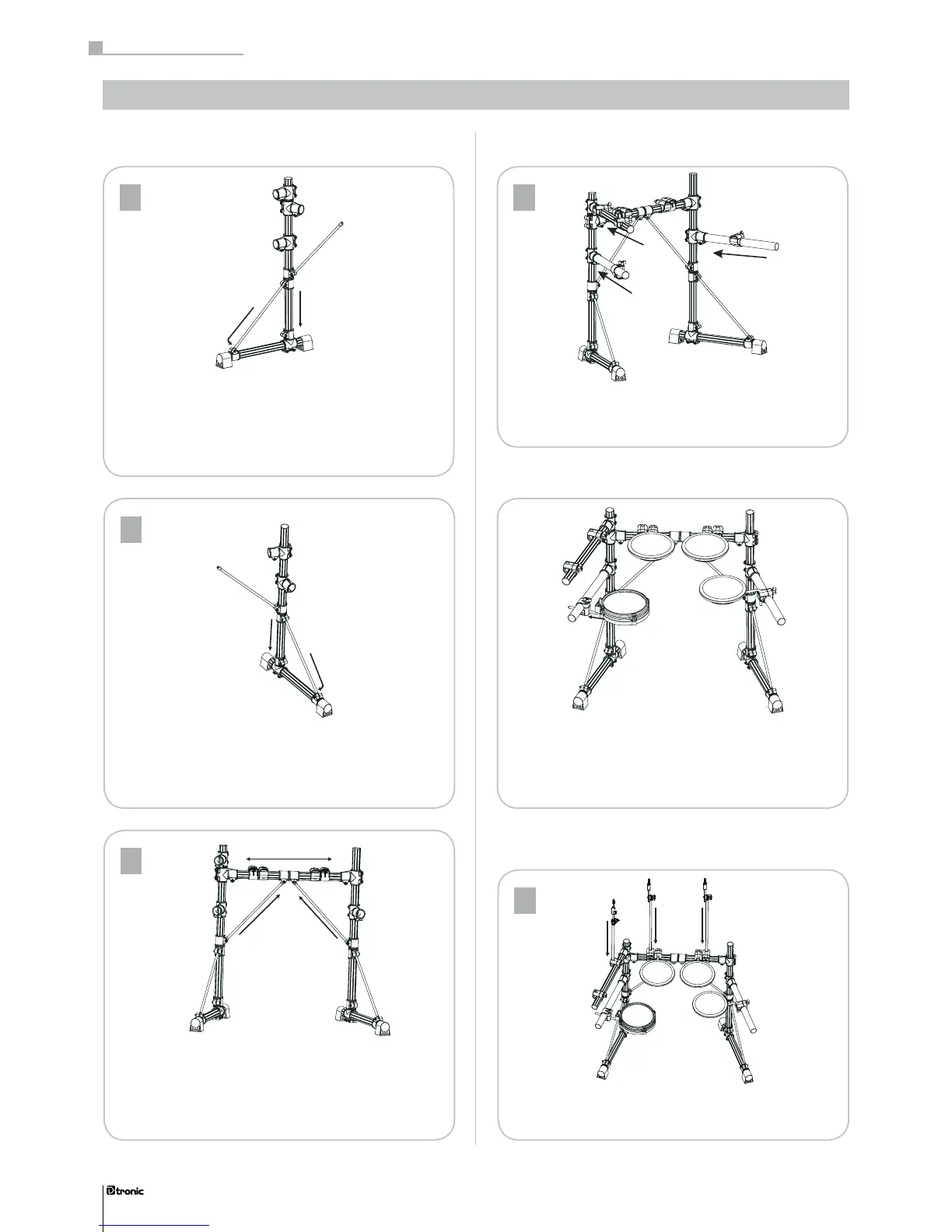
1. Insert the right support into the base rack clamp, tighten
the set-screw.
2. Set up the knighthead, tighten the set-screw.
3
1. Insert the mid-tube into left and right support rack clamps.
Tighten the set-screw with your drum key.
2. Set up the knighthead. Tighten the set-screw with
your drum key.
4
Insert the left and right support arm into the rack clamp as
shown above. Tighten the set-screw.
1. Insert the rod into the pad hole, set to a ne- position and
tighten the screw.
2. Insert the pad rod into rack clamp, set to a ne- position
and tighten the T-screw.
32
Part 1: Assembly instruction
32
Part 1: Assembly instruction .
Assembling the rack
1. Insert the left support into the base rack clamp, tighten the
set-screw.
2. Set up the knighthead, tighten the set-screw.
Assembling the pads
Assembling the cymbal- and the HiHat-pads
1
Insert the cymbal- and the HiHat-stands into the rack clamp
as shown above and tighten the T-screw.


 To Next Page