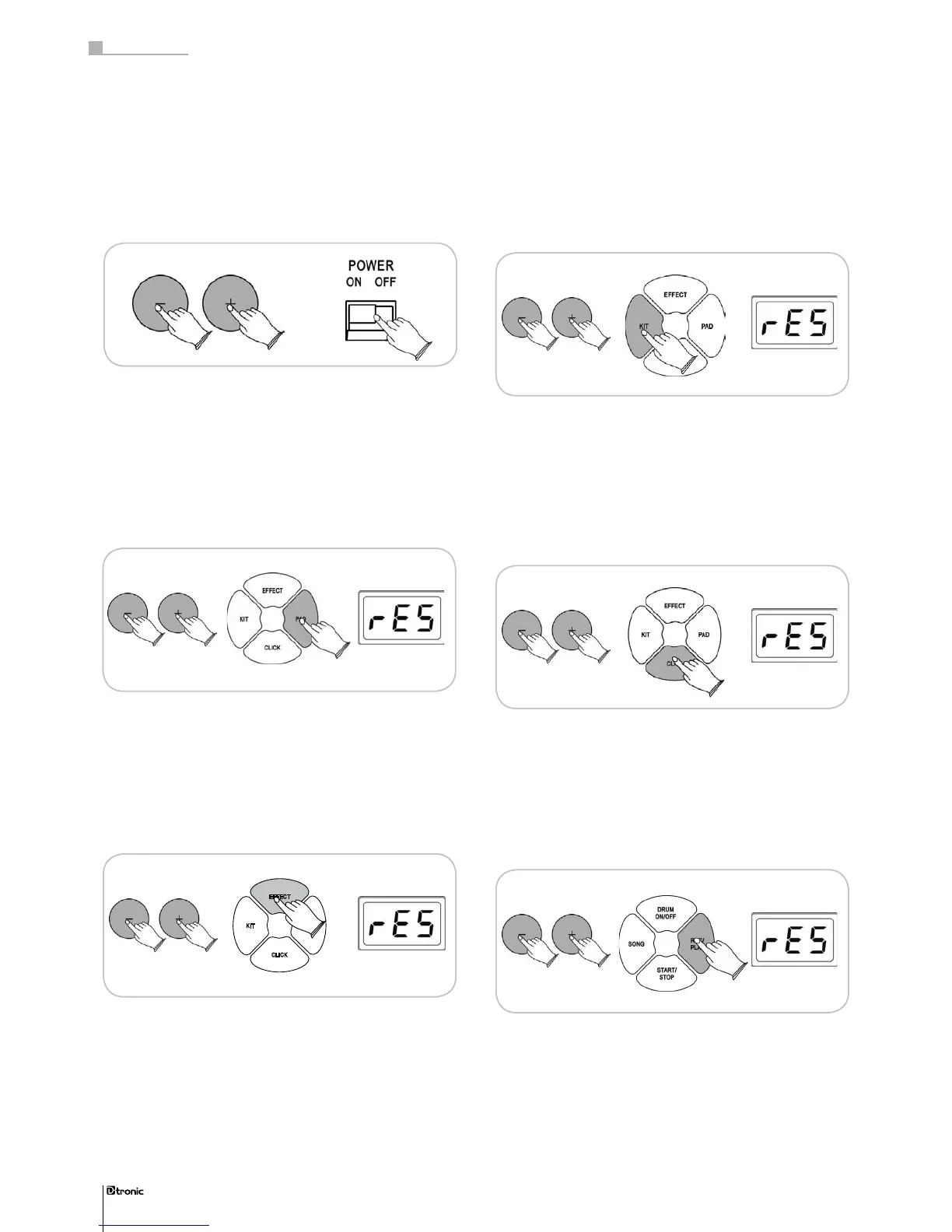
11.1 Restoring the PAD settings
Turn on the sound module. Hold down the buttons [+] and
[-] simultaneously. Additionally press the PAD button. The
display will show “rES” to conrm the factory reset of the
pad settings.
11.2 Restoring the EFFECT settings
Turn on the sound module. Hold down the buttons [+] and
[-] simultaneously. Additionally press the EFFECT button. The
display will show “rES” to conrm the factory reset of the
effect settings.
11.3 Restoring the KIT settings
Turn on the sound module. Hold down the buttons [+] and
[-] simultaneously. Additionally press the KIT button. The dis-
play will show “rES” to conrm the factory reset of the kit
settings.
11.4 Restoring the CLICK settings
Turn on the sound module. Hold down the buttons [+] and
[-] simultaneously. Additionally press the CLICK button. The
display will show “rES” to conrm the factory reset of the click
settings.
11. Factory Reset
Turn off the power of the soundmodule. Hold down buttons
[+] and [-] simultaneously while switching on the module
again. All settings are now replaced by the factory settings.
11.5 Erasing the RECORD data
Turn on the sound module. Hold down the buttons [+] and [-]
simultaneously. Additionally press the REC/PLAY button. The
display will show “rES” to conrm the deletion of all recorded
data.
44
Part 3: Functions


 To Next Page