EasyManua.ls Logo

Dual 1218 - Page 11

Dual 1218
Print Icon
To Next Page IconTo Next Page
To Previous Page IconTo Previous Page
Loading...
The
skating
force
compensation
adjustment
knob
on
the
chassis
makes
it
possible
to
adjust
anti-skating
force
while
a
record
is
play-
ing
important
when
going
from
a
dry
record
to
a
moistened
one,
For
the
two
types
of
stylus
in
frequent
use
today
there
are
two
different
adjustment
scales
Red:
for
spherical
styli
with
15
micron
radius
according
to
DIN
45
500
Black:
for
elliptical
styli
with
ra
microns
by
18
to
22
microns.
i
of
5
to
6
17
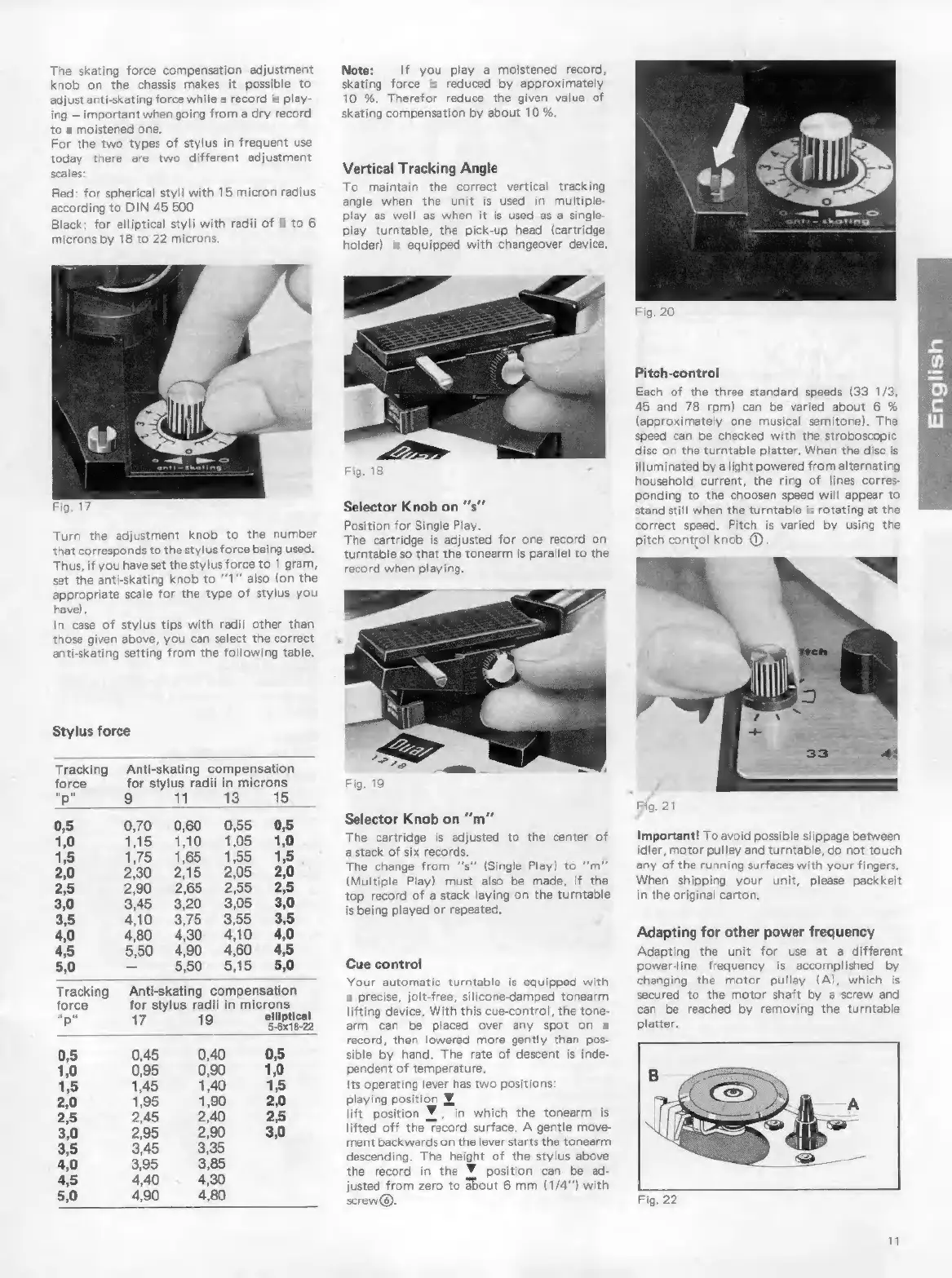
Turn
the
adjustment
knob
to
the
number
that
corresponds
to
the
stylus
force
being
used.
Thus,
if
you
have
set
the
stylus
force
to
1
gram,
set
the
anti-skating
knob
to
*1”
also
(on
the
appropriate
scale
for
the
type
of
stylus
you
have).
In
case
of
stylus
tips
with
radii
other
than
those
given
above,
you
can
select
the
correct
anti-skating
setting
from
the
following
table,
Stylus
force
Tracking
Anti-skating
compensation
force
for
stylus
radii
in
microns
“p“
9
ibe
ST
0,5
0,70
060
055
0,5
1,0
1,15 1,10
1,05
1,0
1,5
175.
165
155
1,5
2,0
2,30
2,15
2,05
2,0
25
290
265
255
25
3,0
345
320
3,05
3,0
3,5
410
3,75
355
35
4,0
480
430
410
4,0
45
550
490 460
4,5
5,0
-
550
5,15
5,0
Tracking
Anti-skating
compensation
force
for
stylus
radii
in
microns
p'
17
19
elliptical
0,5
0,45
0,40
0,5
1,0
0,95
0,90
1,0
1,5
1,45
1,40
1,5
2,0
1,95
1,90
2,0
2,5
2,45
2,40
2,5
3,0
2,95
2,90
3,0
3,5
3,45
3,35
4,0
3,95
3,85
4,5
4,40
4,30
5,0
4,90 4,80
Note:
If
you
play
a
moistened
record,
skating
force
is
reduced
by
approximately
10 %.
Therefor
reduce
the
given
value
of
skating
compensation
by
about
10
%.
Vertical
Tracking
Angle
To
maintain
the
correct
vertical
tracking
angle
when
the
unit
is
used
in
multiple-
play
as
well
as
when
it
is
used
as
a
single-
play
turntable,
the
pick-up
head
(cartridge
holder)
is
equipped
with
changeover
device.
Selector
Knob
on
“'s””
Position
for
Single
Play.
The
cartridge
is
adjusted
for
one
record
on
turntable
so
that
the
tonearm
is
parallel
to
the
record
when
playing.
Fig.
19
Selector
Knob
on
“m”
The
cartridge
is
adjusted
to
the
center
of
a
stack
of
six
records.
The
change
from
“s”
(Single
Play)
to
“m”
(Multiple
Play)
must
also
be
made,
if
the
top
record
of
a
stack
laying
on
the
turntable
is
being
played
or
repeated.
Cue
control
Your
automatic
turntable
is
equipped
with
a
precise,
jolt-free,
silicone-damped
tonearm
lifting
device.
With
this
cue-control,
the
tone-
arm
can
be
placed
over
any
spot
on
a
record,
then
lowered
more
gently
than
pos-
sible
by
hand,
The
rate
of
descent
is
inde-
pendent
of
temperature
Its
operating
lever
has
two
positions:
playing
position
Y,
lift
position
Y,
in
which
the
tonearm
is
lifted
off
the
record
surface.
A
gentle
move-
ment
backwards
on
the
lever
starts
the
tonearm
descending.
The
height
of
the
stylus
above
the
record
in
the
Y
position
can
be
ad-
justed
from
zero
to
about
6
mm
(1/4”)
with
screw®
Fig.
20
Pitch-control
Each
of
the
three
standard
speeds
(33
1/3,
45
and
78
rpm)
can
be
varied
about
6
%
(approximately
one
musical
semitone).
The
speed
can
be
checked
with
the
stroboscopic
disc
on
the
turntable
platter,
When
the
disc
is
illuminated
by
a
light
powered
from
alternating
household
current,
the
ring
of
lines
corres-
ponding
to
the
choosen
speed
will
appear
to
stand
still
when
the
turntable
is
rotating
at
the
correct
speed.
Pitch
is
varied
by
using
the
pitch
control
knob
©
Important!
To
avoid
possible
slippage
between
idler,
motor
pulley
and
turntable,
do
not
touch
any
of
the
running
surfaces
with
your
fingers,
When
shipping
your
unit,
please
packkeit
in
the
original
carton.
Adapting
for
other
power
frequency
Adapting
the
unit
for
use
at
a
different
powerline
frequency
is
accomplished
by
changing
the
motor
pulley
(A),
which
is
secured
to
the
motor
shaft
by
a
screw
and
can
be
reached
by
removing
the
turntable
platter.
Fig.
22
11