POST-WELD
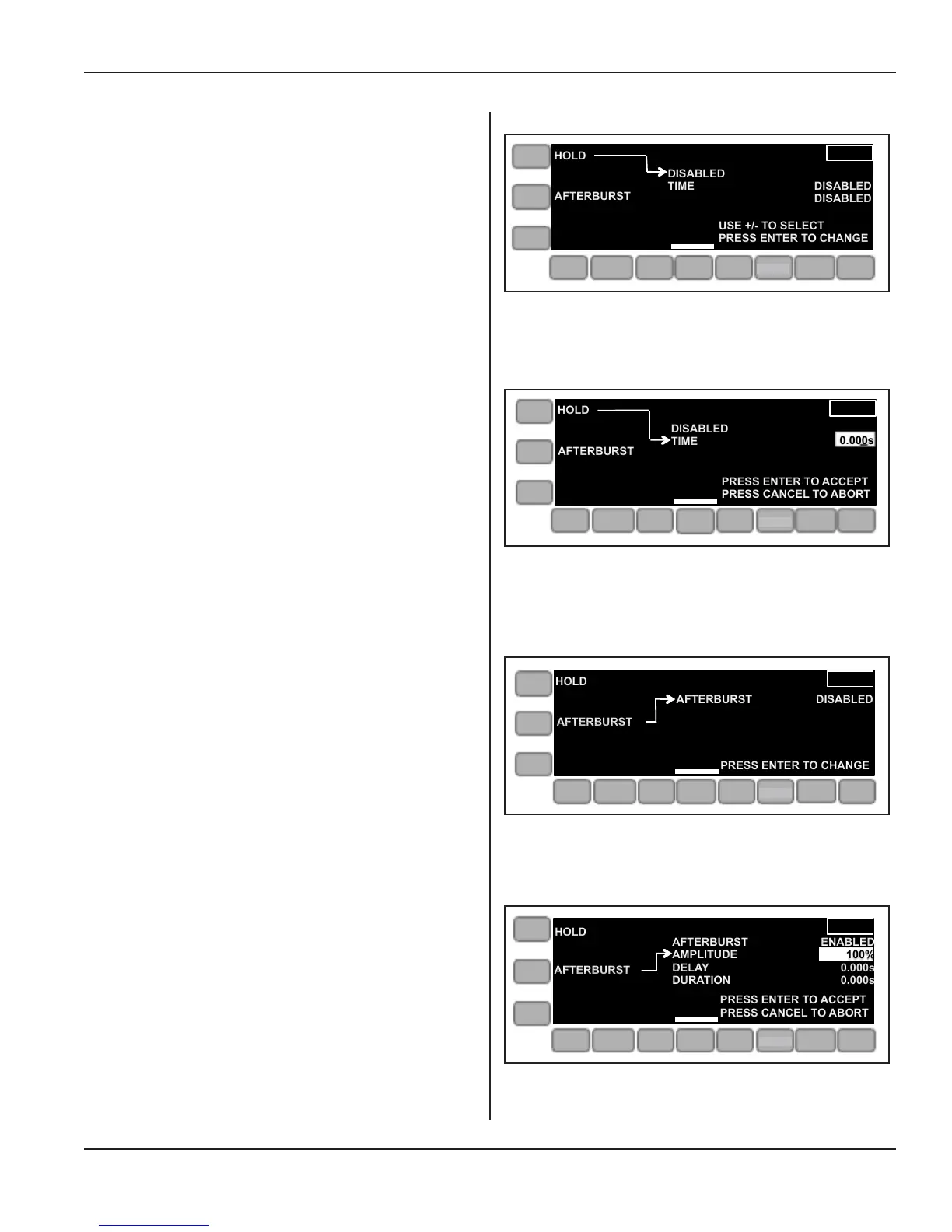
The POST WELD menu seen in Figure 5-20, shows the
display with the mode set either to MANUAL PRESS or
AUTOMATED PRESS.
When TIME has been selected as the HOLD control meth-
od, the menu appears as shown in Figure 5-21 to the right.
Note that TIME is highlighted, ready to be changed.
The menu in Figure 5-22 at the right shows that AFTER-
BURST is disabled.
The menu to the right in Figure 5-23 is displayed when
AFTERBURST is enabled.
Values for afterburst amplitude, afterburst delay and after-
burst duration should be entered.
Figure 5-23 shows the entry box for afterbust amplitude
is highlighted.
Figure 5-20 Post Weld Menu
Figure 5-21 Post Weld Menu, Time Setting
Figure 5-22 Post Weld Menu, Afterburst Disabled
Figure 5-23 Post Weld Menu, Afterburst Enabled
HOLD
AFTERBURST
DISABLED
TIME
DISTANCE
DISABLED
0.000s
PRESS ENTER TO ACCEPT
PRESS CANCEL TO ABORT
ONLINE
AMP
PRE
WELD
WELD
POST
WELD
LIVE
SETUPS
LIMITS
OPERATE
AFTERBURST
PRESS ENTER TO CHANGE
HOLD
AFTERBURST DISABLED
ONLINE
AMP
PRE
WELD
WELD
POST
WELD
LIVE
SETUPS
LIMITS
OPERATE
AFTERBURST
HOLD
|||||
AFTERBURST
AMPLITUDE
DELAY
DURATION
ENABLED
100%
0.000s
0.000s
PRESS ENTER TO ACCEPT
PRESS CANCEL TO ABORT
ONLINE
AMP
PRE
WELD
WELD
POST
WELD
LIVE
SETUPS
LIMITS
OPERATE
HOLD
AFTERBURST
USE +/- TO SELECT
PRESS ENTER TO CHANGE
DISABLED
TIME
DISABLED
DISABLED
ONLINE
AMP
PRE
WELD
WELD
POST
WELD
LIVE
SETUPS
LIMITS
OPERATE
HOLD
AFTERBURST
DISABLED
TIME
0.000s
PRESS ENTER TO ACCEPT
PRESS CANCEL TO ABORT
AMP
PRE
WELD
WELD
POST
WELD
LIVE
SETUPS
LIMITS
OPERATE
SETUP
SETUP
SETUP
SETUP
Page 57
Dukane Manual Part No. 403-594-02
Section 5 - Operation


 To Next Page