WELD
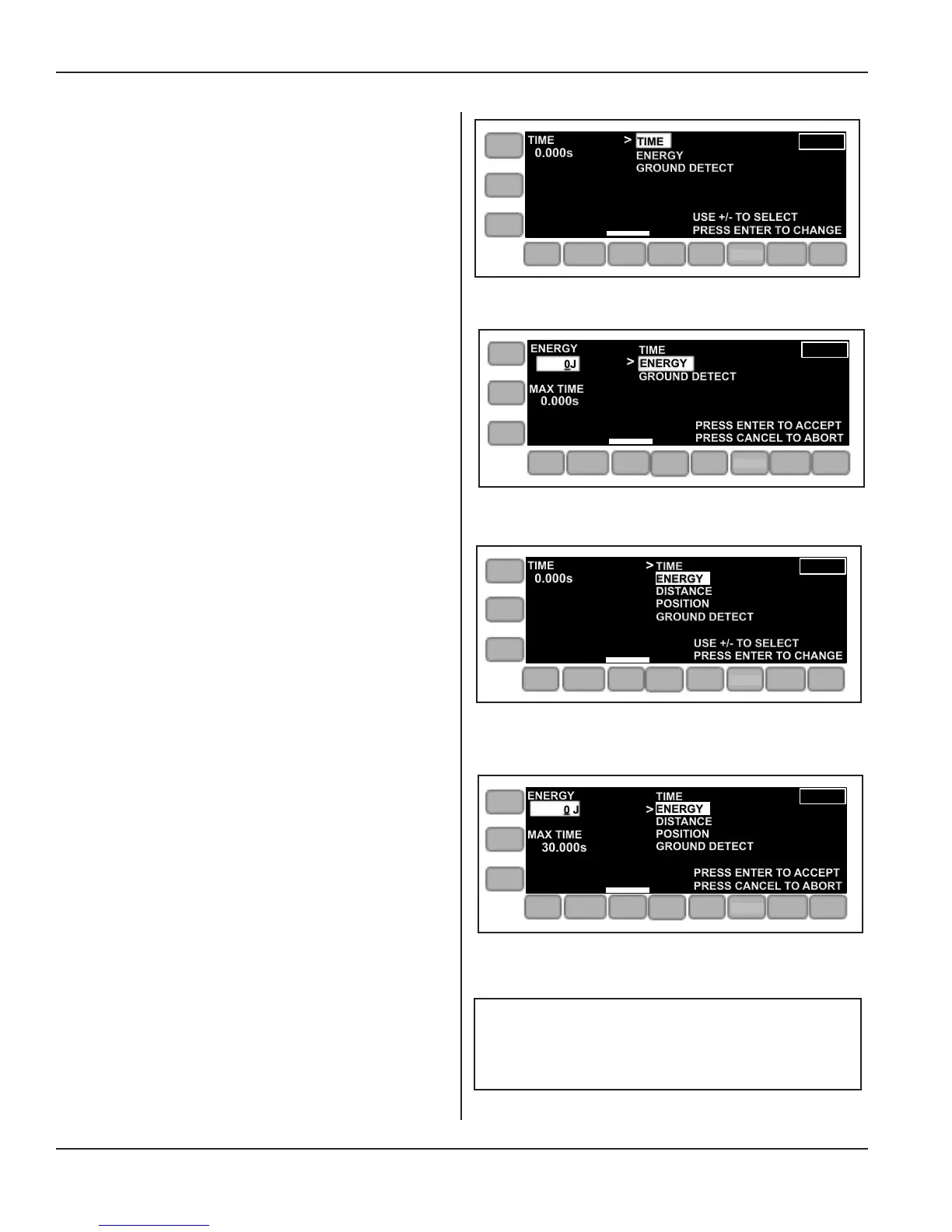
The menu shown in Figure 5-16 at the right appears with
three choices for weld parameter.
In this case, distance is not supported by the press.
ENERGY has been selected, and a value for energy will
be entered.
The menu shown in Figure 5-18 at the right appears for
either operating mode, and when DISTANCE is supported
by the press.
The menu shown in Figure 5-19 at the right appears when
the ENERGY value is being entered.
(Range in Joules: 0-99999.9)
MAX TIME, a secondary parameter, must be programmed
in its range of 0-30.00 seconds. This is the maximum length
of the weld and when reached will stop the weld portion of
the cycle. This does not result in a fault.
Figure 5-17 Weld Menu, Mode: Manual/Automated
Press, Energy Selection
TIME
TIME
0.000s
>
USE +/- TO SELECT
PRESS ENTER TO CHANGE
ONLINE
ENERGY
GROUND DETECT
AMP
PRE
WELD
WELD
POST
WELD
LIVE
SETUPS
LIMITS
OPERATE
Figure 5-16 Weld Menu, Mode: Manual/Automated
Press, Distance not Supported
ENERGY
0J
0.000s
MAX TIME
>
PRESS ENTER TO ACCEPT
PRESS CANCEL TO ABORT
ONLINE
ENERGY
TIME
GROUND DETECT
AMP
PRE
WELD
WELD
POST
WELD
LIVE
SETUPS
LIMITS
OPERATE
Figure 5-18 Weld Menu, Mode: Manual/Automated
Press, Distance is Supported
USE +/- TO SELECT
PRESS ENTER TO CHANGE
>
|||||
TIME
ENERGY
DISTANCE
POSITION
GROUND DETECT
TIME
0.000s
AMP
PRE
WELD
WELD
POST
WELD
LIVE
SETUPS
LIMITS
OPERATE
Figure 5-19 Weld Menu, Mode: Manual/Automated
Press, Energy Entry
ENERGY
0 J
30.000s
MAX TIME
PRESS ENTER TO ACCEPT
PRESS CANCEL TO ABORT
>
|||||
TIME
ENERGY
DISTANCE
POSITION
GROUND DETECT
AMP
PRE
WELD
WELD
POST
WELD
LIVE
SETUPS
LIMITS
OPERATE
Weld Time: Range is 0-30 seconds.
NOTE
SETUP
SETUP
SETUP
SETUP
Page 56
iQ Series Ultrasonic Integrated Press System i 220 User’s Manual
Dukane Manual Part No. 403-594-02


 To Next Page