Continued from Previous Page
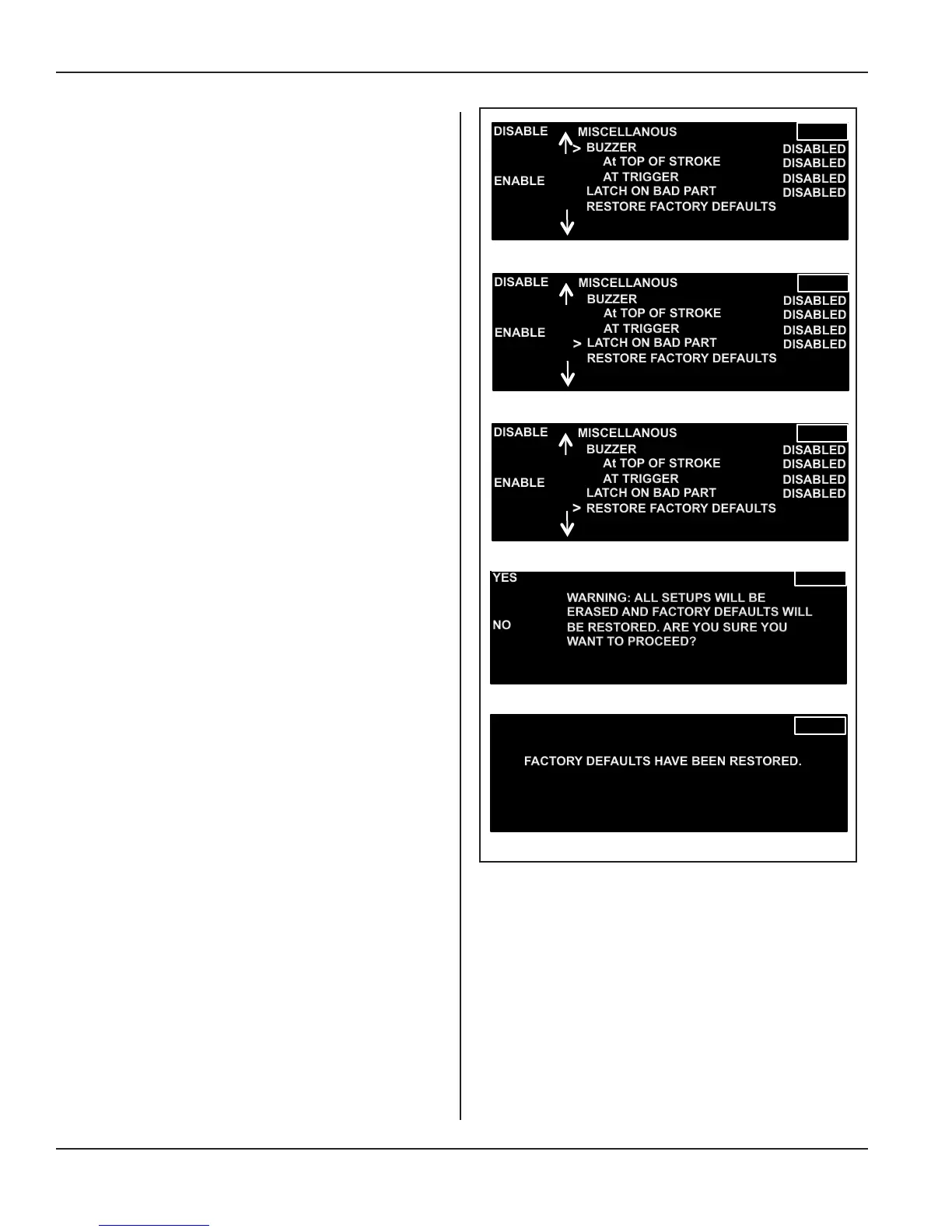
Miscellaneous Sub-menu Items
The three sub-menu items and their corresponding dis-
plays are shown to the right in Figure 5-44.
1) Buzzer
Set the audible buzzer to sound:
At Top of Stroke - Enable or Disable, or
At Trigger - Enable or Disable
2) Latch on Bad Part
Enable or Disable this feature.
When Latch on Bad Part is enabled, the cycle
stops when a bad part is detected. The operator must
deal with this before a new weld cycle can begin.
3) Restore Factory Defaults
Press the RESTORE soft key to erase ALL setups
and factory defaults.
An intermediate display prompts conrmation with
a YES or NO.
If YES is chosen, then another message is displayed
as shown to the right.
Figure 5-44 Miscellaneous Sub-menu Items
FACTORY DEFAULTS HAVE BEEN RESTORED.
YES
NO
WARNING: ALL SETUPS WILL BE
ERASED AND FACTORY DEFAULTS WILL
BE RESTORED. ARE YOU SURE YOU
WANT TO PROCEED?
MISCELLANOUS
DISABLE
>
ENABLE
BUZZER
At TOP OF STROKE
AT TRIGGER
LATCH ON BAD PART
RESTORE FACTORY DEFAULTS
DISABLED
DISABLED
DISABLED
DISABLED
MISCELLANOUS
DISABLE
>
ENABLE
BUZZER
At TOP OF STROKE
AT TRIGGER
LATCH ON BAD PART
RESTORE FACTORY DEFAULTS
DISABLED
DISABLED
DISABLED
DISABLED
MISCELLANOUS
DISABLE
>
ENABLE
BUZZER
At TOP OF STROKE
AT TRIGGER
LATCH ON BAD PART
RESTORE FACTORY DEFAULTS
DISABLED
DISABLED
DISABLED
DISABLED
Page 68
iQ Series Ultrasonic Integrated Press System i 220 User’s Manual
Dukane Manual Part No. 403-594-02


 To Next Page