28
Owner's Manual for Duke Flexbake 5
TM
Proof and Bake Oven with WiFi Connectivity
PROGRAMMING CONTROLS continued
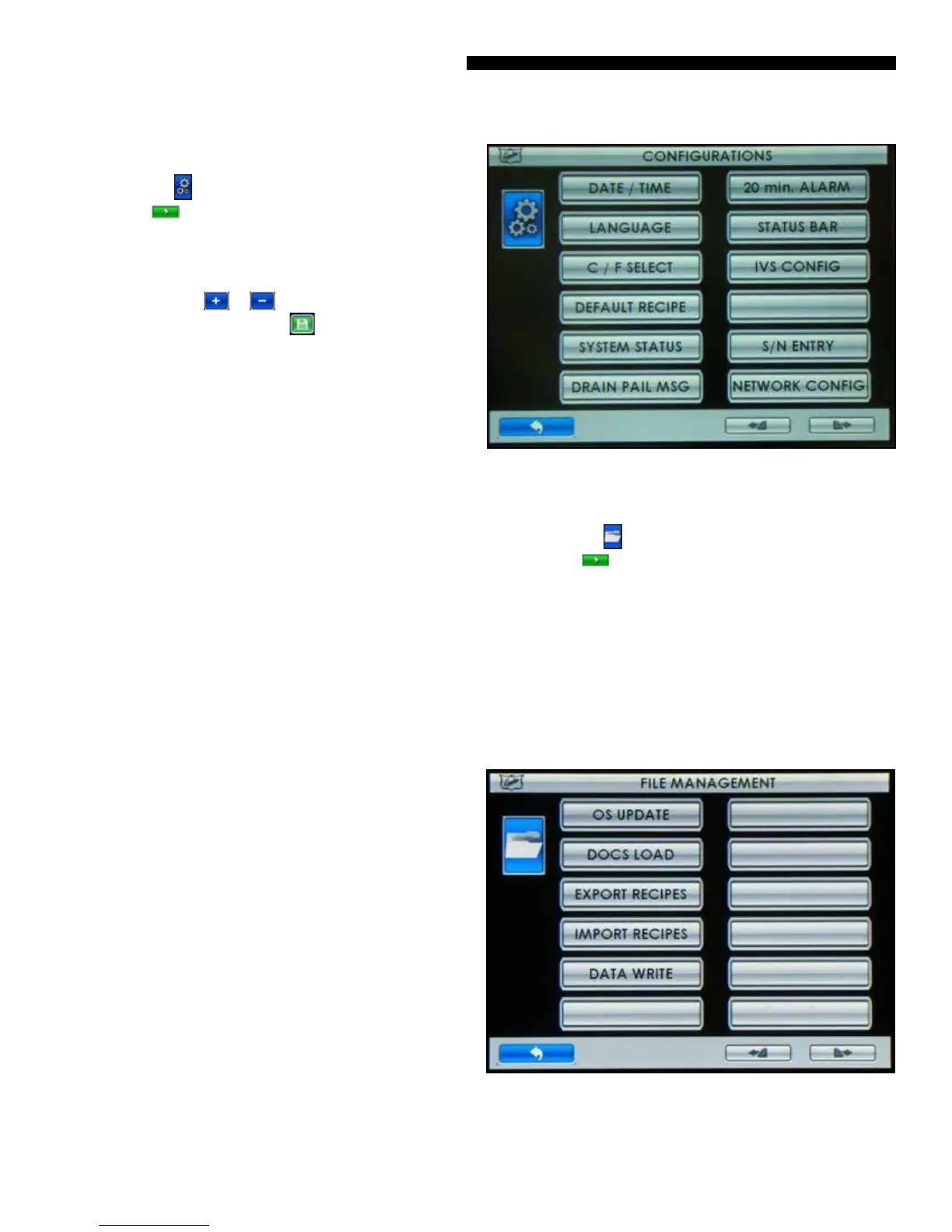
CONFIG CONFIGURATIONS
Step 1 Touch the button and then enter pin code 2 3 4 5
and Touch the button when prompted.
Step 2 Touch the button for the setting you want to edit.
• DATE/TIME – Touching will display DATE/TIME edit
screen. Touch the or button adjacent to the eld
you want to change. Touch the button to save the
changes.
• LANGUAGE – Touching will display a list of included
languages. Touch the preferred language button to select.
• C/F SELECT – Touching will toggle between CENTIGRADE
MODE ENABLED and FAHRENHEIT MODE ENABLED.
• DEFAULT RECIPE – Touching will reload factory defaults.
• SYSTEM STATUS – Touching will display unit status.
• DRAIN PAIL MSG – Touching will toggle between message
enabled and disabled.
• 20 min. ALARM – Touching will toggle between 20 min.
ALARM ENABLED and 20 min. ALARM DISABLED. A bake
complete in 20 min. message and alarm will alert the
operator to retard the next load of bread for optimized
baking throughput.
• STATUS BAR – Touching will toggle between STATUS BAR
ENABLED and STATUS BAR DISABLED.
• IVS CONFIG – Touching will toggle between NO IVS
INSTALLED and IVS INSTALLED.
• S/N ENTRY - Touching will display current oven S/N stored
within the control and an option to enter the S/N if
missing or incorrect.
• NETWORK CONFIG – Touching will display network
connection options and subsequent conguration
settings screens. Refer to the NETWORK CONFIGURATION
section of this manual for detailed instructions.
Figure: Congurations Screen
FILES FILE MANAGEMENT
Step 1 Touch the button and then enter pin code 3 4 5 6
and Touch the button when prompted.
• Select le operation from list and follow instruction on the
display screen.
• OS UPDATE –Update the control rmware.
• DOCS LOAD – Update the embedded User Manual and
graphics les.
• EXPORT RECIPES – Saves Oven Recipes to a USB Drive
• IMPORT RECIPES – Loads Oven Recipes from a USB Drive
• DATA WRITE – Reserved for future use
Figure: File Management Screen



 To Next Page