EasyManua.ls Logo

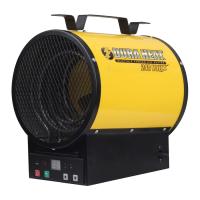
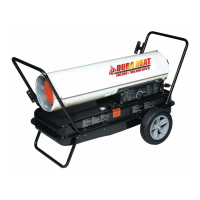
Dura Heat DFA80T - User Manual

Dura Heat DFA80T
84 pages
Print Icon
To Next Page IconTo Next Page
Loading...
IMKFADH-IDH
D
E
S
I
G
N
C
E
R
T
I
F
I
E
D
C US
PORTABLE
FORCED AIR HEATERS
“USER’S MANUAL”
MODEL: DFA50
DFA80T
DFA135C
DFA180CV
DFA220CV
carefully. This USER’S MANUAL has been designed to instruct you as to
the proper manner in which to assemble, maintain, store, and most
Please keep this manual for future reference.
LISTED
World Marketing of America, Inc.
RT.22 West, P.O. Box 192
Mill Creek, PA 17060
Telephone : 814-643-1775 (9AM - 4PM EST)
www.yourheater.com
MODEL: DFA50
DFA80T
DFA135C
DFA180CV
DFA220CV

Questions and Answers

  • B
    Brandon BrownJul 27, 2025
    How to fix a Dura Heat DFA80T that will not turn on?
    • L
      Lawrence CoxJul 27, 2025
      If your Dura Heat Heater won't turn on and the indicator lamp is off, the following might help: * The temperature limit safety device may be overheated. Check the power switch to ‘OFF’ and allow cooling for about 30 minutes. * Ensure the heater is receiving electrical power.
  • J
    Jeremy GarciaAug 1, 2025
    What to do if Dura Heat Heater won't ignite but motor runs and shows 'E1'?
    • D
      Danielle GoodmanAug 1, 2025
      If your Dura Heat Heater doesn't ignite but the motor runs briefly and the indicator lamp is flickering, displaying 'E1', try these steps: * Check the fuel tank. * Ensure correct pump pressure. * Clean the fuel tank with clean kerosene. * Verify electrical components using the wiring diagram. * Attach the ignition wire to the spark plug.
  • J
    Jordan RangelAug 6, 2025
    Why does my Dura Heat DFA80T shut off soon after igniting and shows 'E1'?
    • R
      rsandovalAug 6, 2025
      If your Dura Heat Heater ignites but the main PCB assembly shuts it off shortly after, the indicator lamp flickers, and the display shows 'E1', try the following: * Check the electrical components, ensuring the photocell is properly seated in the bracket. * Adjust the airflow settings. * Clean the photocell lens. * Ensure the photocell boot is correctly seated in the bracket. * Consult the wiring diagram to check electrical components. * Consider replacing the photocell.
  • A
    Amanda ParkerAug 11, 2025
    What to do if Dura Heat DFA80T fan doesn't turn on?
    • A
      Alexandra SmithAug 11, 2025
      If the fan on your Dura Heat Heater doesn't turn on when plugged in and the power switch is ON, and the indicator lamp is on or flickering: * Ensure the thermostat setting isn't too low. * Check the electrical connections.
  • A
    Anthony AvilaAug 16, 2025
    What to do if Dura Heat DFA80T shows error code 'E2'?
    • A
      Angelica LewisAug 16, 2025
      If the indicator lamp is flickering and the room temperature display indicates 'E2' on your Dura Heat Heater, replace the sensor.
  • B
    Benjamin MartinezAug 21, 2025
    What to do if Dura Heat Heater shows error code 'E3'?
    • J
      Jack CooperAug 21, 2025
      If the indicator lamp is flickering and the room temperature display indicates 'E3' on your Dura Heat Heater, replace the switch.

Summary

Introduction to the Heater Manual

Heater Features Overview

Unpacking and Initial Assembly

DFA50;80 T Model Assembly Steps

Instructions for assembling the DFA50/80T heater models.

DFA135 C;180 CV;220 CV Model Assembly Instructions

Steps for assembling the DFA135C/180CV/220CV heater models.

Fueling and Storage Guidelines

Heater Design and Safety Systems

Temperature Limit Control Function

Describes the safety feature that turns off the heater if internal temperature rises.

Electrical System Protection Details

Details the fuse protecting the electrical components from damage.

Flame-Out Sensor Operation

Explains the photocell that monitors the burner flame and shuts off the heater if it extinguishes.

Fueling the Heater Safely

Heater Operation Guide

Ventilation Requirements for Operation

Specifies the necessary fresh air openings for safe and efficient operation.

Step-by-Step Heater Starting Procedure

Step-by-step instructions for safely igniting and operating the heater.

Long-Term Heater Storage

Fuel Tank Draining Procedure

Detailed steps for properly draining the fuel tank before storage.

Routine Heater Maintenance

Fuel Tank Maintenance Steps

Instructions for flushing the fuel tank as needed.

Air Intake Filter Cleaning Guide

How to clean or replace the air intake filter for proper air flow.

Air Output and Lint Filter Replacement

Guidance on replacing the air output and lint filters.

Fan Blades Cleaning Instructions

Steps for cleaning the fan blades to maintain efficiency.

Nozzle Cleaning and Replacement Procedure

Procedures for cleaning or replacing the fuel nozzle.

Spark Plug Cleaning and Regapping

How to clean and regap the spark plug for proper ignition.

Photocell Cleaning and Replacement

Instructions for cleaning or replacing the photocell sensor.

Fuel Filter Cleaning and Replacement

Steps for cleaning or replacing the fuel filter.

Pump Pressure Adjustment Guide

How to adjust the fuel pump pressure for optimal operation.

Replacing the Heater Fuse

Heater Troubleshooting Guide

Heater Wiring Diagrams

DFA50 Model Wiring Diagram

Electrical schematic specific to the DFA50 model.

DFA80 T;135 C;180 CV;220 CV Models Wiring Diagram

Electrical schematic for DFA80T, 135C, 180CV, and 220CV models.

Heater Specifications and Data

Exploded Parts Drawing (DFA50;80 T;135 C Models)

DFA180 CV Model Exploded Parts Drawing

Illustrated breakdown of parts for the DFA180CV model.

DFA220 CV Model Exploded Parts Drawing

Illustrated breakdown of parts for the DFA220CV model.

Parts List (DFA50;80 T;135 C Models)

Parts List (DFA180 CV Model)

Parts List (DFA220 CV Model)

Parts List (Wheels and Handle)

DFA50;80 T Models Wheel;Handle Parts List

Parts list for wheels and handles specific to DFA50/80T models.

DFA135 C;180 CV;220 CV Models Wheel;Handle Parts List

Parts list for wheels and handles specific to DFA135C/180CV/220CV models.

Dura Heat DFA80T Specifications

General IconGeneral
ModelDFA80T
Heating Capacity80, 000 BTU
Fuel TypeKerosene
Heating Area2, 000 sq ft
Run Time12 hours
Power SourceLiquid Fuel

Related product manuals