EasyManua.ls Logo

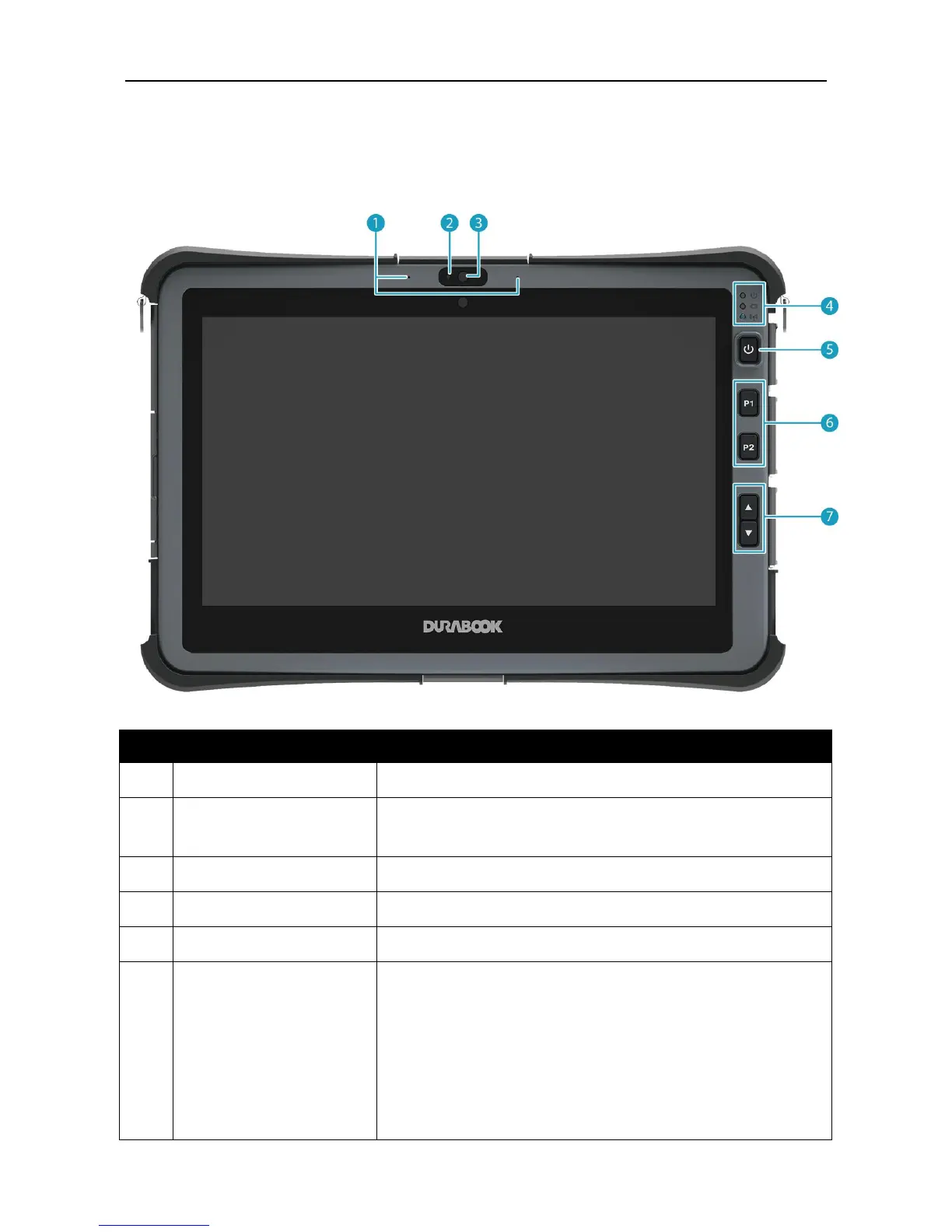
Durabook U11 - Product Overview; Front View

Durabook U11
57 pages
Print Icon
To Next Page IconTo Next Page
To Previous Page IconTo Previous Page
Loading...
Before You Start
EN-6
Product Overview
Front View
No.
Item
Description
1
Microphones
Record the surrounding sound.
2
Ambient light sensor
Use to detect the current level of visible light in the
surrounding environment.
3
Front camera
Use for video conference.
4
Status indicators
Indicate the corresponding function status.
5
Power button
Press to turn your tablet PC on or off.
6
Programmable
buttons
P1: Press to activate the assigned function.
- Stealth mode button (by default).
- Night Vision button.
- Disable (no function).
P2: Press to activate the assigned function.
- Scanner button (if the barcode scanner is
integrated).

Table of Contents

Other manuals for Durabook U11

Related product manuals