R
DURASTAR.COM
15
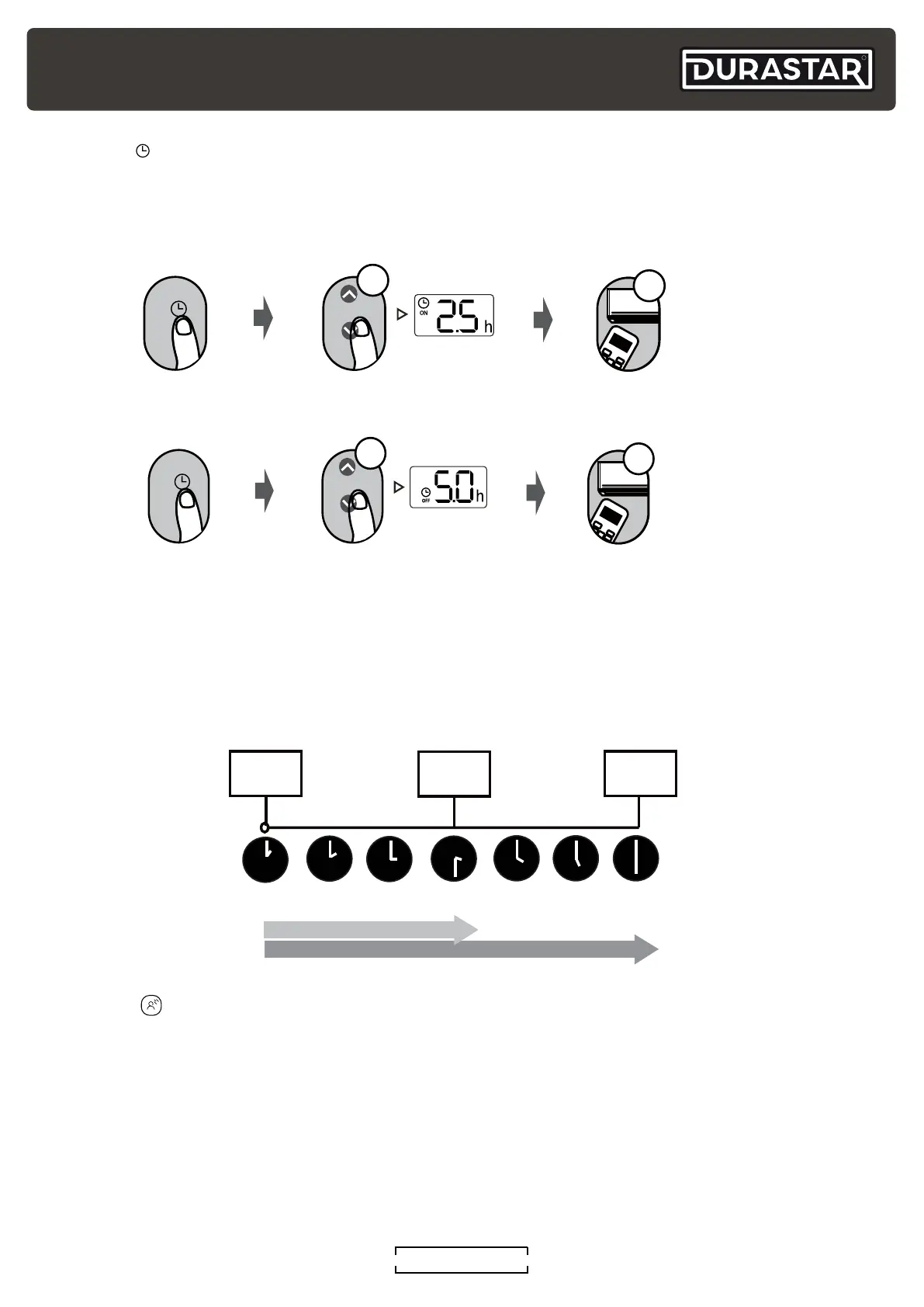
TIMER ON and OFF setting example.
Keep in mind that the time periods you set for both the on and off feature refers to hours after the
current time.
If the current time is 1:00 PM and the TIMER ON setting is adjusted to 2.5 hours, the auto-on time
sequence will turn the air conditioner on 2.5 hours later at 3:30 PM. Setting the TIMER OFF auto-
off sequence to 5.0 hours will turn off the air conditioner 5 hours later at 6:00 PM.
Current Time
1:00PM
2:00PM 3:00PM
4:00PM
5:00PM
6:00PM
Timer starts
Unit turns
ON
Unit turns
OFF
2.5 hours later
5 hours later
3:30PM
TIMER ( )
The TIMER feature establishes the amount of time that will elapse before the unit will
automatically turn on/off.
1. Press TIMER button to initiate
the time ON sequence.
2. Press UP or DOWN button the required
number of times to set the desired
time to turn on the unit.
3. Point remote at unit for 1 second.
The TIMER ON will be activated.
ON/OFF
MOD E
F
AN
SHOR T
CUT
TIMER ON
TIMER OF
F
TEM P
S
L
E
EP
1sec
x5
TIMER
1. Press TIMER button to initiate
the time OFF sequence.
2. Press UP or DOWN button the required
number of times to set the desired
time to turn on the unit.
3. Point remote at unit for 1 second.
The TIMER OFF will be activated.
ON/OFF
MOD E
F
AN
SHOR T
CUT
TIMER ON
TIMER OF
F
TEM P
S
L
E
EP
GENTLE ( )
If the air flow from the unit becomes uncomfortable because it is too intense or blowing directly on
you, simply press the GENTLE button to slow the unit and divert the air flow away from you. Press
the GENTLE button again to turn this feature off. This feature is only available under COOL, DRY,
and FAN modes. This feature is not available in multiple zone configurations.



 To Next Page