Page | 27
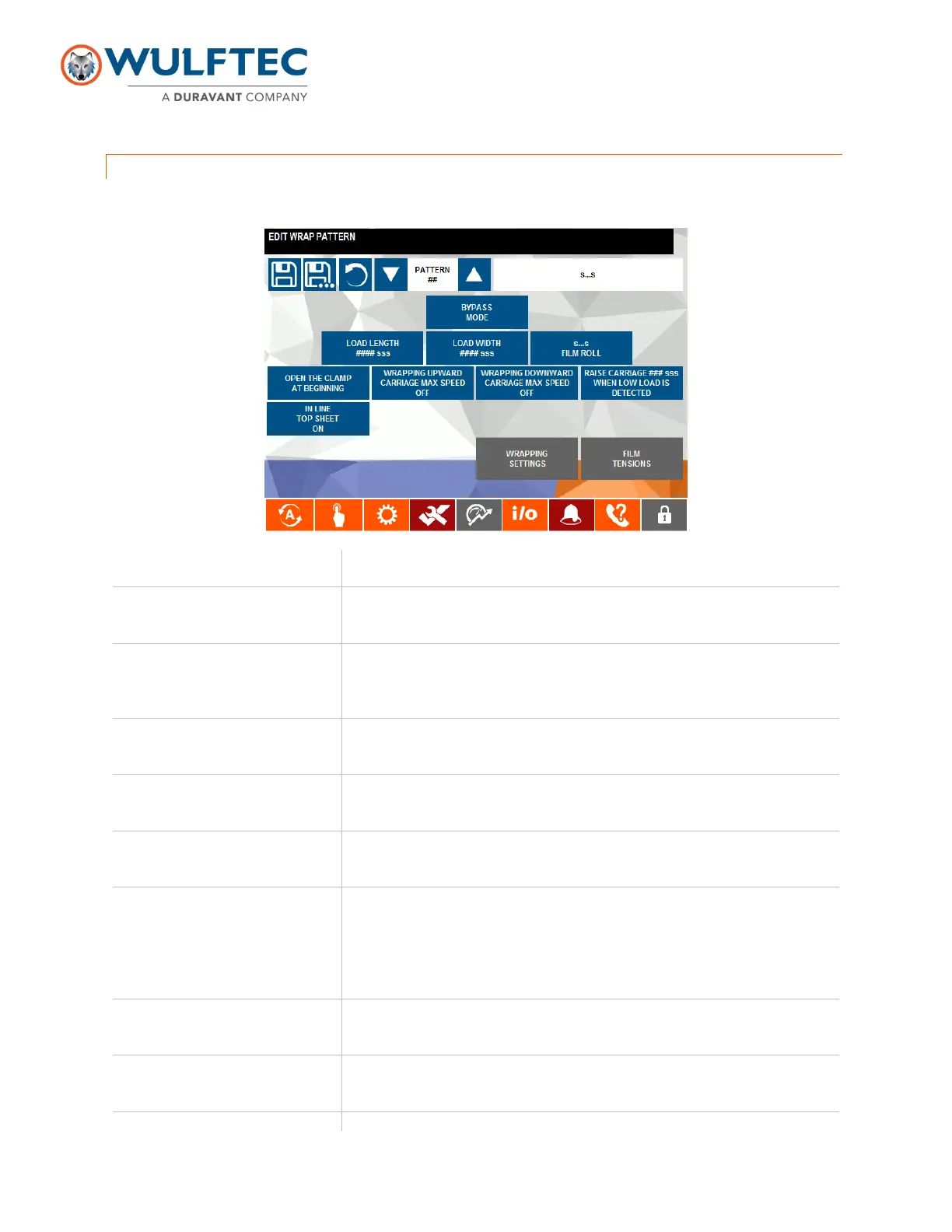
WRAP PATTERN PAGE
Password Level 1
Controls
Functions
Pattern Number & Description
Used to select a pattern number and allows the modification of its description
and settings.
Wrapping Mode/Bypass Mode
When selector is set to bypass mode, the load will pass through the wrapping
zone without being wrapped. The conveyor’s sequence is active and the
wrap sequence is inactive. In wrapping mode, all loads will be wrapped.
Load Length
Used to enter the length of the selected load. The length of the load is taken
from the side parallel to the conveyor side rails.
Load Width
Used to enter the width of the selected load. The width of the load is taken
from the side perpendicular to the conveyor side rails.
S…S Film Roll
SSSS means the name of the film roll that has been predetermined into the
roll film setting page. With this switch, you can choose two types of rolls.
Open Clamp at Beginning/at
the End
Press this button to select the clamp opening at the end or at the beginning of
a wrap cycle. If opening at the beginning, the rotation will move one (1) full
turn on the clamp before carriage can move up. When set to opening at end
of cycle, the carriage will move up right away and the clamp will open just
before the rotation deceleration.
Wrapping Upward
Downward
Carriage Max Speed On/Off
Press this button to activate the carriage full speed to reach the top or bottom
of the load quickly.
Raise Carriage ##” for Low
Load
Used to set the distance the carriage will travel up to accommodate low
loads.
Top Sheet On/Of
Used to activate or deactivate the top sheet.


 To Next Page