. Initial operation
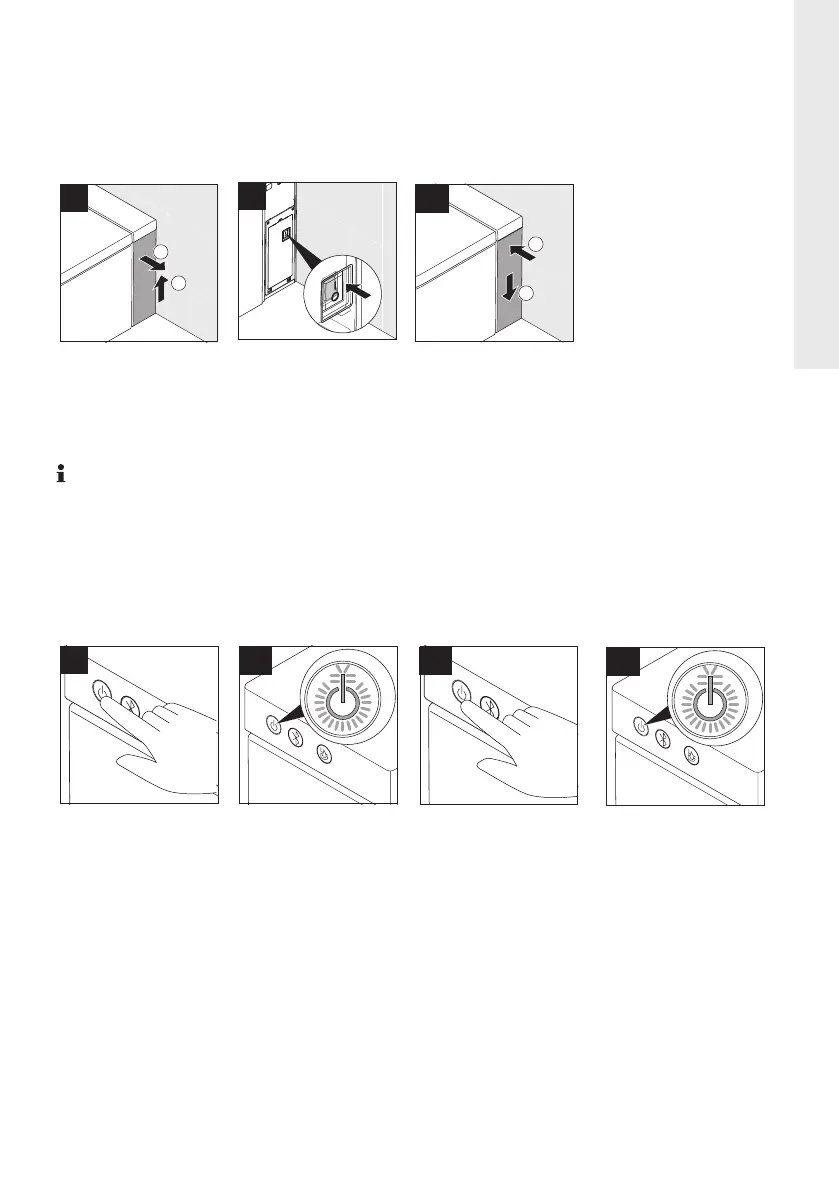
Activate / deactivate SensoWash
®
Requirement: SensoWash
®
must be connected to the main power supply.
SensoWash
®
will start a self-check for about 15 seconds when it is connected to the
power supply. During this time, only the power button on the seat unit can work,
all other operations will not work.
Switch SensoWash
®
on / off
SensoWash
®
can be switched on / off via the side control button.
> Press main switch
to activate/deacti-
vate seat unit.
> Remove side
panel.
2
1
2
1
Trip Indicator
Reset
Test
1
2
> Attach side
panel.
3
> Green LED in-
dicates that the
seat is ready to
use.
3
> Press button
shown to switch
seat off.
4
> Press button
shown to switch
seat on.
2
1
> Red LED indi-
cates standby
mode. Seat not
ready to use.
17
EN






 To Next Page