Cleaning the Printer
29
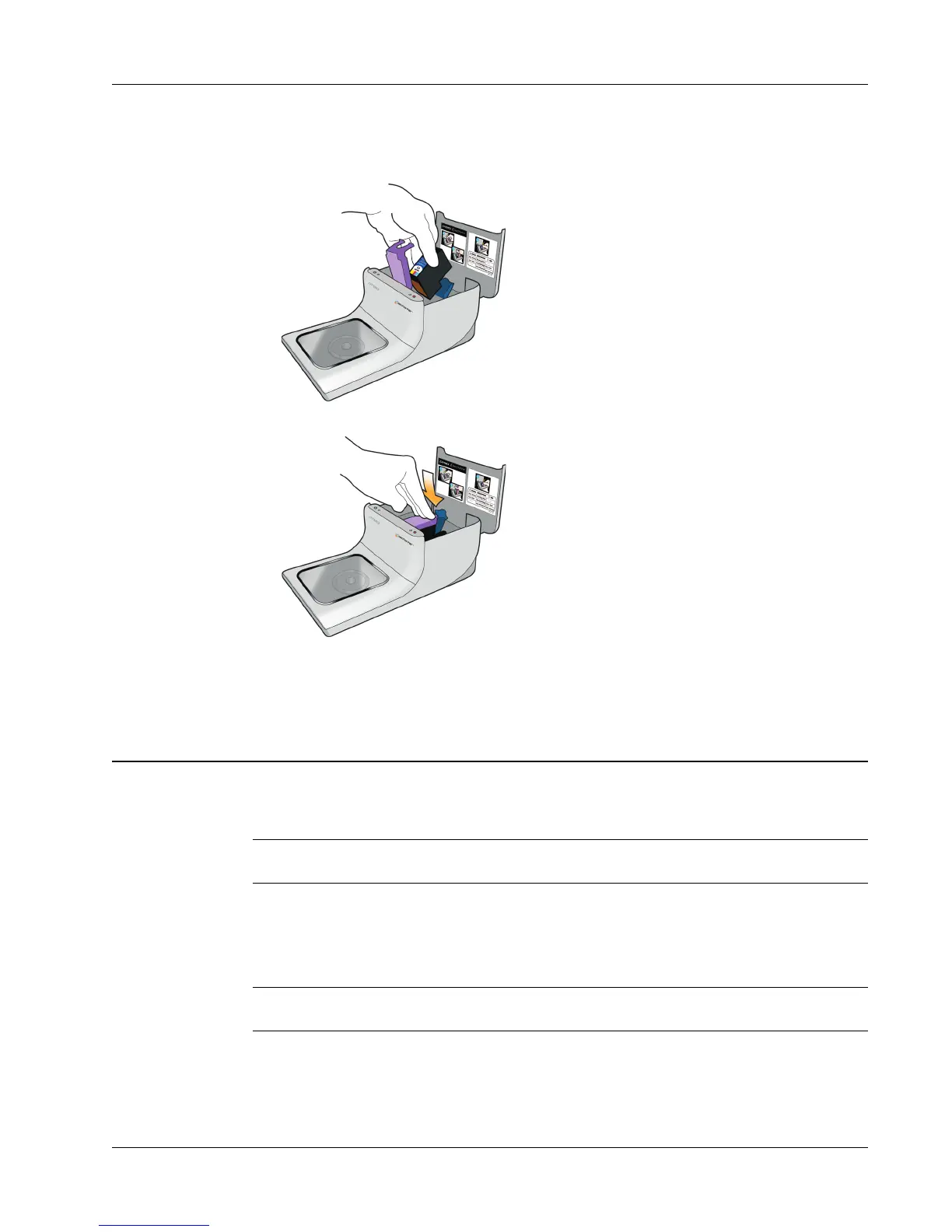
6 Insert the inkjet cartridge into the cartridge bay with the label facing up and the gold contacts
towards the front of the printer.
7 Press the purple cartridge latch down until it locks in place.
8 Close the top cover.
9 Wait four minutes after changing the inkjet cartridge before printing.
This allows the ink temperature to equalize.
Cleaning the Printer
After using the printer for a period of time, a thin film of ink residue may build up on the clear
window in the front cover. This is normal and is caused by the misting of the ink during printing.
Caution Avoid spraying or applying household cleaners inside the printer. Cleaners should only
be used on external surfaces.
To clean the printer
♦
Clean the clear cover and outside of the printer case using a soft cloth and non-petroleum based
cleaner, such as Windex
®
or similar cleaner.
Caution Avoid spraying or applying household cleaners inside the printer. Cleaners should only
be used on external surfaces of the printer.



 To Next Page