5. Technical Notes On Frequently Asked Questions
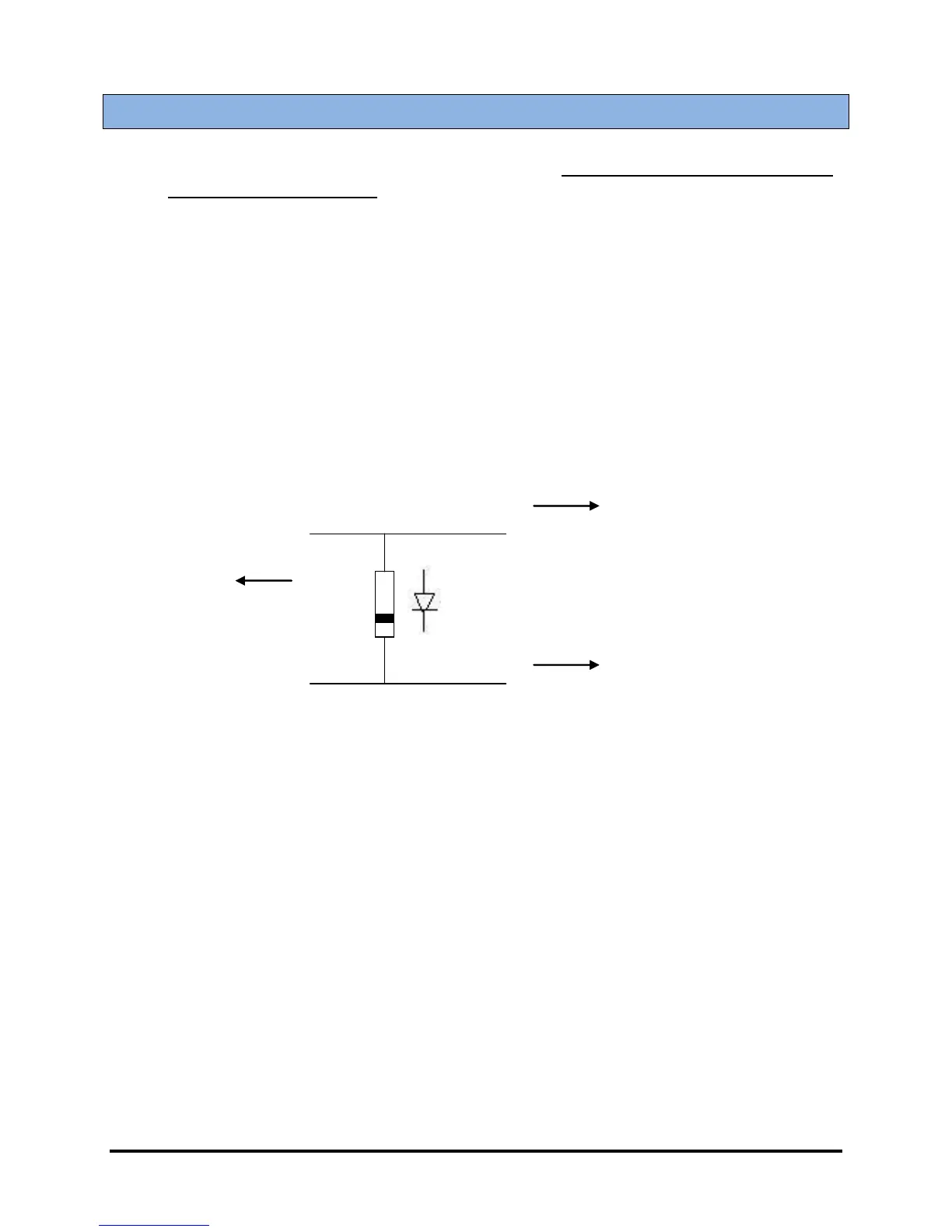
1. 10A Diode On Auto/Off/Test Switch On All Units With Cool-Down Feature ONLY!
(EI, FE, and LT variants).
This tech note does NOT apply to standard ES52 units!
When using a single switch for auto/off /test on any ES52 series controller that has the cool-
down feature, a 10A diode must be installed between test and auto with the band pointing to the
auto terminal. This diode allows power to go to the auto terminal as well as the test terminal
when the switch is put in test position. It is necessary to have the auto terminal powered as well
as the test terminal when the unit is used in the test/manual mode. The diode offers a one-way
jumper that only lets the current go from test to auto and not from auto to test. If the controller is
to be used in a two-switch configuration with one being for auto and one for test, the Auto
Switch has to be ON as well as the test switch when the unit is to be used in test/manual. If only
the test terminal is provided with power, the unit will not operate properly.
2. Controller Memory Clear Time
The ES52 needs 10 seconds for its memory to clear. When the power to the controller is turned
off and then back on again without waiting a few seconds to clear the memory, a loss of speed
will be indicated by the ES52 because the controller remains in run mode and senses that the
generator has stopped. This would be indicated by a Flashing Overspeed LED. By leaving the
ES52 OFF for 10 seconds before it is returned to the Auto setting the memory will be cleared and
it will function as intended.


 To Next Page