EasyManua.ls Logo

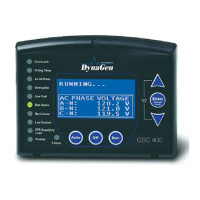
DynaGen GSC400 Series - User Manual

DynaGen GSC400 Series
105 pages
Print Icon
To Next Page IconTo Next Page
Loading...
Revision 2.6
GSC400 Automatic Gen-Set Controller
Installation and User Manual
MAN-0076 Rev2.6, GSC400 User Manual.doc
, May 2010
GSC400 Series
Automatic Gen-Set Controller Manual

Table of Contents

Other manuals for DynaGen GSC400 Series

Questions and Answers

DynaGen GSC400 Series Specifications

General IconGeneral
DisplayLCD
Storage Temperature-40°C to +85°C
CommunicationRS485 Modbus RTU
Protection FeaturesOver/Under Voltage, Over/Under Frequency, Overcurrent
Operating Humidity95% non-condensing

Summary

GSC400 Series Installation and Wiring

Safety Information

Crucial safety precautions and hazard symbols used throughout the document.

GSC400 Terminals

Details on all terminal connections, types, and wiring information.

GSC400 Operation and Basic User Configuration

Controller States

Explanation of the three primary operating modes: OFF, AUTO, and RUN.

Advanced Setup

Analog Inputs

Configuration and usage of various analog sensor inputs for monitoring.

Engine Logic

Settings controlling engine starting and stopping sequences, including pre-heat and cranks.

Default Configuration Settings

Appendix B: Modbus Map

Register Map

Detailed mapping of Modbus registers for controller parameters and status.

Appendix C: J1939 Old DTC Conversion Methods

Related product manuals