English - 8 -
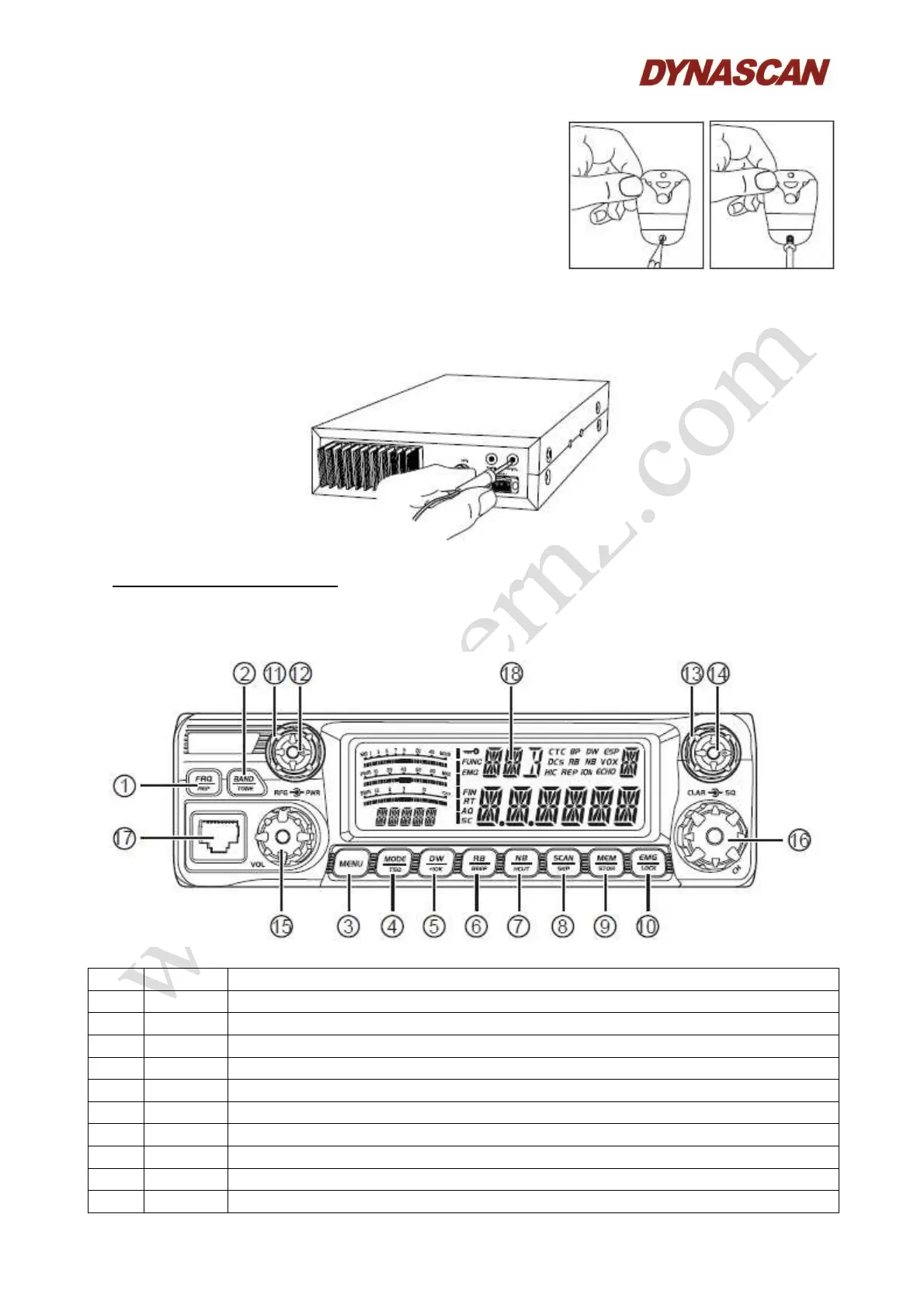
INSTALL MICROPHONE HANGER:
Choose an ideal location which will not interfering the driver
or passengers of the vehicle. Using supplied self-tapping
screws and pads (2 sets) to fix the hanger.
INSTALL EXTERNAL SPEAKER:
If use an external speaker, choose 8 Ω speaker with 3.5 mm mono band plug.
1.- Locate the external speaker in a suitable place.
2.- Plug into the transceiver “EXT.SP.” jack.
5.- GETTING ACQUAINTED:
FRONT PANEL:
No. Key Functions
1 FRQ Switch between channel mode and frequency mode and “Offset” setup.
2 BAND Switch band: A-I and ECHO setup.
3 MENU Menu key setup.
4 MODE Switch mode FM, AM, USB, LSB, PA and “TSQ” setup.
5 DW Dual-watch scan, frequency +10 kHz function.
6 RB “RB” function, “beep” prompt function.
7 NB “NB” function, “HI-CUT” function.
8 SCAN Scan, scan add, scan delete.
9 MEM Use, store or delete memory channel.
10 EMG Emergency channel, keypad lock.



 To Next Page