DS752LT5 User Manual 16
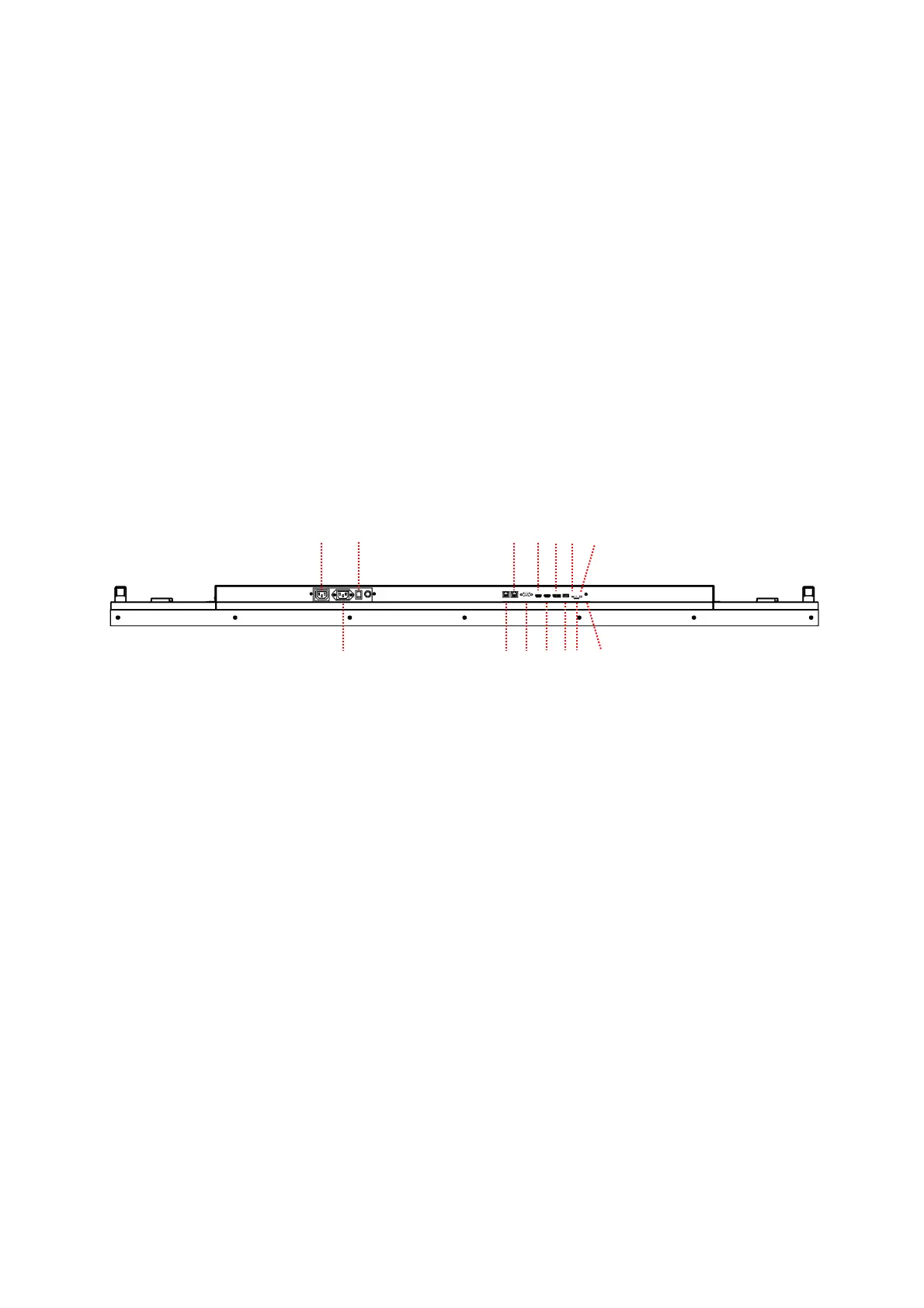
Input / Output Terminals
A. AC (OUT): AC outlet 100 - 240V up to 100 Watt.
B. AC (IN): Connect the supplied power cord to the wall outlet.
C. Power Switch: Press to switch the main power on/off.
D. RJ-45 1 (IN): RJ45 network input connection.
E. RJ-45 2 (IN): RJ45 network input connection.
F. RS-232 (IN): RS232C network input connection for remote control from PC.
G. HDMI 1 (IN): Connect the HDMI output of a PC or an AV device via a HDMI cable.
H. HDMI 2 (IN): Connect the HDMI output of a PC or an AV device via a HDMI cable.
I. DP (IN): Connect the DP output of a PC or an AV device via a DP cable.
J. USB 3.0 port: Support for USB flash drive storage, mouse and keyboard.
K. Extension Connector: Extension Connector for optional IR Extension sensor kit (ESK302).
L. Micro SD card: Support for up to 128GB, FAT32 format is supported.
M. Thermal: Extension Connector for optional Extension thermal kit (ETK203).
N. Audio (OUT): Connect the audio signal output from Audio IN jack to an external AV device.
A
B
C
I M
H L
K


 To Next Page