DL5.0C User Manual
©Dyness reserves the copyright of this document
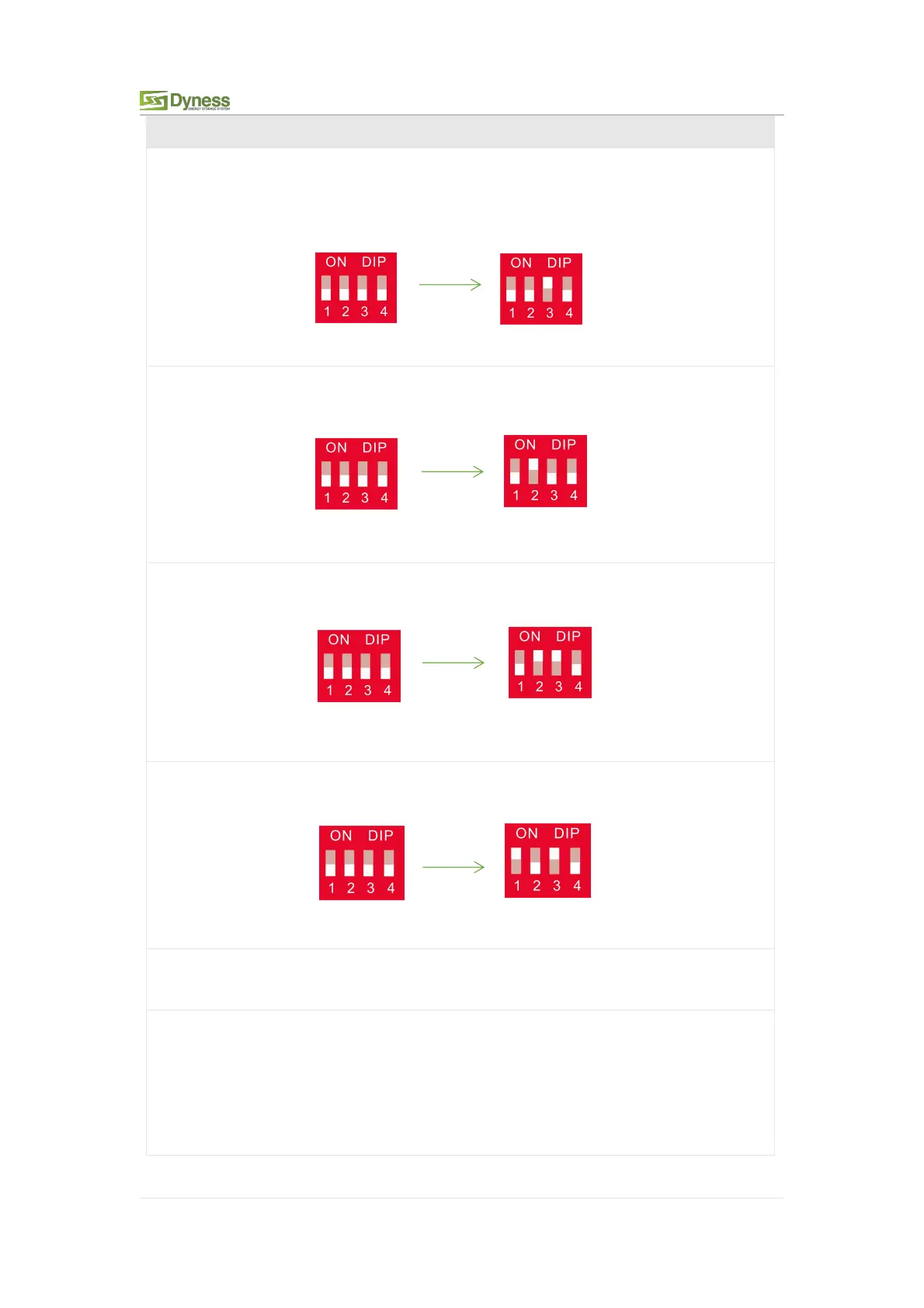
2. When the battery works with GOODWE, Solis, LUX, Sofar, DEYE(Sunsynk),
VICTRON, IMEON, Sungrow, SMA, RENAC, DELIOS, SAJ(CAN Comm) before starting
the battery, you need to put the master DIP switch "# 3" to the "ON" position (to the
top), then turn on the batteries.
3. If the battery communicates with the Axpert-king/VMIII/MAX, Infinisolar, Growatt
SPH/SPA(CAN comm) GMDE, turn the master DIP switch "#2" to "ON" position.
4. If the battery communicates with the Growatt SPF HVM-P/ES/WPV by RS485
communication, turn the master DIP switch "#2" and "#3" to "ON".
5. If the battery communicates with the Schneider Conext Series, turn the master DIP
switch "#1" and "#3" to "ON".
6. When you setup the master DIP as setting 1~4, all the slaves keep the DIP 0000,no
need to change.
7. If the energy storage system has only one DL5.0C, it is the master itself, and still
follow the above steps.
Note: For more information of matching inverter brands, please subject to the latest
document
<The list of compatibility between Dyness ESS and Inverters >.



 To Next Page