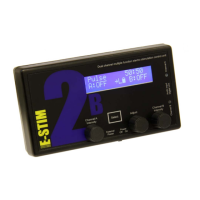
The E-Stim Systems 2B display has an illumination option, called the backlight. It runs in 3
different modes.
Off The backlight is off all the time, apart from when the unit is first
switched on.
On The backlight is on all the time.
Auto The backlight is turned on whenever mode select is entered, and
turns off approx 7 seconds after exit. This is the default mode.
Press the Select button to select and return to the default pulse mode. The status of the
backlight is retained when the unit is switched off.
Battery Level
The battery level indicator shows the current level of the battery. There are 3 battery
level symbols, indicating FULL, 2/3 full, 1/3 full and empty. As the 2B uses a 9V battery, a
brand new battery should show full, however the unit will continue to operate with ‘flat’
batteries with a reduced output. If your 2B starts to reset itself when higher power levels
are selected, then this is a sign the battery needs replacing.
The battery level display will update whenever a control is adjusted.
Because of the variations in battery manufacturing technology, a brand new battery
may not necessarily display a full battery symbol.
For details on changing the batteries see page 8.
Power Selection
The 2B is capable of operating in two different power levels, indicated by a ‘L’ or ‘H’ in
the display (centre bottom line). To change the power mode, select the power mode,
and then using the ADJUST control rotate to select either LOW or HIGH. Press the SELECT
button to choose. The 2B will then return to the default pulse mode.
Once you have selected the power level, the 2B will stay in the same power setting
until either you select the other power mode, or the unit is switched off.
The currently selected power mode is displayed on all program screens as a ‘L’ or ‘H’.
14


 To Next Page