42
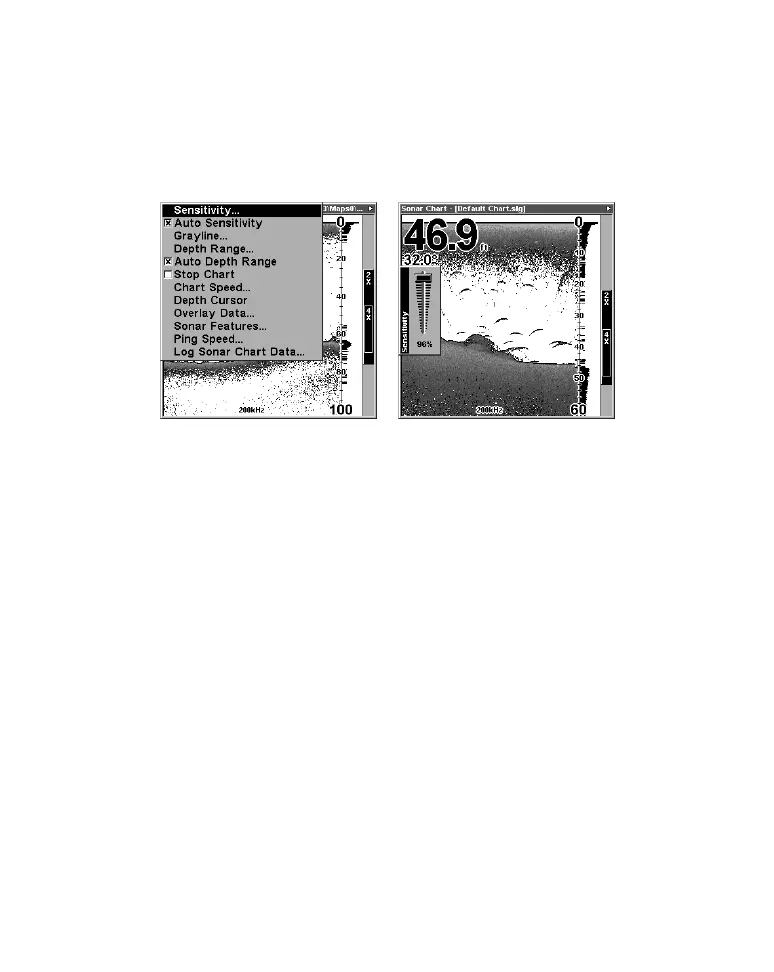
To adjust sensitivity:
1. Press
MENU|ENT.
2. The Sensitivity Control Bar appears. Press ↓ to decrease sensitivity;
press ↑ to increase sensitivity. When it's set at the desired level, press
EXIT. (When you reach the maximum or minimum limit, a tone sounds.)
At left, Sonar Menu with Sensitivity command selected. At right, the
Sensitivity Control Bar.
NOTE:
If you want to change the sensitivity in Manual Mode, first turn off
Auto Sensitivity: from the Sonar Page, press
MENU|↓ to AUTO
SENSITIVITY|ENT|↑ to SENSITIVITY|ENT. Press ↓ or ↑ to pick a different
sensitivity setting. When it's set at the desired level, press
EXIT.
Important Tip:
While you are experimenting and learning, it's possible to scramble
the settings so that the sonar picture disappears from your screen.
If that happens, remember that it's easy to switch back to full
automatic operation by simply restoring the factory auto settings.
Here's how:
To Restore Factory Settings
1. Press MENU|MENU|↓ to RESET OPTIONS|ENT.
2. The unit asks if you want to reset all the options. Press ← to
YES|ENT. All options are reset, and the unit reverts back to the
original settings.



 To Next Page