76
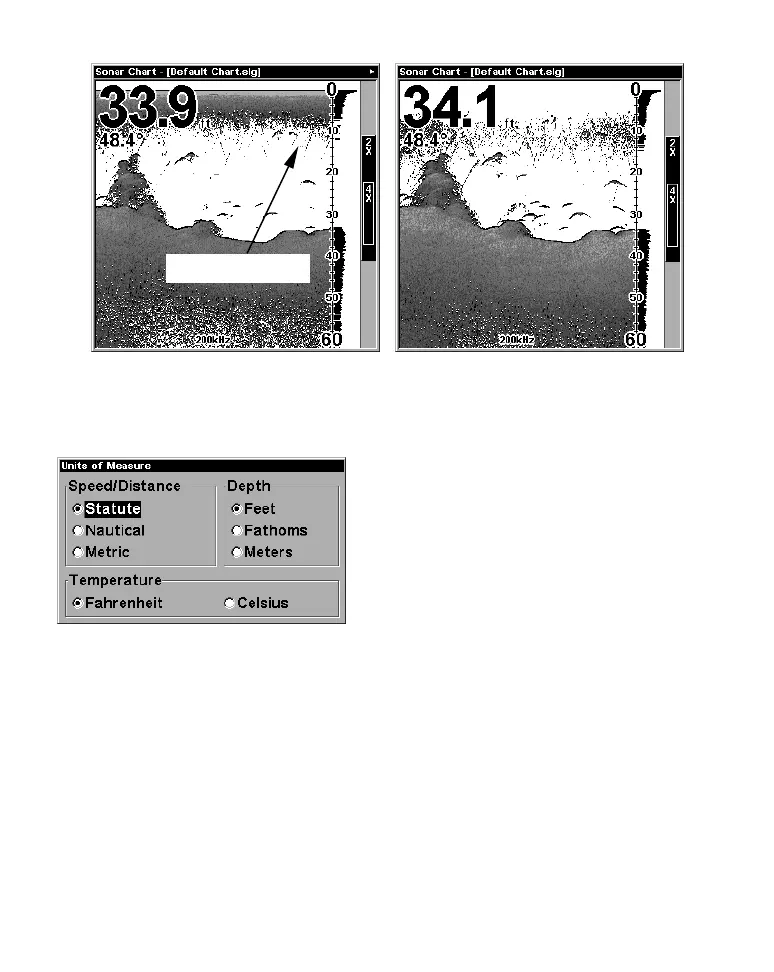
In the illustration at left, Surface Clarity is turned off.
The right view shows Surface Clarity set at High.
Units of Measure
This menu sets the speed and distance
(statute or nautical miles, meters),
depth (feet, fathoms, or meters) and
temperature (degrees Fahrenheit or
Celsius). To change the units:
Press
MENU|MENU|↓ to UNITS OF
MEASURE|ENT.
To set Speed/Distance Unit of Measure:
Press ↑ or ↓ to change the
Speed/Distance, then press ENT.
After the option is set, press
EXIT|EXIT|EXIT to return to the page display.
Zoom & Zoom Bar
"Zooming" the display is a common, fast and easy method used to
enlarge small detail, fish signals and the bottom with its associated
structure. This unit lets you zoom the display quickly and easily by
pressing the Zoom In key,
ZIN.
Surface clutter



 To Next Page