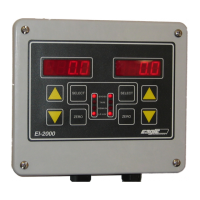
EI-1000 & 2000: Setup, Calibration and Troubleshooting.
Page 5 of 19
Calibration: If you are using a permanently mounted tank, see the Day tank
setup section and follow the calibration instructions there. To enter the
calibration mode:
EI-1000: Press and hold [SELECT] + [RIGHT ARROW] for greater than three seconds.
EI-2000: Press and hold [LEFT SELECT] + [RIGHT SELECT] for greater than three seconds.
1. The display will show “CFG” (EI1000) or “SEL CFG” (EI2000). Use the up
arrow to change “CFG” to “CAL 1” (1000) or “CAL” (2000). Press SELECT
(1000) or the right SELECT (2000). The display will show the gross weight
with the GROSS light flashing.
2. Remove all weight from the scale. If you are using a tank that will be
permanently mounted on the scale it can be left on the scale. Make sure
the tank is empty or pumped out to it’s lowest point.
3. Press the ZERO pushbutton to zero the instrument. On the EI-2000 use
the ZERO button on the side you are calibrating. NEVER use the arrow
keys to zero the scale. If you do so by accident, unplug the power to the
EI before exiting the calibration mode. This will prevent the zero from
being saved.
4. Place a known weight on the scale that is 10% or more of the scale’s
capacity. If you are using a scale with a stop across the back, place the
weight all the way against the stop. On all other scales, roughly center the
weight on the deck or disk. On bases designed for 150 pound or ton CL2
cylinders, calibrate with a full cylinder for best results. If using a day tank
place a known weight in the center of the tank or fill the tank with a known
amount of water or the actual chemical you are using and calibrate.
5. The instrument should show a positive reading. Use the up or down
arrows to set the correct gross weight. On the EI-2000 use the arrows on
the side you are calibrating.
6. On the EI-2000, repeat the calibration on the other side.
7. Press the right arrow twice on the EI-1000 to exit the menus and return to
the gross weight reading. On the EI-2000 use the left SELECT.
Recommended: After correct operation is verified, use the diagnostic mode to
write down the values of parameters 1.o, 1.c, 2.o, 2.c. These store the calibration
information. If the calibration or zero is altered these numbers can be reentered
to restore it.



 To Next Page